
By Tech Success Communications Editorial Team | Checked 23 Nov 2026

A proxy server is a computer between your device and the internet that makes requests for you, so websites see the proxy’s IP address instead of yours.
It is a middleman for your internet traffic: your device talks to the proxy, the proxy talks to the website, and the answer comes back the same way. For the broader idea, see what a proxy is.
Proxy Server Meaning
The word proxy means acting on behalf of someone else, and a proxy server does that on a network. The U.S. National Institute of Standards and Technology defines a proxy as software that receives a request from a client, then sends a request on the client’s behalf to the desired destination. Mozilla’s developer glossary puts it in similar terms: a proxy server is an intermediate program or computer used when navigating through different networks of the internet.
A proxy server can be a separate machine, software on a server, or a service built into a firewall or a secure web gateway. It stands in the path between the client and the destination, and it can forward, block, change, cache, or log the traffic that passes through it. That position is also what limits it: a proxy changes the IP address a website sees, but on its own it does not encrypt your traffic. The encryption on a web page comes from HTTPS.
How Does a Proxy Server Work?
Every request through a proxy follows the same four steps:
- Your device sends a request to the proxy. Instead of connecting to the website directly, your browser, app, or script connects to the proxy’s address and port.
- The proxy opens its own connection. It reads where you want to go and makes a fresh request from its own IP address.
- The website answers the proxy. The site sees the proxy as the visitor, not your device.
- The proxy passes the answer back to you.
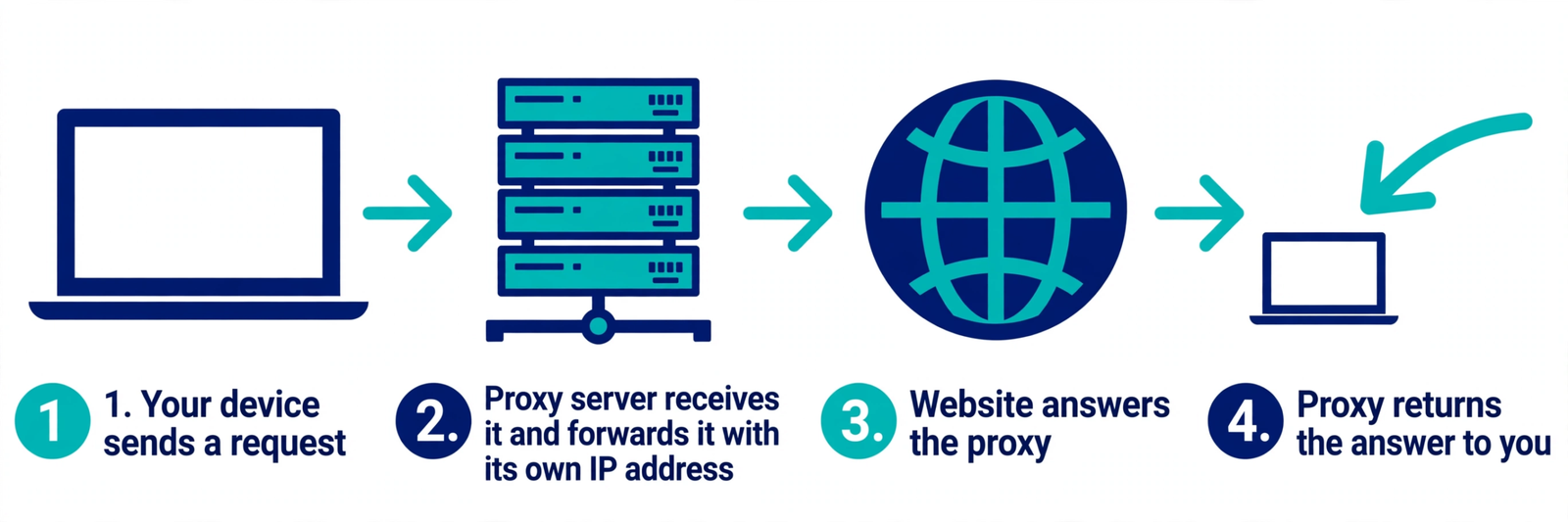
For a plain HTTP page, the proxy can read the request, because it is unencrypted. For an HTTPS page, your browser asks the proxy to open a CONNECT tunnel, usually to port 443; once open, the proxy only relays encrypted bytes, seeing the host name but not the page content. A private proxy asks who you are first, answering with status 407 Proxy Authentication Required until your app sends a username and password. Our guide to how a proxy works goes through the request flow in more detail.
What Does a Proxy Server Do?
A proxy server does several jobs, depending on who runs it.
It hides your IP address. The website records the proxy’s address, not yours, though the proxy operator still knows your real address.
It filters traffic. A proxy can block sites, file types, or ports, which schools and offices use to enforce an acceptable-use policy.
It caches content. When many people ask for the same page, the proxy can serve a stored copy instead of fetching a new one.
It logs traffic. A proxy can record which sites were visited, when, and by whom, which helps troubleshooting and security reviews.
It controls access. A proxy can allow or deny requests by user, group, or destination.
A common function of a proxy server, then, is control.
Forward Proxy vs Reverse Proxy
The most useful split is direction: who the proxy works for.
A forward proxy works for the client. You, or your company, choose to send traffic through it, and it reaches out to the internet on your behalf. Office web filters, caching proxies, and the proxy networks businesses rent are all forward proxies. When people say “proxy server” without qualification, they usually mean a forward proxy.
A reverse proxy works for the server. It sits in front of a website, receives visitors’ requests, and passes them to the servers behind it. Websites use reverse proxies for load balancing, caching, handling HTTPS certificates, and absorbing attacks; content delivery networks are the best-known example. A transparent proxy is a third case: a network places it in your path without your device being configured for it.
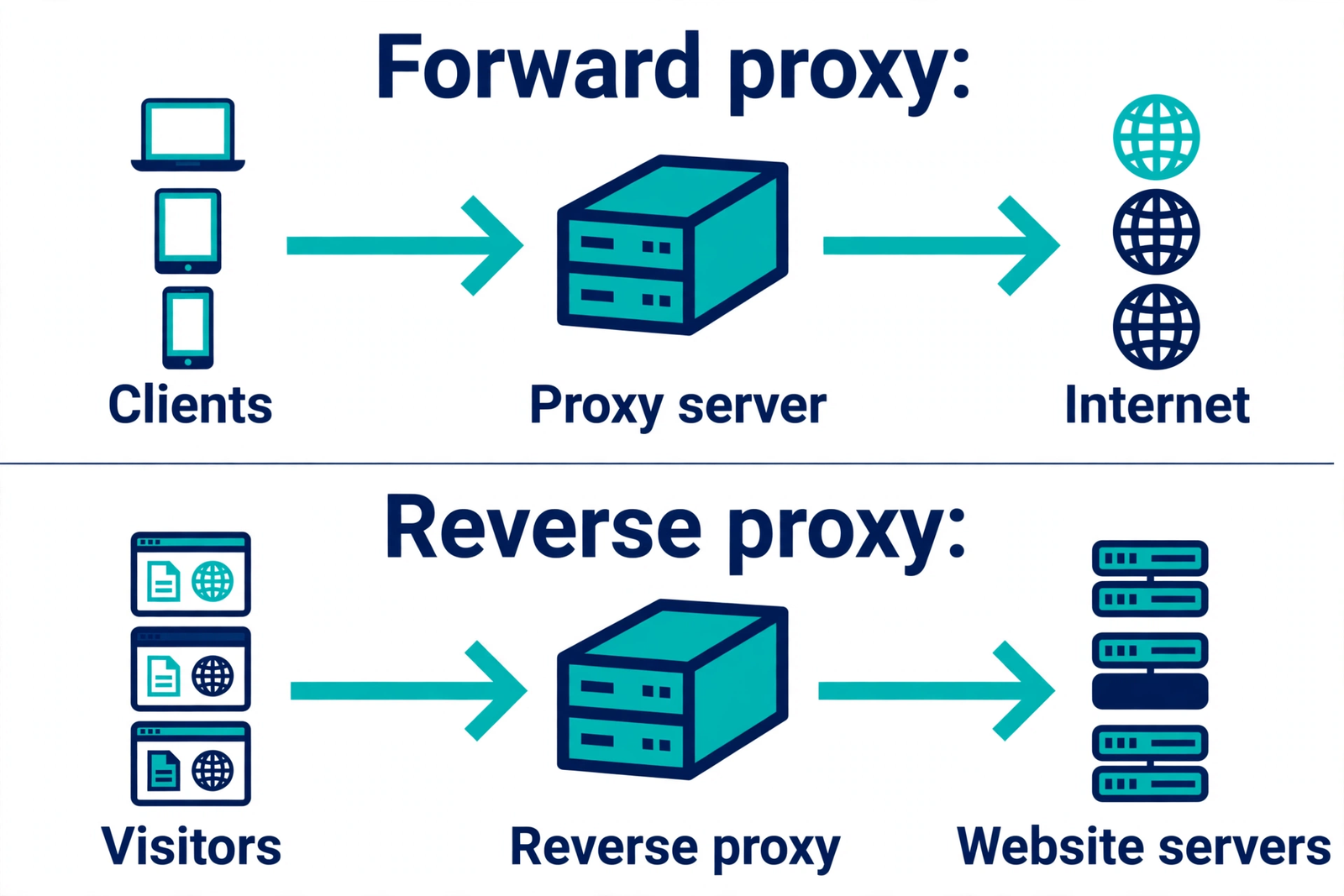
| Forward proxy | Reverse proxy | |
|---|---|---|
| Acts for | The client | The website and its servers |
| Who sets it up | The client or their network administrator | The website operator |
| Hides | The client’s IP address from websites | The servers’ addresses from visitors |
Our guide to reverse proxy vs forward proxy explains the difference in full.
Types of Proxy Servers
Proxy servers are usually sorted by one question at a time.
By protocol. HTTP proxies handle web requests: they read plain HTTP and tunnel HTTPS with CONNECT. SOCKS5 proxies relay raw connections instead of web requests, so they work for any application that supports them.
By where the IP address comes from. Datacenter proxies run on servers in hosting centres: fast and cheap, but easy to recognise as hosting traffic. Residential proxies use home internet connections, so they look like ordinary household visitors. ISP proxies, also called static residential proxies, use provider-registered addresses hosted on servers, and the address stays the same. Mobile proxies run on 4G and 5G carrier networks, where many real subscribers share each public address.
By anonymity and sharing. Transparent proxies pass your real IP along. Anonymous proxies hide your IP but still reveal that a proxy is in use. Elite proxies send neither your IP nor obvious proxy headers. Public, or open, proxies are free and used by anyone who finds them. Shared proxies are paid addresses several customers use. Private, or dedicated, proxies are assigned to one customer only.
Each of these types has its own guide on this site; the overview of types of proxies links to all of them.

Proxy vs VPN: What Is the Difference?
A proxy and a VPN both change the IP address a website sees, but they work at different levels.
| Proxy server | VPN | |
|---|---|---|
| What it covers | One app, browser, or script you point at it | All traffic from the device |
| Encryption | None of its own; HTTPS still protects page content | Encrypted tunnel to the VPN server |
| IP the site sees | The proxy’s | The VPN server’s |
| Setup | Often a setting in the browser or operating system | An app you install and switch on |
| Typical use | Filtering, caching, per-app location changes, data collection | Privacy on untrusted networks, remote access |
A proxy suits a single job, such as routing one browser through another country. A VPN suits protecting everything on a device at once. The full comparison is in proxy vs VPN.
How to Use a Proxy Server
Every proxy setup asks for the same four details: the host (a name or IP address), the port, the protocol (HTTP, HTTPS, or SOCKS5), and, for a private proxy, a username and password. Where you enter them decides what goes through the proxy.
On Windows, open Settings, go to Network and internet, then Proxy, turn on “Use a proxy server”, enter the address and port, and save. Edge and Chrome follow this system setting. On a Mac, open System Settings, choose your active network, open Details, then Proxies, and enter the same details. In a browser, Firefox has its own proxy settings, while Chrome and Edge use the operating system’s settings.
On a Wi-Fi network, the proxy option sits in the Wi-Fi settings: long-press the network on Android, or tap the network on iPhone, and enter the proxy details there. That setting applies only while you are on that network. Per tool or script, scrapers and code take the proxy as a setting or a URL.
To check that a proxy works, load an IP lookup page with the proxy off, then on, and compare the address shown. The changed IP address proves traffic goes through it.

Proxy Server for Android and iPhone
A proxy server for Android is set per Wi-Fi network: open Settings, go to Wi-Fi, long-press the connected network, choose Modify network, expand Advanced options, and set the proxy to Manual. On iPhone, open Settings, tap Wi-Fi, tap the network, scroll to HTTP Proxy, choose Manual, and enter the server and port. Neither phone routes all traffic through a proxy by default; only apps that respect the system setting use it.
The Risks of Free and Public Proxies
Whoever runs a proxy can see the traffic it carries, and with a public proxy you do not know who that is.
A study presented at the NDSS security symposium in 2018 monitored open HTTP proxies for two months and found that 38% of them modified the content passing through them, and 5.15% did so in ways the authors called malicious or unwanted, mostly by injecting ads or tracking code, and sometimes by redirecting users to pages containing malware. A second 2018 study of more than 107,000 listed open proxies over 50 days found that more than 92% did not respond at all.
Two more risks apply to any proxy you do not trust. A proxy login sent with Basic authentication, or a SOCKS5 username and password, travels unencrypted unless the link to the proxy is itself encrypted, and plain HTTP pages are fully readable by the operator. If you use a proxy you cannot vouch for, use HTTPS sites only and never log in to accounts that matter through it.
That does not mean every proxy is unsafe. A proxy run by your employer, your school, or a provider you chose and pay for is a different case from a free address copied from a public list. Our guide to whether using a proxy is safe and legal covers the safety and legal questions in detail.
Should I Use a Proxy Server?
It depends on the job.
Use one when you need to route specific traffic through another IP address, when a network you manage needs filtering, caching, or logging, or when a tool needs its own connection.
Do not use one as a privacy tool on its own. A proxy does not encrypt your traffic, does not hide you from the proxy operator, and does not stop logins, cookies, or browser fingerprinting from identifying you.
If a proxy is on and you do not know why, turn it off and check that your connection still works.
Watch: What Is a Proxy Server?
1. “How to Set Up a Proxy Server” – Palo Alto Networks
A short explainer that walks through proxy setup on Windows, macOS, Chrome and Edge, Android, iOS, and Firefox.
Frequently Asked Questions
What is a proxy server in simple terms?
A middleman computer that visits websites for you, so they see its IP address instead of yours.
What is a proxy server for Wi-Fi?
It is a proxy configured for one Wi-Fi network, so traffic on that network goes through it. Schools, offices, and public networks use it to filter sites, cache content, or log use.
Does a proxy server hide my IP address completely?
Websites see the proxy’s IP instead of yours, as long as the proxy does not forward your address in a header. The proxy operator still knows your IP, and logins and cookies can still identify you.
Is a proxy server safe?
It can be, if it is properly configured and run by someone you trust. A proxy does not encrypt traffic by default, and free or untrusted proxies can log activity or inject malicious content.
Should a proxy server be on or off?
Off, unless your network administrator, school, employer, or proxy provider gave you details to enter. If a proxy is on and you do not know why, turn it off and check that your connection still works.
Why is the proxy server refusing connections?
The usual causes are a wrong host, port, or protocol, a login the proxy rejected, or a proxy server that is down. A 407 response means the proxy wants a login or rejected yours.
The Bottom Line
A proxy server is a middleman that makes requests on your behalf. It hides your IP address from websites, and it can filter, cache, log, and control traffic, but it does not encrypt anything on its own. Used for the right job, and run by someone you trust, it is useful. Used as a privacy tool, it promises more than it delivers. For the next step, see how a proxy works.
Sources
- NIST, CSRC Glossary, “proxy” – https://csrc.nist.gov/glossary/term/proxy
- Mozilla Developer Network, “Proxy server” – https://developer.mozilla.org/en-US/docs/Glossary/Proxy_server
- Cloudflare Learning, “What is a reverse proxy?” – https://www.cloudflare.com/en-gb/learning/cdn/glossary/reverse-proxy/
- Palo Alto Networks, “What Is a Proxy Server?” – https://www.paloaltonetworks.sg/cyberpedia/what-is-a-proxy-server
- Kaspersky IT Encyclopedia, “What is a proxy server?” – https://encyclopedia.kaspersky.com/glossary/proxy-server/
- Cisco Umbrella, “What is a Proxy Server?” – https://umbrella.cisco.com/blog/what-is-a-proxy-server
- Canopius, “What Is a Proxy Server?” – https://www.canopius.com/insurance/cyber-insurance/cyberglossary/what-is-a-proxy-server/
- ProxyEmpire, “What Is a Proxy Server?” (last reviewed 22 Oct 2026) – https://proxyempire.io/what-is-a-proxy-server/
- RFC 9110, “HTTP Semantics” (IETF, Jun 2022) – https://www.rfc-editor.org/rfc/rfc9110
- RFC 1928, “SOCKS Protocol Version 5” (IETF, Mar 1996) – https://www.rfc-editor.org/rfc/rfc1928
- Tsirantonakis et al., “A Large-scale Analysis of Content Modification by Open HTTP Proxies”, NDSS Symposium 2018 – http://www3.cs.stonybrook.edu/~mikepo/papers/proxyscan.ndss18.pdf
- Palo Alto Networks, “How to Set Up a Proxy Server” (Cyberpedia) – https://www.paloaltonetworks.co.uk/cyberpedia/how-to-set-up-a-proxy-server
- ProxyEmpire, “Windows Proxy Server Settings” (last reviewed 1 Oct 2026) – https://proxyempire.io/windows-proxy-server-management/
Checked 23 Nov 2026. Every factual claim here was verified against a named source above.