A YouTube proxy is a proxy server that routes your YouTube traffic through another IP address, so YouTube sees the proxy’s address and location instead of yours. That lets you watch videos that are blocked on your network or unavailable in your country, as long as the proxy can actually play video. Many web proxies cannot: they load the YouTube homepage and then fail on the player, because the player is a JavaScript application, not a plain page.
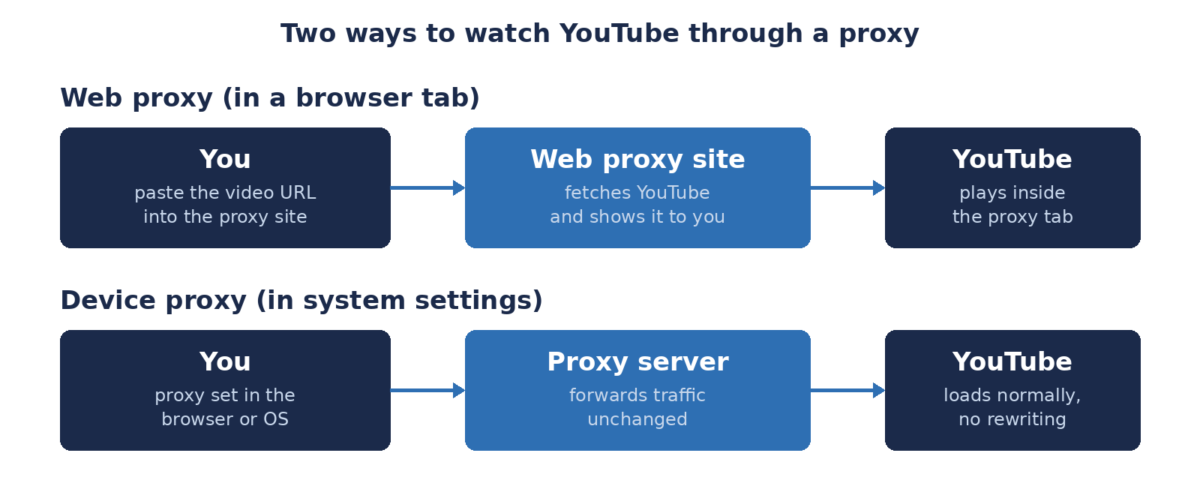
There are two kinds of YouTube proxy, and they fail in different ways. A web proxy is a site you open in your browser, where you paste a YouTube URL and watch inside the proxy’s tab. A device proxy is an IP address you enter in your browser or system settings, so YouTube loads normally with no rewriting in the middle. For the wider list of free web proxies, start with our guide to the best free web proxy sites.
What Is a YouTube Proxy?
A YouTube proxy is a proxy used to reach YouTube. The proxy sits between your device and YouTube: your browser or script sends the request to the proxy, the proxy forwards it to YouTube with its own IP address, and the response comes back the same way.
That changes three things YouTube can see. It changes your apparent location, so YouTube shows content, ads, and trends for the country of the IP. It changes the network type: a home or mobile IP looks like a normal viewer, while a server IP looks like a data center. And it changes your identity over time: a stable IP keeps a logged-in account consistent, while a changing IP spreads requests across many addresses.
A proxy is not a VPN. A proxy changes the address YouTube sees, but it does not encrypt your traffic. For the full comparison, see our proxy vs VPN guide. If you watch YouTube daily rather than once, a VPN is usually the better tool, and our guide to the best VPN for YouTube covers that side.
Why Is YouTube Blocked?
School and office networks. Many schools and workplaces block youtube.com, or block video streaming while allowing other sites.
Country blocks. Some countries block YouTube entirely, and others restrict specific videos.
Regional licensing. Some videos are available only in certain countries because of licensing deals. The uploader or rights holder chose the regions, and YouTube enforces them by IP location.
Age restrictions. Some videos require you to sign in and confirm your age. A proxy does not help here, because the restriction is on the account, not the network.
Copyright takedowns. A video removed for copyright is gone everywhere. No proxy brings it back.
Web Proxy vs Device Proxy: Two Ways to Watch
Web proxies
A web proxy is a website. You open it in your browser, paste a YouTube URL into its address box, and the proxy fetches the page and shows it to you inside its own tab. No software to install, no settings to change, and no account needed. That convenience is the appeal, and it is also the weakness: the proxy has to rebuild YouTube’s player inside its own page, and most of them cannot. Web proxies suit opening one blocked video or checking what a page looks like from another country. They are the wrong tool for watching a full season.
Device proxies
A device proxy is a proxy address you enter in your browser or system settings: a host, a port, and usually a username and password. Your browser then sends all of its traffic through that proxy, and YouTube loads normally, with no rewriting in the middle. The page, the player, and the video segments all arrive as YouTube sent them. Device proxies need a paid provider and a few minutes of setup, but they sidestep the rewriting problem entirely.
Why YouTube Breaks Most Web Proxies
A web proxy will happily load youtube.com and show you the homepage. Then you click a video and get a spinner that never resolves. The homepage is the easy half; the player is where most proxies give up, and the cause sits in the architecture of the proxy, not in how fast its servers are.
YouTube is a JavaScript application, not a plain page. The layout, the player, and the comments are assembled from API responses after the page loads, and the video segments come from googlevideo.com in byte-range requests. A proxy that only rewrites HTML delivers a working page shell and a broken player, because the player requests never pass through its rewriter. Only client-side interception, where the proxy’s own script rewrites requests inside your browser tab, survives a modern single-page application. Server-side rewriting is cheap to run and fine for news sites, but it cannot play YouTube video.
Which Web Proxies Can Play YouTube?
A November 2026 check of the well-known web proxies sorted them into two groups, and the split follows the architecture above, not age or budget.
| Site | Approach | YouTube |
|---|---|---|
| croxyproxy.com | Client-side interception | Plays |
| proxyium.com | Same behaviour as CroxyProxy | Plays |
| proxypal.net | Same behaviour, different front end | Plays |
| proxfree.com | Client-side interception, in-house engine | Plays |
| shifter.io/web-proxy | Client-side interception, open-source engine | Plays |
| proxysite.com | Server-side rewriting | Fails |
| hide.me/en/proxy | Server-side rewriting | Fails |
CroxyProxy is the reference point for this category. It runs a client script that rewrites requests inside the tab and has supported YouTube, Google, and Facebook for years. Expect ads injected around the video. Proxfree runs its own Service Worker plus a compiled encryption module, with dedicated video proxy pages. The Shifter web proxy is built on the open-source Scramjet engine, with a residential IP behind each exit and no ads, but every visit starts with a reCAPTCHA.
Proxysite.com is the oldest name in the list, and it rewrites pages on its own servers instead of inside your browser. In November 2026 it loaded the YouTube shell with no working player. Its marketing still lists YouTube among its supported sites, which was true when the player was a Flash object. Hide.me’s free proxy behaves the same way: the page opens, YouTube does not play, and you get an error where the video should be. Our CroxyProxy review and our ProxySite.com review cover the two best-known names in full.

How to Watch YouTube Through a Web Proxy
The steps are the same on desktop and mobile.
- Open a web proxy that plays video. Use one from the table above, and check that the connection uses HTTPS.
- Paste a video URL, not the homepage. A direct video URL is a better first test than loading the homepage.
- Press Go and wait. Start with a standard video before trying Shorts, live streams, or high-quality playback.
- Play the video for thirty seconds. Many proxies load the player, then stall when the buffer runs out.
- Open the quality menu. A proxy that caps you at 360p is working exactly as designed.
- Seek to the middle of a ten-minute video. Seeking forces a new byte-range request, which is where broken rewriting shows up.
How to Watch YouTube Through a Device Proxy
Setting up a device proxy takes a few minutes. The outline is the same everywhere: get a proxy in a country where YouTube and the video are available, enter it in your network settings, and check that your IP changed before opening YouTube. On Windows, go to Settings, Network and Internet, then Proxy, and turn on manual proxy setup. On macOS, go to System Settings, Network, Details, then Proxies, and turn on Web Proxy and Secure Web Proxy. On Android, long-press your Wi-Fi network, open advanced settings, and set the proxy to Manual. On iPhone, tap your Wi-Fi network, scroll to HTTP Proxy, and set it to Manual.
After setup, check that your IP changed, then open youtube.com. Use a sticky session or a static ISP proxy so the IP does not change in the middle of a video: a rotating proxy that changes the exit mid-stream breaks playback.
Which Proxy Type Is Best for YouTube?
| YouTube task | Best starting point | Why |
|---|---|---|
| Watch one blocked video quickly | Free web proxy site | No setup, no account, good enough for one video |
| Watch regularly from another country | Static residential or ISP proxy | A consistent location avoids changing the apparent origin mid-session |
| Collect public video or comment data | Rotating residential proxies | Distributes requests while allowing session controls |
| Manage YouTube accounts | Static residential or ISP proxy, one per account | A changing IP looks like account takeover |
| Stream in high quality daily | Device proxy, or a VPN | The player needs a stable, fast connection |
A proxy changes the exit IP and apparent network location. It does not change cookies, account history, or browser fingerprints, and it does not guarantee playback or make automated activity acceptable under YouTube’s rules.
Limits Even When It Works
Video quality is the first compromise. A shared exit server has finite bandwidth, and most free web proxies cap the bitrate instead of making you wait. If the quality menu stops at 480p, that is a setting the operator chose, not a fault in the player.
DRM content will not play. Films rented or bought through YouTube Movies use Widevine, which needs a protected media path that a rewritten page does not have. Trailers and user uploads are fine; purchased movies are not.
Is Using a YouTube Proxy Safe and Legal?
Using a proxy is legal in most countries. What you watch matters more than how you reach it: if a video is blocked in your region because of a licensing deal, the rights holder may still consider access a violation of YouTube’s Terms of Service even where the law is unclear. YouTube’s Terms of Service say you are not allowed to circumvent, disable, or interfere with any part of the service, including features that limit the use of the service or content.
Do not log in to YouTube through any web proxy. The proxy operator can read everything the page sends, including your session cookie and any password you type. Never enter Google account credentials or payment information while behind a proxy. If you must log in, do it on a direct, secure connection instead, and use the proxy for viewing public videos only. Free web proxies also carry the usual free-proxy risks: the operator can log your traffic, inject ads, and sell your data. Our guide to whether using a proxy is safe and legal covers the legal questions in full.

What to Do If a Proxy Does Not Work
Work through this list before trying another provider.
- Check the block type. If the video needs a sign-in or is age-restricted, a proxy will not help.
- Try a direct video URL. Paste the full video link instead of loading the homepage.
- Switch web proxies. Move from a server-side rewriter to a client-side one from the table above.
- Switch to a device proxy. Enter a residential or ISP proxy in your browser settings so the page loads without rewriting.
- Try a VPN instead. A VPN is the most reliable option for daily watching.
Related Guides
- Best free web proxy sites — the parent roundup this guide belongs to.
- CroxyProxy review — is it safe, and does it play YouTube?
- ProxySite.com review — is it safe, and why its YouTube support no longer works.
- Is using a proxy safe and legal? — the legal questions, in full.
- Best VPN for YouTube — the VPN alternative for daily watching.
Frequently Asked Questions
What is a YouTube proxy?
A YouTube proxy is a proxy server that routes your YouTube traffic through another IP address. YouTube sees that IP instead of yours, so it shows content for the proxy’s country and network.
Why does the YouTube homepage load but the video not play?
Because the homepage is HTML the proxy can rewrite, while the player and the video segments are built and requested by JavaScript after the page loads. A server-side rewriter never sees those requests.
Which web proxies can play YouTube videos?
In a November 2026 check, CroxyProxy, Proxyium, Proxypal, Proxfree, and the Shifter web proxy played YouTube, while Proxysite.com and Hide.me’s free proxy did not. The difference is client-side interception versus server-side rewriting.
Is using a proxy to watch YouTube legal?
Using a proxy is legal in most countries, but bypassing a regional licensing block may breach YouTube’s Terms of Service, which forbid circumventing features that limit the use of the service or content.
Can I log in to YouTube through a proxy?
You should not log in through a web proxy. The operator can read your session cookie and any password you type. Watch public videos only, and log in on a direct connection.
Sources
10
- ProxyFuel, Which Web Proxies Can Play YouTube Videos. https://proxyfuel.com/blog/youtube-web-proxy
- Octo Browser, 5 Best YouTube Proxy Services. https://blog.octobrowser.net/5-best-youtube-proxy-services
- Geekflare, Best YouTube Proxies That Work. https://geekflare.com/proxy/best-youtube-proxies/
- FloppyData, How to Unblock YouTube with a Proxy in 2026. https://floppydata.com/blog/unblock-youtube-by-proxy-services/
- YouTube, Terms of Service (15 December 2023). https://www.youtube.com/t/terms
- IETF, RFC 9110: HTTP Semantics, Section 3.7, Intermediaries. https://www.rfc-editor.org/rfc/rfc9110#section-3.7
- MDN Web Docs, Proxy servers and tunneling. https://developer.mozilla.org/en-US/docs/Web/HTTP/Guides/Proxy_servers_and_tunneling
- Wikipedia, Proxy server. https://en.wikipedia.org/wiki/Proxy_server
- NodeMaven, YouTube Proxy Service: Setup Guide and How to Unblock. https://nodemaven.com/blog/youtube-proxy-service/
- Socks5.io, Best Proxy Server for YouTube: A Practical Guide by Use Case. https://socks5.io/blog/best-proxy-server-for-youtube/