

By Tech Success Communications Editorial Team | Checked 23 Nov 2026

An AI tool is software that uses artificial intelligence, usually machine learning, to do a task that used to need a person: drafting an email, editing a photo, searching the web, writing code or summarising a meeting. This guide explains how these tools work, the main types, what they cost and where they fall short.
AI tools are no longer a niche interest. In McKinsey’s 2025 State of AI survey, 78 percent of respondents said their organisation uses AI in at least one business function, up from 55 percent in 2023. Most people meet AI first through a chatbot, then find tools built for their own job.
How AI Tools Work
IBM describes artificial intelligence as technology that lets computers simulate human learning, comprehension, problem solving, decision making, creativity and autonomy. Underneath that sits machine learning: instead of following fixed rules, a model learns patterns from data and uses them to make predictions or decisions.
Most AI tools you will meet are built on a few ideas:
Training. A model is trained on huge volumes of data, such as text, images or code. Training finds the patterns in that data and stores them as numbers called parameters. IBM notes that a foundation model can hold billions of parameters.
Prompts. You give the tool an instruction, called a prompt, and it produces an output that fits the patterns it learned. A clearer prompt usually gives a better result, because the model has more to work with.
Generation. Generative AI models create new content rather than sorting old content: text, images, audio, video or code. IBM’s page on AI explains that a text model builds its answer one piece at a time, predicting the most likely next piece from what came before.
Agents. Some tools go further and act on your behalf. IBM defines an AI agent as a program that can design its own workflow and use other tools to complete a task without human intervention at each step. A chatbot answers; an agent books, files or sends.
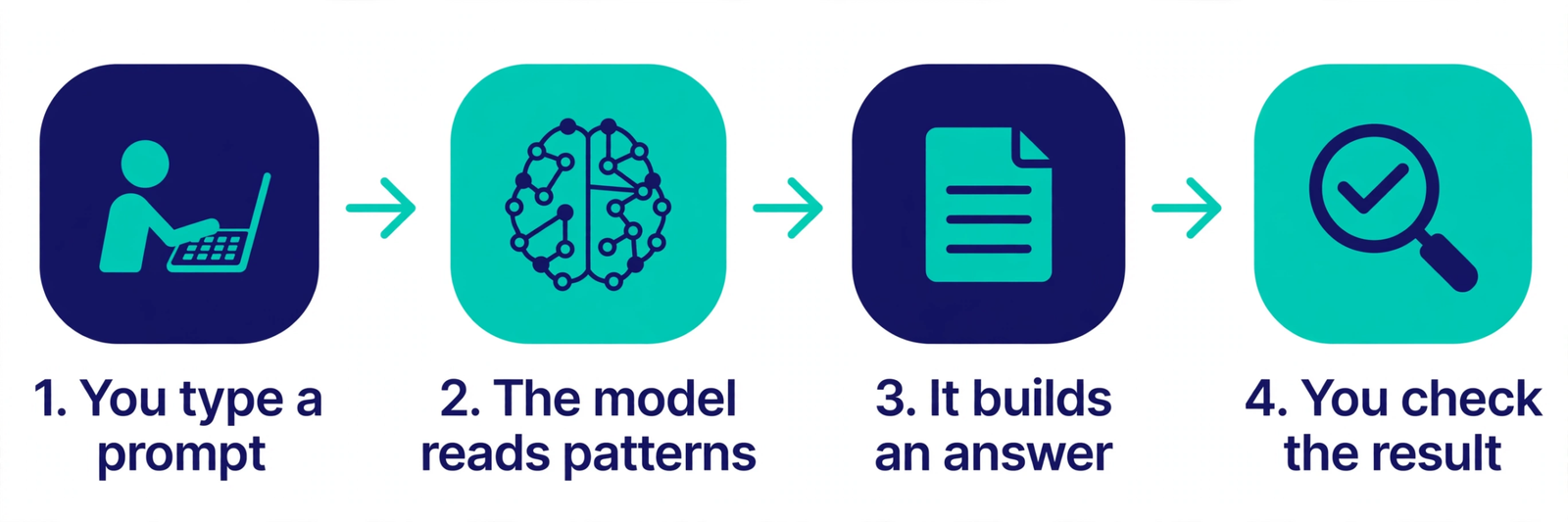
Generative AI tools deserve their own explanation, because they work differently from older software that only sorted or searched. Our guide to generative AI tools explained covers text, image, video and audio generation in detail.
The Main Types of AI Tools
No single tool does everything well. AI-powered tools are built for one job, and the right choice starts with the job, not the brand. The table below maps the main categories to the guides on this site.
| Category | What the tools do |
|---|---|
| AI writing tools | Draft, rewrite, summarise and check text |
| AI image generators | Create and edit images from a text prompt |
| AI video generators | Turn text into clips, edit video and build avatars |
| AI detection tools | Check whether text or an image looks AI-made |
| AI SEO tools | Find keywords, plan content and track rankings |
| AI marketing tools | Write ads, plan email and run social content |
| AI coding tools | Suggest code, explain it and spot bugs |
| AI tools for small business | Cover support, scheduling, invoicing and admin |
| AI study tools for students | Summarise readings, build flashcards and help with research |
| Google AI tools | Gemini, NotebookLM and the other tools from Google and its rivals |
| AI governance and monitoring tools | Set rules, watch for risks and keep records |
A few tools sit above the categories. General-purpose assistants such as ChatGPT, Claude, Gemini and Microsoft Copilot answer questions, draft text, write code and analyse files in one place. They are the best starting point if you only want one tool. ChatGPT, the chatbot that made this kind of AI famous, launched on 30 November 2022 and reached 100 million users within two months.
If you want names rather than categories, our roundup of the best AI tools compares the leading options by the job they do best.

AI Search Tools
AI search tools answer a question directly instead of returning a list of links. They search the web live, read the pages they find and write a short answer with citations, so you can check where each claim came from. Perplexity is one well-known example, and Google adds AI-generated summaries, called AI Overviews, to many searches. AI Overviews launched in the United States in May 2024 and have since rolled out to more than 200 countries.
These tools suit research questions with a fresh answer: prices, news, comparisons and anything that changed recently. A chatbot trained months ago can only guess at those. AI search tools still make mistakes, and their citations do not always support the sentence they sit next to. Open the source before you quote the answer, especially for facts that matter.

Open Source AI Tools
Open source AI tools are systems anyone can use, study, modify and share. The Open Source Initiative’s Open Source AI Definition sets four freedoms: use the system for any purpose, study how it works, modify it, and share it with or without changes. To count as open source, a system must also share the data information, code and model parameters needed to rebuild it.
People choose open source tools for three reasons: they can run them on their own hardware, they can inspect how they work, and they are not tied to one vendor’s prices or rules. Meta’s Llama models are a well-known example of open source foundation models. The trade-off is effort: open source tools usually need more technical skill to set up, and running a large model needs a powerful computer or a rented server. For most beginners, a hosted tool is the easier start.
AI Tools for Beginners
If you have never used an AI tool, start small. Pick one repeated task, use a free tool for a week, and judge it on the time it saves.
- Pick one task. Drafting emails, summarising long articles and turning rough notes into a tidy document are good first jobs.
- Start with a general assistant. ChatGPT, Claude and Gemini all offer a free tier, so you can learn prompting without paying.
- Write a specific prompt. Say what you want, who it is for and what format you need. “Draft a polite reply to this customer email in under 100 words” beats “write an email”.
- Check every output. Read it before you send or publish it. Fix names, numbers and claims yourself.
- Keep private data out. Do not paste passwords, customer details or confidential documents into a free tool unless you have read its data policy.
After a week, you will know which jobs the tool does well and which ones still need you. That is the point: the tool handles the first draft, and you keep the final say.

How to Choose the Right AI Tool
Choosing starts with the job, not the feature list. A tool that is excellent for one team can be useless for another.
Name the task first. Product managers often want tools that turn meeting notes and feedback into clear specs. Customer success teams want tools that draft replies and summarise support tickets. A coder wants code completion; a teacher wants lesson plans. Write the task down before you compare tools.
Check what happens to your data. Read the privacy policy, not just the marketing page. Ask whether your inputs train future models, how long data is kept and whether you can delete it. Business plans usually offer stronger data controls than free plans.
Compare the real cost. A free tier is enough for light use. Heavy use needs a paid plan, and some tools charge by usage instead of a flat monthly fee. Add up a month of your actual use before you commit.
Test the output, not the demo. Run your own examples through the free tier: your documents, your customers, your style. A tool that shines on the vendor’s examples can fail on yours.
Look for fit with your other tools. Some products are single-purpose tools; others are AI platforms that bundle many tools under one login. A platform saves switching, but a focused tool is often better at its one job.

How Much Do AI Tools Cost?
Most leading AI tools offer a free tier with usage limits, and paid plans for the best-known assistants usually start at about $17 to $20 a month. Team and business plans cost more and add shared workspaces, admin controls and stronger data handling. Specialist tools vary widely: some charge a few dollars a month, others charge per image, per video minute or per thousand words.
Prices change often, so treat any figure here as a typical range checked on 23 November 2026, not a quote. Before you pay, check the vendor’s pricing page and work out what a month of your own use would cost. If you want to start free, our roundup of the best free AI tools lists the free tiers worth trying first.
Are AI Tools Safe?
AI tools are safe to use with care, but they carry real risks. Three matter most.
Your data. Anything you paste into a tool may be stored, reviewed or used to train future models, depending on the plan and the settings. Business plans usually let you opt out of training. The safest rule is simple: do not paste anything into an AI tool that you would not want a stranger to read.
Wrong answers. AI tools can produce confident answers that are false, a problem called hallucination. They predict likely text, not verified facts. Check names, dates, prices and quotes against a source you trust before you rely on them.
Misleading claims. The US Federal Trade Commission warned in 2023 that marketers must not exaggerate what an AI product can do, promise it beats a non-AI product without proof, or claim a product uses AI when it does not. The same warning applies in reverse: be sceptical of tools that promise perfect results.
Rules are catching up. NIST published its voluntary AI Risk Management Framework in January 2023, with a companion profile for generative AI in July 2024, to help organisations manage AI risks. The EU AI Act entered into force on 1 August 2024, and most of its rules start applying on 2 August 2026. For everyday use, the practical rules are short: keep private data out, check outputs, and keep a human in charge of anything that matters.

What AI Tools Cannot Do
AI tools are powerful, and their limits are easy to miss when the output reads so smoothly.
They cannot verify facts. A fluent paragraph is not a true paragraph. The model does not know what it does not know, and it will fill gaps with plausible-sounding text.
They cannot replace judgment. An AI tool can draft a contract, a summary or a hiring shortlist, but it cannot take responsibility for the result. A person must decide, and a person is accountable.
They carry bias. Models learn from human text, so they can repeat the biases in that text. NIST’s framework lists bias as one of the core risks to manage, and it shows up most in hiring, lending and content about people.
They cannot create original thought. Every output is built from patterns in training data. AI tools remix and recombine; they do not have ideas, taste or intent of their own.
Used with those limits in mind, AI tools save real time. Used without them, they create confident errors at speed.
Related Guides
- AI SaaS: How AI Is Changing Software: how the software industry itself is being rebuilt around AI.
- Proxies for AI Tools and APIs: how proxies fit into AI tool and API workflows.
Frequently Asked Questions
What can you do with AI tools?
Write and edit text, create images and video, search the web, write and review code, analyse data, summarise meetings, plan marketing and automate routine admin. Most people start with writing and search, then add tools for their own job.
Are AI tools free?
Many offer a free tier with limits on messages, images or features. Paid plans for the best-known assistants usually start at about $17 to $20 a month. Specialist tools charge per use or per month, so check the vendor’s pricing page.
Which AI tool is best for beginners?
Start with a general-purpose assistant such as ChatGPT, Claude or Gemini. All three offer a free tier, work in plain language and cover writing, questions, summaries and basic coding. Pick the one whose free tier fits your daily use, then add specialist tools later.
Do AI tools replace writers, designers and developers?
No. They handle first drafts and routine work, but the final result still needs a person who understands the audience, checks the facts and takes responsibility. Teams that get the most from AI tools use them to clear routine work so people can focus on decisions only people can make.
Can AI tools be wrong?
Yes, often and confidently. AI tools predict likely text, they do not check facts. Always verify names, numbers, dates and quotes before you publish or act on an answer.
Is it safe to paste work documents into an AI tool?
Only if you have checked the tool’s data policy. Free tiers may use your inputs for training. For confidential documents, use a business plan with training opt-out, or a tool you run yourself, and remove names, passwords and customer details first.
What is the difference between an AI tool and an AI agent?
An AI tool does one task when you ask. An AI agent plans and carries out several steps on its own, using other tools along the way, such as reading your calendar, booking a meeting and sending the invite. Agents need more oversight, because each step can go wrong.
Do I need to know how to code to use AI tools?
No. Most AI tools work in plain language: you type what you want, and the tool replies. Coding helps only if you want to build your own tools or connect them to other software.
Watch: AI Tools Explained
1. “What Is Generative AI?” – AI Explained For You
A beginner-friendly explainer on how generative AI makes text, images, voices and video, why it sometimes makes things up, and four habits for using it well. The channel is an independent education channel with no affiliate links in the video description. Checked live on 23 Nov 2026.
2. “AI in 5 Minutes From Turing to ChatGPT & Beyond 2026 Explained”
A five-minute history of AI from Turing’s 1950 question to today’s generative AI, covering neural networks, machine learning and transformers in plain language. Checked live on 23 Nov 2026.
Sources
11
- IBM, “What Is Artificial Intelligence (AI)?” — https://www.ibm.com/think/topics/artificial-intelligence
- US National Institute of Standards and Technology, “AI Risk Management Framework” — https://www.nist.gov/itl/ai-risk-management-framework
- US Federal Trade Commission, “Keep your AI claims in check” (Feb 2023) — https://www.ftc.gov/business-guidance/blog/2023/02/keep-your-ai-claims-check
- European Commission, “AI Act enters into force” (1 Aug 2024) — https://commission.europa.eu/news-and-media/news/ai-act-enters-force-2024-08-01_en
- Open Source Initiative, “The Open Source AI Definition – 1.0” — https://opensource.org/ai/open-source-ai-definition
- McKinsey & Company, “The state of AI: How organizations are rewiring to capture value” (12 Mar 2025) — https://www.mckinsey.com/capabilities/quantumblack/our-insights/the-state-of-ai
- OpenAI, “Plans and Pricing | ChatGPT” — https://openai.com/chatgpt/pricing/
- Built In, “59 Best AI Tools to Know” — https://builtin.com/artificial-intelligence/ai-tools
- TechCrunch, “ChatGPT launched three years ago today” (30 Nov 2025) — https://techcrunch.com/2025/11/30/chatgpt-launched-three-years-ago-today/
- Engadget, “How OpenAI’s ChatGPT has changed the world in just a year” — https://www.engadget.com/how-openais-chatgpt-has-changed-the-world-in-just-a-year-140050053.html
- Wikipedia, “AI Overviews” — https://en.wikipedia.org/wiki/Google_AI_Overviews
Every factual claim on this page was verified against a named source above. Pricing figures are typical ranges checked on 23 November 2026, not quotes for any single provider.
