
By Tech Success Communications Editorial Team | Checked 23 Nov 2026

A 409 error means your request clashed with the current state of something on the server, like saving over a newer version of a file or creating an account that already exists. This guide explains that code and the other 4xx errors most people meet: 405, 422, 451, 406, 413, 419 and 431, plus the rest of the 4xx family. For the full list, see our guide to http error codes.
What Is a 4xx Error?
A 4xx error is a client error: the first digit, 4, tells you the problem sits with the request, not with the server. The server understood the request well enough to answer, and it is refusing it.
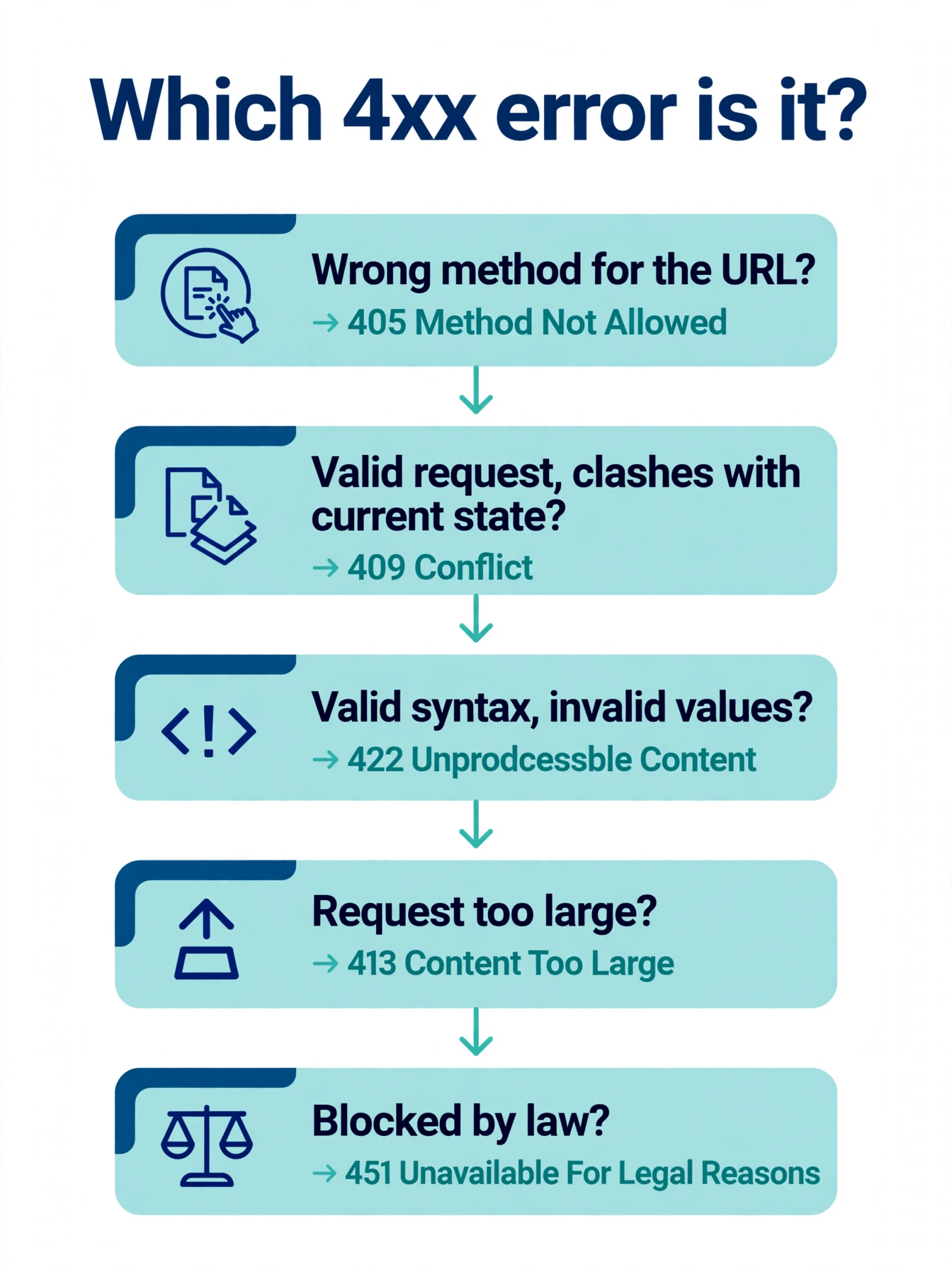
That is the useful part. A 4xx code is a message, not a dead end. Each number points at a different problem: the wrong method, a conflict, invalid data, a legal block, or a request that is too large.
Definitions here come from RFC 9110, the HTTP Semantics standard, and from MDN Web Docs. Where a code comes from somewhere else, such as Laravel or nginx, its section says so.
409 Error: Conflict
A 409 error, formally 409 Conflict, means the request could not be completed because it conflicts with the current state of the target resource. That is the definition in RFC 9110, section 15.5.10.
The request itself is fine: its syntax and values are valid. What is wrong is the match between the request and the state of the resource at that moment.
What is a 409 error in practice
The most common triggers are easy to picture:
- Creating something that already exists. Signing up with an email address that already has an account, or creating a file, username or slug that is taken.
- Saving over a newer version. Two people edit the same record, or two browser tabs hold the same page. The second save is based on an old copy, and the server refuses it rather than wiping out the newer version.
- An action the current state does not allow. Cancelling an order that has already shipped, or deleting a folder that still has files in it.
- A job that is already running. Some systems return 409 when you try to start a task that is already in progress.
Developers usually meet 409 as an API response, not a browser page. The response body carries the explanation, and the Network tab in browser developer tools shows the failed request with status 409.
How to fix a 409 error
If you are visiting a site, reload the page first so you are working from the latest version, then redo your change and save again. For a sign-up conflict, try logging in to the existing account instead of creating a duplicate.
If you run the site or the API, return a body that says what conflicted: which field, and which current version the server holds. Clients should re-read the resource, merge the change or ask the user, and retry. Retrying the identical request changes nothing.
A 409 error code meaning is often confused with 412 Precondition Failed. With 412, the client sent a condition such as an If-Match header and the server’s version did not match it. With 409, the server detected the conflict itself, without a conditional header. A 422 error is different again: 422 means the data itself fails a rule, while 409 means the data is fine but the state is wrong.

405 Error: Method Not Allowed
A 405 error means the server knows the request method but the target resource does not support it. That is MDN’s definition, and RFC 9110 section 15.5.6 says the same. The URL exists, and the method is the problem.
A common example is sending a POST request to a page that only accepts GET, or trying to DELETE a read-only resource. Another is posting a form to a static file, such as an HTML page, which a web server only serves with GET and HEAD.
What is a 405 error, and what is the Allow header
Every 405 response must include an Allow header listing the methods the resource does accept, for example Allow: GET, HEAD. That header is the fastest clue to the fix, because it tells you exactly which methods work on that URL.
How to fix a 405 error
If you are a visitor, reload the page and submit the form again, in case a cached page pointed at the wrong endpoint. If it persists, report it to the site: a genuine 405 is a server configuration issue with no client-side fix.
If you run the site, read the Allow header on your own 405 response and compare it with what the client is sending:
- Add the missing method to the route. A route registered for GET alone returns 405 for every other method by design.
- Check server rules. In Apache, a
LimitExceptdirective in.htaccesscan block methods; in nginx, alimit_exceptblock or a static-file location catching an API path does the same. In WordPress, a security plugin blocking PUT or DELETE calls from the block editor is a frequent cause. - Handle OPTIONS for CORS. A cross-origin preflight request uses OPTIONS, and a server that does not answer it returns 405 before the real request ever runs.
A 405 error is not a 404 error. A 404 means nothing exists at the URL, while a 405 means the URL exists but rejects the method used to reach it. It is also not a 403 error, which means the server refuses the request even though the method is fine.
422 Error: Unprocessable Content
A 422 error means the server understood the content type of the request and its syntax was correct, but it could not process the instructions inside it. That is MDN’s definition, following RFC 9110 section 15.5.21. The code was renamed from Unprocessable Entity to Unprocessable Content in RFC 9110.
The distinction is syntax versus meaning. A 400 error means the server could not read the request at all, for example because the JSON is broken. A 422 error code means the JSON parsed fine but a value inside it breaks a rule: a required field is missing, an email address has the wrong format, or an end date falls before the start date.
How to fix a 422 error
Do not retry the same request. MDN states that repeating a 422 request without modification will fail with the same error. Read the response body instead: a well-built API names the field and the rule that failed.
For a form on a website, read the message next to each field and correct the value it names. If the page shows no detail, open the developer tools, find the failed request in the Network tab, and read its response body.
For an API, check the payload against the API documentation: required fields, data types, formats and allowed values. Common mistakes are sending a number as a string, using the wrong date format, or sending a field under a different name than the schema expects.
This 422 code turns up inside apps, and people search for it by app name: the Chick-fil-A app, Discogs and SteamVR. The fix is the same: update the app, re-enter the field, or contact the app’s support.

451 Error: Unavailable For Legal Reasons
A 451 error means the requested resource cannot legally be provided, such as a web page censored by a government. That is MDN’s definition. The code comes from RFC 7725, and the number refers to the novel Fahrenheit 451.
You meet 451 when a site blocks content in a country or region because of a law, a court order, or a takedown demand. Some sites show it to visitors in the European Economic Area when they cannot comply with local data protection rules. The response may name the legal demand.
There is no client-side fix. The content is withheld on purpose, and no change to the request will make the server provide it. If you run a site and receive a 451 from a service you use, the block sits with that service and its legal obligations.

406 Error: Not Acceptable
A 406 error, formally 406 Not Acceptable, means the server cannot produce a response that matches the Accept headers the client sent. That is MDN’s definition, following RFC 9110 section 15.5.7. The client asked for a format, language or encoding the server cannot provide.
A browser rarely triggers a genuine 406, because browsers accept many formats. APIs meet it more often, for example when a client asks for XML from a JSON-only API. Loosen the Accept header or ask for a format the server supports.
One practical note: security tools also use 406. ModSecurity, a common web application firewall, returns 406 by default when it blocks a request it judges suspicious, so a 406 on a normal-looking request can mean a firewall rule fired. If you run the site, check the firewall logs.
413 Error and 431 Error: Too Large
These two codes are cousins: both mean something in the request was too large, but they point at different parts of it.
A 413 error, now called Content Too Large in RFC 9110, means the request body is larger than the server is willing or able to process. It was previously called Payload Too Large. The usual trigger is a file upload over the size limit. Shrink the file, compress it, or split the upload. The server may close the connection or return a Retry-After header.
An http error 431, formally 431 Request Header Fields Too Large, means one header field, or all the header fields together, are too large. It comes from RFC 6585. The usual culprit is an oversized Cookie header, built up by many cookies from the same site. Clear cookies for that site and try again.

419 Error: Page Expired
A 419 error code is the odd one out in this group: 419 is not in the HTTP standard at all. It is a Laravel convention. Laravel, a PHP web framework, returns 419 Page Expired when its CSRF protection rejects a form submission.
CSRF stands for cross-site request forgery. Laravel generates a token for each session and checks it on every POST, PUT, PATCH or DELETE request, to make sure the form was submitted intentionally by the user. When the token is missing or does not match the session, the request fails with 419.
The usual causes are a form left open so long that the session expired, a form missing the @csrf directive, or an AJAX request sent without the X-CSRF-TOKEN header. If you are a visitor, reload the page to get a fresh token and submit again, and make sure cookies are enabled. If you run the Laravel site, add @csrf to the form and send the token from the page’s meta tag in JavaScript requests.
The Rest of the 4xx Family
Each code below follows the same pattern: the request is wrong in a specific way, and the fix follows from the definition.
| Code | Name | What it means | Fix |
|---|---|---|---|
| 402 | Payment Required | Reserved for future use in RFC 9110, though some APIs use it for billing or plan limits. | Read the service’s message. |
| 407 | Proxy Authentication Required | Like 401, but the client must authenticate with a proxy first. | Sign in to the proxy. |
| 408 | Request Timeout | The server gave up waiting for the client to finish sending the request. | Retry, and check the connection. It also appears in searches such as US Cellular error code 408. |
| 410 | Gone | The resource was deliberately removed and will not come back. Unlike 404, the absence is permanent. | Remove links and bookmarks. It also appears in searches such as US Cellular error code 410. |
| 411 | Length Required | The server requires a Content-Length header and the request has none. | Add a Content-Length header. |
| 412 | Precondition Failed | A condition in the request headers, such as If-Match, was not met. | Re-read the resource, then retry. |
| 414 | URI Too Long | The URL is longer than the server is willing to interpret. | Shorten the URL. |
| 415 | Unsupported Media Type | The format of the request body is not supported by the server. | Send a supported format. |
| 417 | Expectation Failed | The expectation in the Expect header cannot be met. | Drop the Expect header. |
| 418 | I’m a Teapot | The server refuses to brew coffee with a teapot. Defined in RFC 2324, a 1998 April Fools’ joke. | None needed. |
| 420 | Enhance Your Calm | Not part of the standard. The old Twitter API returned it when a client was rate limited. | Slow down and wait. Modern services use 429 instead. |
| 421 | Misdirected Request | The request went to a server that cannot produce a response for that scheme and authority. | Send the request to the correct host. |
| 423 | Locked | The resource is locked, from WebDAV. | Unlock it or wait. |
| 424 | Failed Dependency | A previous request failed, from WebDAV. | Fix the earlier request. |
| 428 | Precondition Required | The server requires the request to be conditional, to prevent lost updates. Defined in RFC 6585. | Send a conditional header such as If-Match. |
| 499 | Client Closed Request | Not part of the standard. An nginx code logged when the client closed the connection early. | Nothing to fix. |
The Codes With Their Own Guides
Five 4xx codes have their own articles on this site, so they get a short summary and a link here, not a full section.
A 400 Bad Request error means the server cannot read the request at all, usually because of malformed syntax. Our guide to error 400 covers the causes and fixes.
A 401 error means the request lacks valid authentication, so the client must sign in first. Our guide to 401 error explains how it differs from 403.
A 403 forbidden error means the server understood the request and refuses it, even though the client is authenticated. Our guide to 403 forbidden error covers the fixes.
A 404 error means the server cannot find the requested resource. Our guide to 404 error explains the fixes.
A 429 error means the client has sent too many requests in a given amount of time and is being rate limited. Our guide to 429 error covers the fixes.
How to Read Any 4xx Error
Whatever the number, the same three steps work:
- Read the response body. The status code is a category, not a diagnosis. The body usually names the field, the rule, or the state that failed.
- Read the headers. A 405 carries an Allow header and a 413 may carry Retry-After. Each one points at the fix.
- Change the request, then retry. A 4xx error means the request was wrong, so sending the identical request again will fail the same way. Fix the method, the values, the size, or the state, and send it again.
4xx Errors and Search Engines
A 4xx error tells a search engine the page is not available because of a client error, so the URL is generally not indexed while it returns one. That is usually fine for a page that never existed, but a real page that starts returning a 4xx by mistake can drop out of search results while the error stands.
The 410 code is the strongest signal here. MDN notes that clients are expected to remove their caches and links to a resource that returns 410. Use 410 when a page is deliberately and permanently removed, and 404 when the absence might be temporary or uncertain.
Frequently Asked Questions
What is a 409 error?
A 409 error means the request conflicts with the current state of the resource on the server. The request is valid, but it clashes with what is already there, such as a duplicate account or an edit based on an old version. Reload the latest version, resolve the conflict, and send it again.
What is a 405 error?
A 405 error means the server knows the request method but the resource does not support it, for example a POST sent to a page that only accepts GET. The Allow header in the response lists the methods that do work on that URL.
What does a 422 error mean?
A 422 error means the request was well formed but its contents failed validation. The syntax is correct, yet a value inside it breaks a rule. Fix the named field instead of retrying.
What is error 406?
Error 406 means the server cannot produce a response matching the Accept headers the client sent. Ask for a format the server supports, or check whether a firewall rule is returning 406.
What is a 419 error code?
A 419 error code is Laravel’s Page Expired response: the CSRF token was missing or expired when a form was submitted. Reload the page for a fresh token and submit again.
What is http error 431?
An http error 431 means the request headers are too large, usually because of an oversized Cookie header. Clear the site’s cookies and try again.
What is error 451?
Error 451 means the resource cannot legally be provided, for example because of a government block or a court order. There is no client-side fix.
How do I fix a 413 error?
A 413 error means the request body is larger than the server accepts. Shrink the file, compress it, or split the upload into smaller parts.
Watch: HTTP Status Codes Explained
1. “15 HTTP Status Codes You’ll Actually Hit” – Coffee Time
A walk through the status codes in the order a request meets them, including 418, 429 and 451. Chapters run to 8:15. Checked live on 23 Nov 2026.
2. “What Are HTTP Codes and How Do They Work? | Full Breakdown” – WsCube Tech
A full breakdown of the 1xx to 5xx classes, with the 4xx section starting at 12:30. Checked live on 23 Nov 2026.
Sources
13
- IETF, RFC 9110, “HTTP Semantics” – https://www.rfc-editor.org/rfc/rfc9110.html
- MDN Web Docs, “HTTP response status codes” – https://developer.mozilla.org/en-US/docs/Web/HTTP/Status
- MDN Web Docs, “405 Method Not Allowed” – https://developer.mozilla.org/en-US/docs/Web/HTTP/Reference/Status/405
- MDN Web Docs, “409 Conflict” – https://developer.mozilla.org/en-US/docs/Web/HTTP/Reference/Status/409
- MDN Web Docs, “422 Unprocessable Content” – https://developer.mozilla.org/en-US/docs/Web/HTTP/Reference/Status/422
- IETF, RFC 6585, “Additional HTTP Status Codes” – https://www.rfc-editor.org/rfc/rfc6585.html
- IETF, RFC 7725, “An HTTP Status Code to Report Legal Obstacles” – https://www.rfc-editor.org/rfc/rfc7725.html
- IETF, RFC 2324, “Hyper Text Coffee Pot Control Protocol (HTCPCP/1.0)” – https://www.rfc-editor.org/rfc/rfc2324.html
- IETF, RFC 4918, “HTTP Extensions for Web Distributed Authoring and Versioning (WebDAV)” – https://www.rfc-editor.org/rfc/rfc4918.html
- IANA, “Hypertext Transfer Protocol (HTTP) Status Code Registry” – https://www.iana.org/assignments/http-status-codes/http-status-codes.xhtml
- Postman Blog, “422 Unprocessable Entity Error: What Is It and How to Resolve” (Nov 2025) – https://blog.postman.com/error-cache-service-responded-with-422/
- Laravel Documentation, “CSRF Protection” – https://laravel.com/docs/csrf
- Wikipedia, “List of HTTP status codes” – https://en.wikipedia.org/wiki/List_of_HTTP_status_codes
Every factual claim on this page was verified against a named source above.