By Tech Success Communications Editorial Team | Checked 23 Nov 2026

An error message tells you something did not work, and its code is the fastest way to find out what. Read the code, the message, and which app showed it, and you usually know the problem and the first fix. If you already have a code, our error codes list has its fix.
What Is an Error?
The Cambridge Learner’s Dictionary defines error as “a mistake, especially one that can cause problems”. On a computer, an error is a message that something did not go as expected: a file that would not open, a page that would not load, a program that stopped. The message reports the problem; it is not the problem itself. If a page says something “errored”, it means it failed.
The same word means different things outside computing. In baseball, an error is a fielding mistake. In statistics, a standard error measures how far a sample result can sit from the true value, and a sampling error is the gap between a sample and the population. This guide covers computer errors only.
The Three Parts of Every Error Message
Every error message has three parts, each answering a different question.
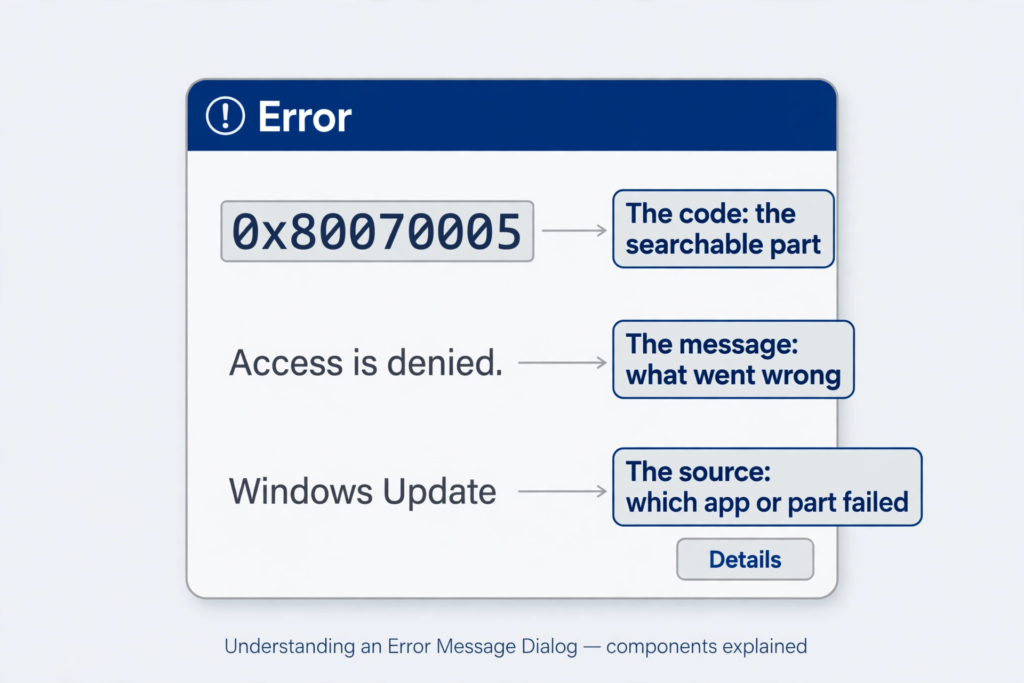
The code. A number or short identifier, such as 0x80070005 or 404. This is the part worth searching, because it is exact.
The message. The plain-language sentence, such as “Access is denied.” It is often vague, but it points you in the right direction.
The source. Which app or device showed it. The same code means different things in different places, so the source makes the code readable.
Many messages have a Details button. Open it before you search.
How to Read an Error Code
Most codes follow a pattern set by the system that made them.
Windows codes: the last digits carry the meaning
Windows codes often start with 0x8007, which means the code wraps a standard Windows system error. The last four digits are the real code: in 0x80070005, they are 0005, system error 5, “Access is denied.” Microsoft’s list gives each number’s plain meaning:
| Code | Meaning |
|---|---|
| 0 | The operation completed successfully |
| 4 | The system cannot open the file |
| 5 | Access is denied |
| 32 | The file is being used by another process |
| 112 | There is not enough space on the disk |
Error 0 looks like a failure, but in Windows it means success. If an app reports error code 0 next to a failure, no error was recorded, so look at the message around it instead.
Web codes: the first digit is the class
HTTP status codes are three digits, and the first digit tells you whose side the problem is on: 4xx codes are client errors, where the request was wrong, and 5xx codes are server errors, where the server failed. A 404 means the server cannot find the resource, often a mistyped address or a moved page. A 500 means the server hit a situation it does not know how to handle.
App codes: the same number can mean different things
Each app and device keeps its own list, so never read a code without its source. In Roblox, error 277 means the connection to the game server was lost, and error 279 means the game could not connect at all. On a Xiaomi scooter, error 24 means the system voltage check failed, while on many e-bikes the same number means a motor sensor fault. The number alone tells you nothing.

How to Fix This Error: Safe First Steps
Work in this order; the early steps are cheap and fix most errors.
- Read the whole message. Open Details if there is one; the useful line is often below the fold.
- Write it down exactly, or take a photo. A code remembered wrong is unsearchable.
- Note what you were doing. Which app, which file, which button, and whether it happens every time or only once.
- Restart the app, then the device. Close the app completely and open it again.
- Check the simple causes. Internet connected? Disk full? Update just finished? File open elsewhere?
- Search the exact code in quotes, with the app name. Search
"0x80070005" Windows Update, not the whole sentence. Remove anything personal first, like your username or file paths. - Follow the vendor’s fix first. Microsoft’s guidance for damaged system files is to run DISM first, then System File Checker, from an elevated Command Prompt:
DISM.exe /Online /Cleanup-image /Restorehealth, thensfc /scannow. Google’s help page for Chrome loading errors gives the same shape of advice: reload, check the connection, update Chrome, test in Incognito, turn off extensions, then clear browsing data. - Change one thing at a time. Otherwise you will not know which change fixed it.
Do not download a “fixer” program from a search result, call a phone number shown in a pop-up, or run commands from a random forum that you do not understand.

If nothing works, ask for help with the exact message and code, what you were doing, when it started, and what you tried.

Common Error Messages and What They Mean
| Message | What it means | Try first |
|---|---|---|
| Access is denied | A permission problem, not damage. | Run as administrator. |
| The file is being used by another process | Something has the file open. | Close the other program, or restart. |
| Not enough space on the disk | The disk is full. | Free space before you retry. |
| 404 Not Found | The page or file is not at that address. | Check for typos. Our 404 error guide covers the fix. |
| 500 Internal Server Error | The server failed. | Wait a few minutes and retry. |
| Aw, Snap! (Chrome) | Chrome could not load the page. | Reload, then test in Incognito. If it loads there, an extension is the cause. |
| Internal error | The app hit a problem it cannot describe. | Retry, update the app, and report it if it repeats. |
| Query error | A request to a database or app could not run. | Read the words after it; they name the problem. |
| Hydration error | A website bug: server and browser built different pages. | Nothing for a visitor to fix. |

Three Real Errors, Read Step by Step
Here is the method on three real errors.
Windows Update error 0x80070005
The code: 0x80070005. The message: “Access is denied.” The source: Windows Update. Microsoft describes this as a general access denied error, where permissions were changed so the servicing stack cannot reach what it needs. The fix follows the meaning: sign in with an administrator account and retry, then run DISM and System File Checker if it repeats.
Vaillant boiler F.22
The code: F.22. The message: low water pressure. The source: a Vaillant ecoTEC boiler. The manual says the fault appears when there is too little water in the product, and on the ecoTEC pro the boiler switches off below 0.5 bar. Top the system up to the value in the manual, usually 1 to 1.5 bar when cold. If the pressure keeps dropping, there is a leak or a faulty valve, and that needs an engineer.
OKI printer error 983
The code: 983. The message: a fuser error. The source: an OKI ES5431 printer. Third-party guides based on the service manual describe 983 as a fuser-unit error: the fuser, the hot roller that bonds toner to paper, is not installed correctly or has reached the end of its life. The fix is to reseat the fuser, or replace it if the printer says it is worn out. Check OKI’s manual before ordering a part.
DStv error E106-0 shows the limit of the method: the decoder is not recognised as part of the current network, and DStv’s guidance is to contact a MultiChoice branch. Some errors have no safe fix at home.
When an Error Message Is a Scam
Some error messages are the attack, not a warning about one. A pop-up that fills the screen, claims your computer is infected, and tells you to call a number is a tech support scam. The US Federal Trade Commission is direct: real security pop-ups will never ask you to call a phone number, and legitimate tech companies will not contact you to tell you there is a problem with your computer.
If you see one, do not call the number, click anything on the warning, or let anyone connect to your computer. Close the browser tab, or restart the computer if the page will not close. If you are worried something is really wrong, update your security software, run a scan, and contact a company you trust using contact details you find yourself. Report the scam at ReportFraud.ftc.gov.
When There Is No Error Message
Some failures show no message at all. Then the pattern substitutes for the message: always at the same point, always with the same app, always after running for a while.
The most famous silent failure is the crash screen. For decades Windows showed a blue screen with a stop code when it hit a problem it could not recover from. In 2025 Microsoft replaced it on Windows 11 version 24H2 with a black “unexpected restart” screen, announced on 26 June 2025. The new screen drops the sad face and QR code and shows a short message with the stop code and, where known, the faulty driver. It usually disappears in about two seconds, so note the stop code quickly, or find it later in Event Viewer. Logs hold many meaningless warnings, so look for errors at the time of your problem.

Frequently Asked Questions
What does this error mean?
Read its three parts: the code names the problem, the message says what went wrong, and the app or device tells you whose list to check. Search the code in quotes with the app name.
Why am I getting this error?
Something changed, or something ran out: an update, a new app, a lost connection, a full disk, a file in use, or a changed permission. The change just before it started is usually the cause.
How do I fix an error I have never seen before?
Read the whole message, photograph it, restart the app and then the device, check the simple causes, and search the exact code with the app name. Follow the vendor’s fix first.
What is error code 0?
In Windows, error code 0 means success: “The operation completed successfully.” If an app reports it next to a failure, no error was recorded, so the message around it matters more.
What does “internal error” mean?
It means the app hit a problem it cannot describe, usually on the server’s side or a bug in the app. Retry, update, and report it if it keeps happening.
Is it safe to download a program that promises to fix my errors?
No. Most “fix my errors” programs sold through search results are unnecessary at best, and some install malware. Use the vendor’s own tools. Never call a phone number shown in a pop-up.
Watch: What Happened to the Blue Screen of Death
Microsoft Killed the Blue Screen of Death: Did Windows Crashes Actually Get Fixed?
An explainer on the blue screen’s history, what the new black restart screen shows, and how to read stop codes. Checked live on 23 Nov 2026; the title and description match.
The Bottom Line
An error message is a diagnosis in shorthand. The code names the fault, the message describes it, and the source tells you whose list to check. Read all three before you act, try the cheap fixes first, and treat any message that asks you to call a number as a scam. For specific codes, see our error code fixes guide.
Sources
15
- Cambridge Dictionary, “error” (Learner’s Dictionary) – https://dictionary.cambridge.org/us/dictionary/learner-english/error
- Microsoft Learn, “System Error Codes (0-499)” – https://learn.microsoft.com/en-us/windows/win32/debug/system-error-codes–0-499-
- Microsoft Learn, “COM Error Codes (Generic)” – https://learn.microsoft.com/en-us/windows/win32/com/com-error-codes-1
- MDN Web Docs, “HTTP response status codes” – https://developer.mozilla.org/en-US/docs/Web/HTTP/Reference/Status
- Microsoft Support, “Use the System File Checker tool” – https://support.microsoft.com/en-us/windows/experience/backup-recovery/use-the-system-file-checker-tool-to-repair-missing-or-corrupted-system-files
- Google Chrome Help, “Fix connection and loading errors in Chrome” – https://support.google.com/chrome/answer/6098869
- US Federal Trade Commission, “How to Spot a Tech Support Scam” – https://consumer.ftc.gov/sites/default/files/articles/pdf/tech-support-scam-infographic-508-v3.pdf
- React, “Hydration mismatch” – https://react.dev/link/hydration-mismatch
- PCWorld, “Windows 11 officially kills the Blue Screen of Death in latest update” (23 Jul 2025) – https://www.pcworld.com/article/2856678/latest-windows-11-update-officially-kills-the-blue-screen-of-death.html
- Eastbourne Heating, “Vaillant fault codes” (quoting the Vaillant ecoTEC manuals) – https://eastbourneheating.com/topic/vaillant-codes/
- OKI ES5431 User Manual – https://www.manua.ls/oki/es5431/manual?p=13
- ProError, “Troubleshooting the OKI ES5431 983 Error” – https://www.proerror.com/amp/oki-es5431-983-error-fuser-service-manual
- Dish Technician 247, “DStv Error Codes Explained” – https://dishtechnician247.co.za/dstv-error-codes-explained.html
- Endgame Tools, “Roblox error codes: meaning and fixes” – https://endgametools.com/en/roblox/news/roblox-error-codes
- Fallman Tech, “Xiaomi M365 Electric Scooter – Error Code List” – https://fallman.tech/xiaomi-m365-error-codes/
Every factual claim on this page was verified against a named source.