By Tech Success Communications Editorial Team | Checked 23 Nov 2026

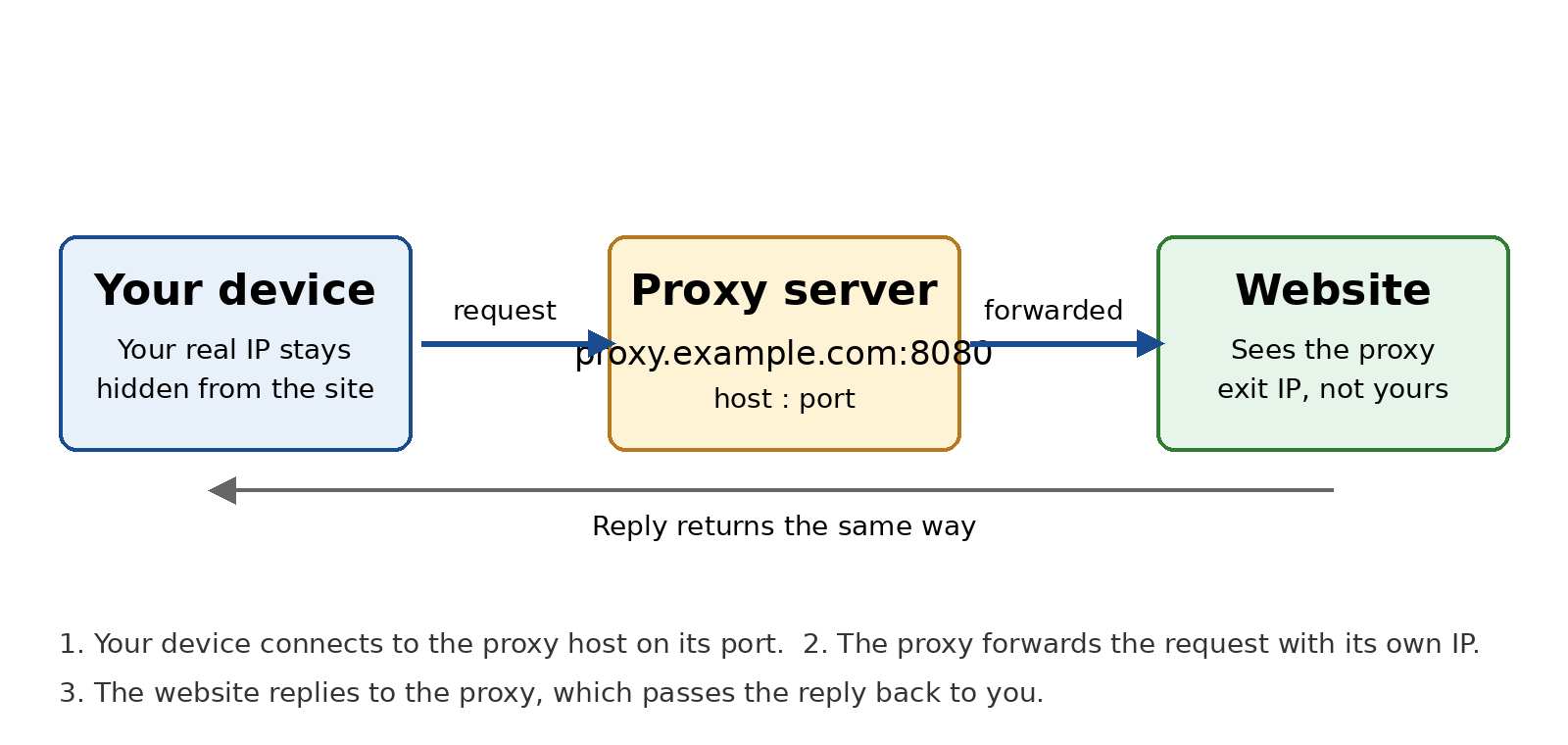
A proxy IP is the IP address of a proxy server, and it works together with a port number. The IP address says which server to contact, and the port says which service on that server should answer. Our guide to what a proxy is explains the basic idea first: a proxy sits between your device and the internet, and forwards your requests for you.
What Is a Proxy IP?
A proxy IP is the IP address of the proxy server your traffic passes through. Your device connects to the proxy server, the proxy server connects to the website, and the website sees the proxy IP instead of your own address. A site that logs visitors records the proxy address, not yours, though the proxy provider itself can still see your address.
The proxy IP can mean two different addresses. The entry IP is the address your device connects to. It is the host in your proxy settings, and it is often a hostname such as proxy.example.com rather than a bare IP address. The exit IP is the address websites see. On a simple proxy, the entry IP and the exit IP are the same server. On a rotating gateway, they are different: one host and port in your settings can give a different exit IP on each request, because the gateway picks an exit server for you.
So when someone asks for your proxy IP, check what they actually need. A support team asking how your device is configured wants the entry address from your settings. A website that blocked you, or a checker showing your location, is talking about the exit IP.
What Is a Proxy IP Address?
A proxy IP address is the same thing as a proxy IP: the numeric address of a proxy server. The longer phrase is also used for the full connection details, meaning the address plus the port.
A proxy server address is usually an IP address, such as 198.51.100.23, or a hostname, such as proxy.example.com. A hostname is a name your device looks up and turns into an IP address before connecting, so it can keep working even if the server behind it changes address.
Proxy IP Address and Port
A proxy address on its own is not enough. It needs a port number as well, written after a colon:
198.51.100.23:8080
In that example, 198.51.100.23 is the proxy server IP address and 8080 is the proxy port number. Together they form the proxy IP address and port, the complete destination your software connects to. The same pattern works with a hostname, proxy.example.com:8080, and with a username and password, http://username:password@proxy.example.com:8080.
Most proxy addresses are IPv4, such as 198.51.100.23. IPv6 proxy addresses need square brackets so the colons inside the address do not clash with the colon before the port: [2001:db8::1]:8080. Copy the full bracketed form from your provider.
What Is a Proxy Hostname?
A proxy hostname is the name form of a proxy address. Instead of numbers, your settings hold something like proxy.example.com. The word hostname and the word host are used for the same field in most settings screens. A hostname is easier to read than a string of numbers, and a provider can move its servers behind the same name without asking every customer to change their settings. On a phone, the proxy is saved per Wi-Fi network, so a proxy set on your home network does not follow you to a cafe network.
Proxy Address vs IP Address
A proxy address and an IP address are related, but they are not the same idea. An IP address is a numeric label for a device or server on a network. A proxy server address points to a proxy service that forwards traffic for you. It may use an IP address, but it also carries a port, and it describes a service rather than a single machine.
Your IP address is the address your device uses on the network. A proxy IP address is the address of the server that forwards your traffic. A proxy server address is that address plus the port, the full host:port pair your software needs. In Microsoft Active Directory, proxyAddresses is an attribute that lists a user’s email aliases. It has nothing to do with a proxy server.
What Is a Proxy Port?
A proxy port is the numbered endpoint your device connects to on a proxy server. Think of the IP address as the building and the port as the door number.
One server can run many services at once, and the port number tells the operating system which listening program should receive the connection. Port numbers run from 0 to 65535. IANA divides that space into three ranges, as set out in RFC 6335: system ports from 0 to 1023, user ports from 1024 to 49151, and dynamic or private ports from 49152 to 65535. Most proxies listen on user ports such as 8080, 3128, or 1080. A port number on its own does not prove what is running there, so always use the port your provider lists for your line.
Common Proxy Ports
These are the port numbers you will see most often. Each one is a convention; use the port your provider lists for your line.
| Port | Usual use | Where the convention comes from |
|---|---|---|
| 80 | Plain HTTP proxy | The standard HTTP port |
| 443 | HTTPS proxy | The standard HTTPS port |
| 8080 | HTTP and HTTPS proxy, the most common alternate | IANA registers 8080 as http-alt |
| 3128 | HTTP proxy | Squid normally listens on 3128 |
| 1080 | SOCKS4 and SOCKS5 proxy | RFC 1928 and IANA both name 1080 for socks |
| 8000, 8888 | Alternate HTTP proxy ports | Common alternates |
| 9050 | Tor local SOCKS port | Tor convention |
Port 8080 is the port most people meet first: IANA registers it as http-alt, HTTP Alternate, and proxy software, web apps, and development servers all use it, so a service on 8080 is a proxy only if it was set up as one. Port 3128 is the Squid port, though IANA assigns 3128 to an unrelated service, so software convention made the number famous. Port 1080 has the clearest standards link: RFC 1928, the SOCKS Protocol Version 5 standard from March 1996, says the SOCKS service is conventionally on TCP port 1080, and IANA registers 1080 as socks. Port 443 appears in two roles. When an HTTP proxy carries an HTTPS request, your client asks the proxy to open a tunnel to the website’s port 443 with the CONNECT method, whatever port the proxy itself listens on. An HTTPS proxy is something else: the connection to the proxy is itself encrypted, and it can listen on 443 like any HTTPS server.
How a Proxy IP and Port Work Together
A proxy connection has three parts: a host, a port, and a protocol. The host says where, the port says which service, and the protocol says how to speak to it. Enter only the proxy address, and the system will not know which service to reach. Enter only the port, and it will not know which server to contact. Enter the right host and port with the wrong protocol, and the proxy will reject the connection or close it at once.
Providers often give the port extra meaning. One hostname can sit in front of several services, so a provider can tell products, protocols, or regions apart by port, or hand out a block of ports where each port maps to a session, a country, or a single IP address. Others put those choices in the username instead. Either way, copy the combination from your provider’s dashboard for the exact line you are using.
The scheme in front of the address decides the protocol in code and command-line tools. Use http:// for an HTTP proxy and socks5:// or socks5h:// for a SOCKS5 proxy. The socks5h form also sends DNS lookups through the proxy. A SOCKS line typed as a plain host:port without a scheme will fail in many tools.

Proxy IP Address and Port in Scripts and Code
In scripts, the proxy usually appears as a single URL string. A Python example using the Requests library looks like this:
proxies = {
    'http': 'http://proxy.example.com:8080',
    'https': 'http://proxy.example.com:8080',
}
In shell environments, the same details often live in environment variables such as HTTP_PROXY, HTTPS_PROXY, and ALL_PROXY. On Linux or macOS, echo $http_proxy prints the value in use. In code, the variable is often named proxy_ip or proxy_url. To replace one proxy address with another in PowerShell, change it in Settings, or read the current setting first with Get-ItemProperty 'HKCU:\Software\Microsoft\Windows\CurrentVersion\Internet Settings', where ProxyServer holds host:port.
Proxy Script Address
Some networks give you a script address instead of a host and port: a URL pointing to a proxy auto-configuration file whose rules choose a proxy for each site. Windows calls this field “Use setup script” and macOS calls it “Automatic proxy configuration”. Its rules look like return "PROXY host:port".
How to Find Your Proxy Server Address
If you bought a proxy, the address is in your provider’s dashboard, next to the username and password for your plan. If a proxy is already set on your device, it is in the system or browser settings. Copy the host, port, username, and password exactly as shown: a single wrong digit in the port is one of the most common reasons a proxy connection fails.
How to Find Your Proxy Address on Windows
On Windows 11 or Windows 10, open Settings, go to Network and internet, then Proxy. Under Manual proxy setup, select Set up next to “Use a proxy server”. The address and port are shown in the Proxy IP address and Port fields. Windows has a second, separate setting for system services, called WinHTTP: check it with netsh winhttp show proxy. Direct access (no proxy server) means none is set.
How to Find Proxy Address on macOS
On macOS, open System Settings, select Network, choose your active connection such as Wi-Fi, and click Details, then Proxies. Each switched-on type shows its server and port. In Terminal, scutil --proxy prints the same settings.
How to Find Proxy Address on Linux
Most command-line tools on Linux read the proxy from environment variables. Run env | grep -i proxy to see http_proxy, https_proxy, all_proxy, and no_proxy, with values like http://host:port. On a GNOME desktop, the desktop setting is separate: check it with gsettings get org.gnome.system.proxy mode.
How to Find Proxy Address on Android and iPhone
On a phone, the proxy is saved per Wi-Fi network. On Android, open the network’s settings, then Advanced options, then Proxy, and choose Manual: the proxy hostname and proxy port fields appear. You need to be connected to that network first, because the setting belongs to the network, not to the phone. On iPhone, open Settings, then Wi-Fi, tap the info button next to the network, and look at Configure Proxy. Choose Manual to see the Server and Port fields.
How to Find Proxy Address in a Browser
Chrome and Edge have no proxy settings of their own on Windows and macOS: their settings pages open your computer’s proxy settings. The exceptions are a proxy extension, which shows its active proxy in its own menu, and a command-line flag in the shortcut that launched the browser. Firefox can have its own setting: open Settings, search for “proxy”, and click Settings under Network Settings. “Manual proxy configuration” shows the host and port for each type.
How to Find the Proxy IP Websites See
Check what websites actually see, because it can differ from your settings. Send a request through the proxy to an IP echo service with curl. For an HTTP proxy line:
curl -x "http://USERNAME:PASSWORD@HOST:PORT" https://api.ipify.orgFor a SOCKS5 line, use curl -x "socks5h://USERNAME:PASSWORD@HOST:PORT" https://api.ipify.org.
Each command prints the exit IP that websites see. If it shows your own internet provider and location, the proxy is not in use for that app. If it shows another IP and location, the proxy is working.
You can also check in a browser: open an IP checker site and compare the address and location it shows with the address shown when the proxy is off. A result that says “proxy IP detected” means the checker recognised the address as belonging to a proxy network. That is normal for a proxy, and it is also why some sites treat proxy traffic with extra checks.
Proxy IP Addresses by Country and Type
Providers sell proxy IPs from many countries, and the country is part of the product. An Australian IP proxy, a British IP proxy, or an Italian IP proxy simply means the exit IP is registered in that country, so websites see a visitor from Australia, the UK, or Italy. The same applies to a Vietnamese IP proxy. The country changes where the traffic appears to come from, not how the address and port work.
The source of the IP matters too. Residential proxies use addresses assigned to home internet customers, data center proxies use addresses from server farms, and mobile proxies use addresses from mobile networks. Those types each have their own guides on this site, and the format stays the same for all of them: host, port, and usually a username and password. A random IP proxy hands out a different exit IP for each request or session. A Hypixel proxy IP is not a proxy product at all: Hypixel is a Minecraft server network, and its server address is sometimes searched for as a “proxy IP” by players. It does not belong in your proxy settings. An AWS proxy IP is usually a proxy running on Amazon Web Services infrastructure.
Common Proxy Address and Port Problems
Check the address and port first, because that is where most mistakes live.
Connection refused. Your device reached the server, but nothing accepts connections on that port. Check the port, then the host.
Timeout with no reply. Your network blocks that outgoing port, or the host is wrong or offline. Office, school, and hotel networks sometimes allow outgoing connections only on ports 80 and 443.
407 Proxy Authentication Required. The host and port are right, but the username or password is not. If your password contains @ or :, percent-encode it in a URL.
The connection closes at once, or a SOCKS error appears. A protocol mismatch is the usual cause: an http:// URL pointed at a SOCKS port, or socks5:// at an HTTP port.
HTTP sites load but HTTPS sites fail. The proxy does not allow CONNECT tunnels on that port, or the client is not sending HTTPS traffic through the proxy. Check the secure proxy fields, not just the plain HTTP ones.
The proxy works in one app but not another. Some apps use the system proxy, and some keep their own. Check the app’s own settings, its environment variables, and any proxy extension.
The port is reachable but nothing works. Check it with nc -vz HOST PORT on macOS or Linux, or Test-NetConnection HOST -Port PORT in Windows PowerShell. A success message means a service is listening; it does not check your credentials yet.
Is Using a Proxy Safe and Legal?
Whether a proxy is safe and legal depends on how you use it and where you are. A proxy itself is a normal networking tool: offices use them to filter traffic and developers use them for testing. The risks come from the provider you choose and the activity you route through it. A free proxy run by an unknown operator can log, inspect, or alter your traffic, and using any proxy to break a site’s rules or hide fraud can still be against the law or the service’s terms. Our guide to whether using a proxy is safe and legal covers the risks, the rules, and the warning signs in full.

Frequently Asked Questions
What is a proxy IP?
A proxy IP is the IP address of a proxy server. Websites see that address instead of your own.
What is a proxy IP address?
A proxy IP address is the address of a proxy server, usually written with its port as host:port, for example 198.51.100.23:8080.
What is a proxy server address?
A proxy server address is the host and port your device sends traffic through, such as proxy.example.com:8080. It always comes with a port.
What is a proxy server port?
A proxy port is the numbered endpoint on a proxy server that your device connects to. Common proxy ports are 8080 and 3128 for HTTP proxies and 1080 for SOCKS proxies, but a provider can run a proxy on any port from 1 to 65535.
How do I find my proxy server address?
Check your provider’s dashboard first if you bought a proxy. If a proxy is already set on your device, look in your system settings: Network and internet, Proxy on Windows; Network, Proxies on macOS; or the proxy section of your Wi-Fi network on Android and iPhone.
How do I find my proxy address on Android?
Open the Wi-Fi network’s settings, then Advanced options, then Proxy, and choose Manual. The proxy hostname and proxy port fields show the address your phone uses.
Is the proxy address the same as my IP address?
No. The proxy address is where your traffic is sent first. Your public IP is the address websites see. With a proxy on, websites see the proxy’s exit IP.
Can a proxy use port 443?
Yes. That is separate from the 443 in a CONNECT request, which is the website’s HTTPS port.
Watch: Proxy IP Addresses and Ports, Explained on Video
What is a Proxy Server? How Proxies Work and Proxy vs VPN Explained – Anoop | Python and Automation
A four-and-a-half-minute explainer on how a proxy routes traffic, forward and reverse proxies, and proxy versus VPN. Checked live on 23 Nov 2026.
How to Set Up a Proxy Server – Cyberpedia by Palo Alto Networks
A three-minute walkthrough of proxy setup on Windows, macOS, Android, iOS, and Firefox. Checked live on 23 Nov 2026.
Sources
9
- IANA, “Service Name and Transport Protocol Port Number Registry” – https://www.iana.org/assignments/service-names-port-numbers/service-names-port-numbers.xhtml
- IETF, RFC 1928, “SOCKS Protocol Version 5” (Mar 1996) – https://www.rfc-editor.org/rfc/rfc1928.txt
- IETF, RFC 6335, “Internet Assigned Numbers Authority (IANA) Procedures for the Management of the Service Name and Transport Protocol Port Number Registry” – https://www.rfc-editor.org/rfc/rfc6335.txt
- Cloudflare Learning, “What is a reverse proxy? | Proxy servers explained” – https://www.cloudflare.com/en-gb/learning/cdn/glossary/reverse-proxy/
- Squid, “http_port” configuration documentation – http://www.squid-cache.org/Versions/v3/3.0/cfgman/http_port.html
- Red Hat Documentation, “Configuring the Squid Service to Listen on a Specific Port or IP Address” – https://docs.redhat.com/en/documentation/red_hat_enterprise_linux/7/html/networking_guide/configuring-the-squid-service-to-listen-on-a-specific-port-or-ip-address
- IPRoyal, “What Is a Proxy Port? Meaning and Common Ports” – https://iproyal.com/blog/proxy-port/
- Shifter, “How to Find Your Proxy Server Address and Port” – https://shifter.io/blog/how-to-find-your-proxy-server-address-and-port
- BuyProxy, “Proxy Server Port: Common Ports and How to Find Yours” – https://www.buyproxy.org/blog/proxy-server-port-common-ports-how-to-find-yours
Every factual claim on this page was verified against a named source above.