


IaaS vs PaaS vs SaaS comes down to one question: how much of the computing stack do you want to manage yourself, and how much do you want the provider to handle? IaaS rents you raw infrastructure, PaaS gives you a ready platform to build on, and SaaS gives you a finished application you simply log in to. Our guide to what is SaaS explains the finished-software end of that spectrum in full.
The three models are the service models of cloud computing. The US National Institute of Standards and Technology (NIST) defines cloud computing as on-demand network access to a shared pool of configurable computing resources, and names three service models: infrastructure as a service, platform as a service, and software as a service. Every cloud product you meet sits somewhere on the line between those three points, and many companies use more than one at the same time. Together, IaaS, PaaS and SaaS are known as the cloud service models.
The Short Answer: Who Manages What
Think of the cloud as a stack of layers: networking, storage, servers, virtualization, the operating system, middleware, the runtime, and finally the application and its data. Each model draws the line between you and the provider at a different layer.
With IaaS, the provider runs the physical infrastructure and you manage everything above it, including the operating system and your applications. With PaaS, the provider also manages the operating system, runtime, and middleware, and you bring your code and data. With SaaS, the provider manages the whole stack and delivers a finished application.
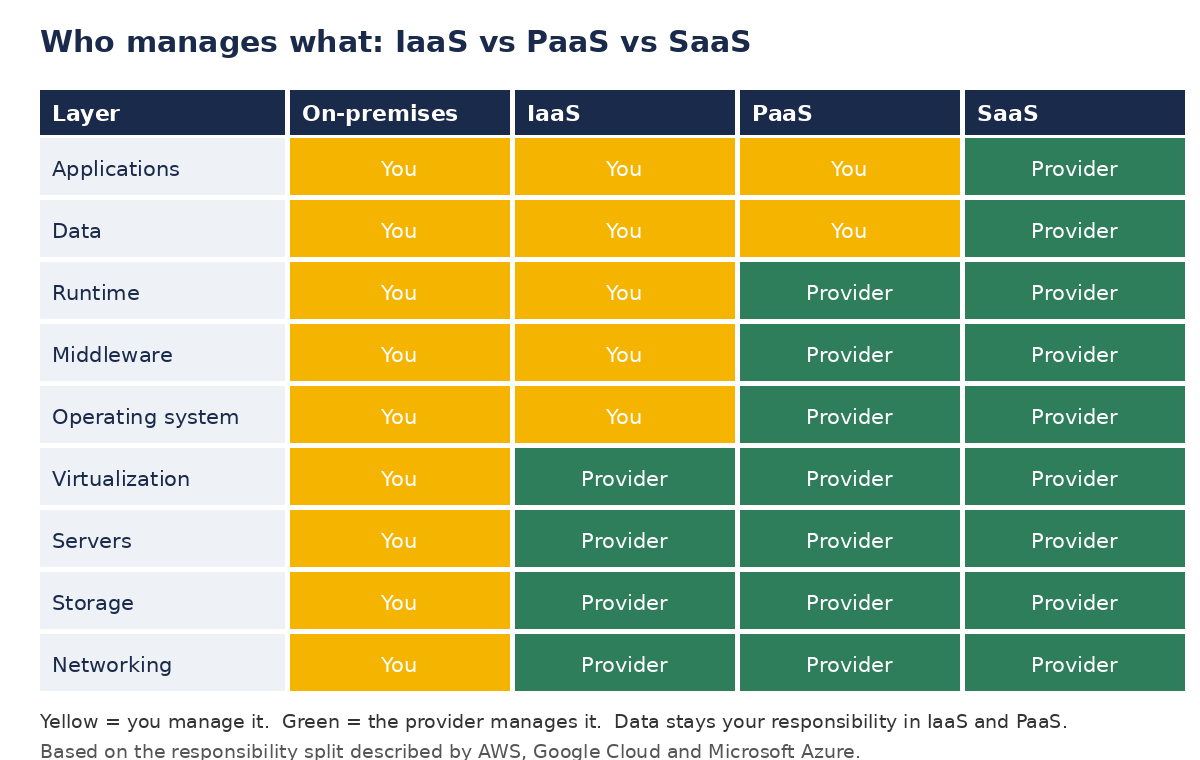
That split is the whole difference between IaaS, PaaS and SaaS: everything else, from cost to speed, follows from where the line sits.
What Is IaaS (Infrastructure as a Service)?
Infrastructure as a service rents you the basic building blocks of computing over the internet: virtual servers, storage, and networking. You do not buy or maintain physical hardware. You request a virtual machine, choose its size, install the operating system of your choice, and run whatever software you need on it.
Google Cloud describes IaaS as on-demand access to highly scalable computing resources, where you only pay for what you use. AWS makes the same point: IaaS gives you the highest level of flexibility and management control over your IT resources, and it is the model closest to running your own servers. Azure adds that you can set up infrastructure for a new product in minutes or hours instead of days or weeks.

Common IaaS examples are Amazon EC2, Google Compute Engine, and Microsoft Azure Virtual Machines. The people who use IaaS most are system administrators, DevOps teams, and infrastructure engineers, because IaaS is the model that asks the most of its user.
IaaS fits when you need full control: custom operating systems, unusual networking, legacy software that needs a specific environment, or workloads with strict compliance rules. It also fits backup and disaster recovery, big data analysis, and sudden traffic spikes. The price of that control is work. You patch the operating system, configure the firewall, and watch for threats yourself. AWS is clear about this in its shared responsibility documentation: on an EC2 instance, the customer manages the guest operating system, the software installed on it, and the firewall rules around it.
What Is PaaS (Platform as a Service)?
Platform as a service gives developers a managed environment for building, running, and deploying applications, without the work of managing the servers underneath. You write the code and manage your application and its data. The provider manages the infrastructure, the operating system, the runtime, and the middleware.
AWS describes PaaS as removing the need to manage the underlying infrastructure so teams can focus on deploying and managing their applications. Google Cloud puts it the same way: a PaaS provider delivers the software features and tools needed for application development, while you still write the code and manage your apps and data.

Common PaaS examples are Heroku, Google App Engine, Microsoft Azure App Service, and AWS Elastic Beanstalk. These platforms are built for application developers and engineering teams. PaaS is a natural fit for web and mobile apps, APIs and microservices, and IoT software development, where the team wants to ship features fast and let the platform handle scaling, logging, and deployment.
The trade-off is control. You cannot tune the operating system or kernel, and you work inside the platform’s conventions. Moving away can also take work if your application leans on platform-specific services. PaaS for SaaS companies is a common pattern: a team builds its product on a platform like Heroku and sells the finished product as SaaS.
What Is SaaS (Software as a Service)?
Software as a service delivers a complete application over the internet, ready to use. You sign up, log in through a browser or an app, and start working. The provider runs the infrastructure, the platform, and the application itself, including updates, backups, and security patches.
Salesforce describes SaaS as a way of delivering applications remotely over the internet instead of locally on machines, turning software from a product you buy once into a service you subscribe to. Common SaaS examples are Google Workspace, Microsoft 365, Salesforce, Slack, and Dropbox. Its users are end users and business teams, not engineers.
Our guide to what is SaaS in cloud computing covers the model in depth, including how cloud delivery changed software from something you install into something you subscribe to. How that software is built matters too: our guide to SaaS architecture explains multi-tenancy and the other patterns that let one application serve many customers at once.

IaaS vs PaaS vs SaaS: Side-by-Side Comparison
| IaaS | PaaS | SaaS | |
|---|---|---|---|
| What you get | Virtual servers, storage, networking | A managed platform to build and run apps | A finished application |
| You manage | Operating system, runtime, middleware, applications, data | Applications and data | Users, settings, and your data |
| Provider manages | Physical hardware, virtualization | Everything below your code | Everything |
| Primary users | System administrators, DevOps teams | Developers and engineering teams | End users and business teams |
| Technical skill needed | High | Medium | Low |
| Customization | High | Medium | Low |
| Cost model | Pay for resources used | Pay for platform resources used | Subscription, usually per user |
| Setup time | Days to configure | Minutes to deploy code | Instant, log in and use |
| Examples | Amazon EC2, Google Compute Engine, Azure Virtual Machines | Heroku, Google App Engine, Azure App Service | Google Workspace, Salesforce, Slack |
IaaS offers the most control and the most work. PaaS trades some control for speed. SaaS trades almost all control for convenience. The right choice depends on the workload, not on the model.
SaaS vs PaaS: What Is the Difference?
The difference between SaaS and PaaS is whether you are using software or building it. SaaS gives you finished software for a business task, like email, CRM, or team chat. PaaS gives you the tools to build your own software and run it without managing servers.
A small business that needs email and documents should pick SaaS: Google Workspace or Microsoft 365 is ready in minutes. A development team building a custom ordering app should pick PaaS: the platform handles the runtime, scaling, and patching while the team writes the ordering logic. So the SaaS or PaaS question usually answers itself once you know whether you need to buy software or build it. The two models often work together. A team can build a product on Heroku or App Engine and sell it to customers as SaaS, so PaaS is the factory and SaaS is the shop front.
The models also stack: a SaaS product can run on PaaS, and a PaaS platform runs on IaaS.
IaaS vs SaaS: What Is the Difference?
IaaS vs SaaS is the widest gap of the three comparisons. With IaaS you rent the raw materials and build everything yourself. With SaaS you rent the finished product and build nothing.
Choose IaaS when the software you need does not exist as a product, when you need a specific operating system or network setup, or when you are migrating a legacy application that cannot be rewritten. Choose SaaS when the problem is already solved: email, calendars, CRM, payroll, and file storage all have mature SaaS products, and building your own version would cost more than subscribing.
On cost, IaaS bills for resources consumed, so an idle server still costs money if left running. SaaS bills per user per month, so the cost is predictable but grows with every seat. Neither is cheaper in general.
How to Choose Between IaaS, PaaS, and SaaS
Start with the job, not the acronym. Ask three questions.
Who will use it? If the users are employees who need a tool, SaaS is the default. If the users are developers building a product, PaaS is the default. If the users are infrastructure engineers running custom systems, IaaS is the default.
How custom is the work? Standard business functions, like email, CRM, and video calls, are SaaS jobs. Custom applications with your own logic are PaaS or IaaS jobs, depending on how much control the application needs over its environment.
How much operations work can your team take on? IaaS needs people who can patch operating systems, configure networks, and respond to incidents. PaaS needs developers and little else. SaaS needs an administrator to manage users and settings. A team with no DevOps support should not pick IaaS for a standard application.
Most companies use all three at once for different jobs, and the models are designed to work together.

How Much Do IaaS, PaaS, and SaaS Cost?
The three models bill in different ways, so comparing their prices means comparing billing models, not price tags.
IaaS bills for the resources you use, usually by the hour or second for compute, plus storage and network traffic. That makes it flexible: you can scale down to almost nothing overnight and scale up for a launch. It also makes overspending easy: a virtual machine left running keeps billing until someone switches it off.
PaaS bills for the platform resources your application consumes, such as the compute units that run your code and the add-on services you attach, like databases and logging. The bill is usually smaller than an equivalent IaaS setup for the same application, but the platform’s limits can push costs up for unusual workloads.
SaaS usually bills per user per month. That is the easiest model to budget, and it is also the one where costs creep quietly: every new hire adds a seat to every SaaS product they use. The SaaS business model explains why subscription pricing became the standard for software, and our guide to SaaS pricing models covers the per-user, tiered, and usage-based variants you will meet when comparing products.
One practical tip: most large providers offer free tiers or credits for new accounts. Google Cloud, for example, offers new customers $300 in free credits to spend on its cloud services. That is a useful way to learn the cost of a small IaaS or PaaS setup before committing to it.
Security: Who Is Responsible for What?
Security in the cloud is shared, and the split follows the same line as everything else. The provider secures the parts it manages, and you secure the parts you manage. AWS calls this security “of” the cloud versus security “in” the cloud: AWS protects the infrastructure that runs its services, while the customer is responsible for what they put into the cloud and how they configure it.
That means the security work shrinks as you move up the models. With IaaS you patch the operating system, configure the firewall, and manage access to your virtual machines. With PaaS the provider patches the operating system and runtime, and you secure your application code and your data. With SaaS the provider handles nearly all of it, and your job is access control: strong passwords, multi-factor authentication, and deciding who can see what.
No model removes your responsibility entirely. Your data, your user accounts, and your configuration choices stay yours in all three. The most common cloud security failures are misconfigurations on the customer side, like a storage bucket left open, rather than failures in the provider’s data centers.
SaaS vs On-Premise Software
The older alternative to all three models is on-premise software: buying servers, installing software on them, and running everything in your own building.
The comparison that matters most is SaaS against on-premise software, because that is the choice most businesses actually face for everyday tools. SaaS removes the hardware, the installation, and the upgrades, and replaces a large upfront purchase with a monthly subscription. On-premise software keeps the data and the application inside your own building, which some regulated industries still require. Our comparison of on-premise software vs SaaS covers that trade-off in full, including the cases where staying on-premise is still the right call.
DaaS and iPaaS: Two Related Models
Two more acronyms appear in cloud comparisons, and both are worth one paragraph each.
DaaS is Desktop as a Service: a full virtual desktop delivered over the internet. Instead of a physical computer on every desk, each user connects to a desktop running in the cloud, and the provider hosts and maintains the computer, storage, and access infrastructure. It is closest to SaaS in spirit, but the product is a whole desktop rather than one application. The DaaS vs SaaS question comes down to scope: SaaS gives you one application, DaaS gives you an entire desktop.
iPaaS is Integration Platform as a Service: a cloud service that connects different applications so they can share data. A business that uses Salesforce for sales, a separate tool for support, and another for billing can use an iPaaS product, such as Boomi, to move data between them without building custom integrations. The iPaaS vs SaaS difference is simple: SaaS is the application you use, iPaaS is the plumbing that connects your applications to each other.
Common Mistakes When Choosing a Cloud Model
Picking IaaS for a standard problem. If a SaaS product already solves the problem, building on IaaS means paying engineers to rebuild and maintain something you could have subscribed to.
Picking SaaS for a custom problem. If the work needs custom logic, unusual data, or deep integration, a SaaS product will fight you. That is a PaaS or IaaS job.
Forgetting the people cost. IaaS looks cheap per hour, but it needs skilled staff to run. PaaS and SaaS fold that staffing cost into the price. Compare the total cost, including the team, not just the monthly bill.
Assuming the provider handles all security. The provider secures its side. Your accounts, your data, and your configuration are still yours to protect in every model.

Frequently Asked Questions
What is the difference between IaaS, PaaS, and SaaS?
The difference is how much you manage. With IaaS you manage the operating system, applications, and data while the provider runs the hardware. With PaaS you manage only your applications and data while the provider runs the platform. With SaaS the provider manages everything and you simply use the application.
Which cloud model should I choose?
Choose SaaS for standard business tools, PaaS for building custom applications quickly, and IaaS when you need full control over the operating system or network.
Is SaaS better than PaaS?
Neither is better in general. SaaS is better when a ready-made application solves your problem. PaaS is better when you need to build a custom application and want the platform to handle servers, scaling, and patching.
What are examples of IaaS, PaaS and SaaS?
IaaS examples are Amazon EC2, Google Compute Engine, and Microsoft Azure Virtual Machines. PaaS examples are Heroku, Google App Engine, and Microsoft Azure App Service. SaaS examples are Google Workspace, Salesforce, Slack, and Dropbox.
Is AWS IaaS or PaaS?
AWS is both. Amazon EC2 is IaaS, AWS Elastic Beanstalk is PaaS, and AWS also offers SaaS products. The same is true of Azure and Google Cloud: each provider sells services across all three models, so the question is about the specific service, not the provider.
Can a company use IaaS, PaaS, and SaaS at the same time?
Yes, and most do. A company might use SaaS for email and CRM, PaaS for the applications its developers build, and IaaS for legacy systems or workloads that need full control. The models are designed to work together.
What is DaaS vs SaaS?
DaaS, Desktop as a Service, delivers a full virtual desktop over the internet, while SaaS delivers a single application. With DaaS you log in to an entire desktop; with SaaS you log in to one piece of software.
What is iPaaS vs SaaS?
iPaaS, Integration Platform as a Service, connects different applications so they can share data. SaaS is the application itself. A company uses SaaS products to do its work and iPaaS to keep those products in sync.
Is Gmail SaaS or PaaS?
Gmail is SaaS. It is a finished email application that Google runs and you use through a browser or app. Google Workspace, which includes Gmail, is one of the most widely used SaaS products.
Watch: IaaS vs PaaS vs SaaS Explained
SaaS vs. PaaS vs. IaaS: Cloud Service Models Explained Simply — Build Learn Impact
A short, practical breakdown of the three models with examples for each, aimed at people studying for cloud certifications or preparing for tech interviews. Checked live on 23 Nov 2026.
IaaS vs PaaS vs SaaS: Who Controls What?
A walkthrough of the three cloud service models with a side-by-side comparison of who controls what, including tips for the AZ-900 Azure Fundamentals exam. Checked live on 23 Nov 2026.
Sources
10
- US National Institute of Standards and Technology, “The NIST Definition of Cloud Computing”, Special Publication 800-145 (Sep 2011) — https://www.nist.gov/publications/nist-definition-cloud-computing
- Amazon Web Services, “What are the types of cloud computing?” — https://aws.amazon.com/types-of-cloud-computing/
- Amazon Web Services, “Shared Responsibility Model” — https://aws.amazon.com/compliance/shared-responsibility-model/
- Google Cloud, “What is IaaS (Infrastructure as a Service)?” — https://cloud.google.com/learn/what-is-iaas
- Microsoft Azure, “What is Infrastructure as a Service (IaaS)?” — https://azure.microsoft.com/en-us/resources/cloud-computing-dictionary/what-is-iaas/
- Salesforce, “What is SaaS (Software as a Service)?” — https://www.salesforce.com/saas/
- Heroku, “IaaS vs. PaaS vs. SaaS: What Are the Differences?” — https://www.heroku.com/resources/articles/iaas-vs-paas-vs-saas/
- freeCodeCamp, “Cloud Service Models Explained: IaaS vs PaaS vs SaaS” — https://www.freecodecamp.org/news/cloud-service-models-explained-iaas-vs-paas-vs-saas/
- KodeKloud, “Cloud Service Models” — https://notes.kodekloud.com/docs/Cloud-Computing-Fundamentals/Cloud-Service-and-Deployment-Models/Cloud-Service-Models/page
- Wikipedia, “as a service” — https://en.wikipedia.org/wiki/XaaS
Every factual claim on this page was verified against a named source above.