
By Tech Success Communications Editorial Team | Checked 23 Nov 2026

Onion over VPN means connecting to a VPN server first, then routing your traffic through the Tor network. A VPN is the better everyday tool for speed and whole-device privacy, while Tor Browser is the stronger choice when no one should be able to link your browsing to you.
Tor and VPNs are often presented as rivals, but they solve different problems, and the right choice depends on who you are trying to hide from. For the other common comparison, see our VPN vs proxy guide.
What Is Tor?
Tor, short for The Onion Router, is a free volunteer-run network that hides who you are from the sites you visit. Onion routing began in the mid-1990s at the U.S. Naval Research Laboratory; the Tor Project became a nonprofit in 2006.
When you use Tor Browser, your traffic passes through three relays. Each removes one layer of encryption, like peeling an onion, and knows only the relay before it and the relay after it. The guard knows your IP address but not your destination, the middle relay knows neither, and the exit knows your destination but not your IP. No single relay sees both ends, and that split is the whole point of Tor.
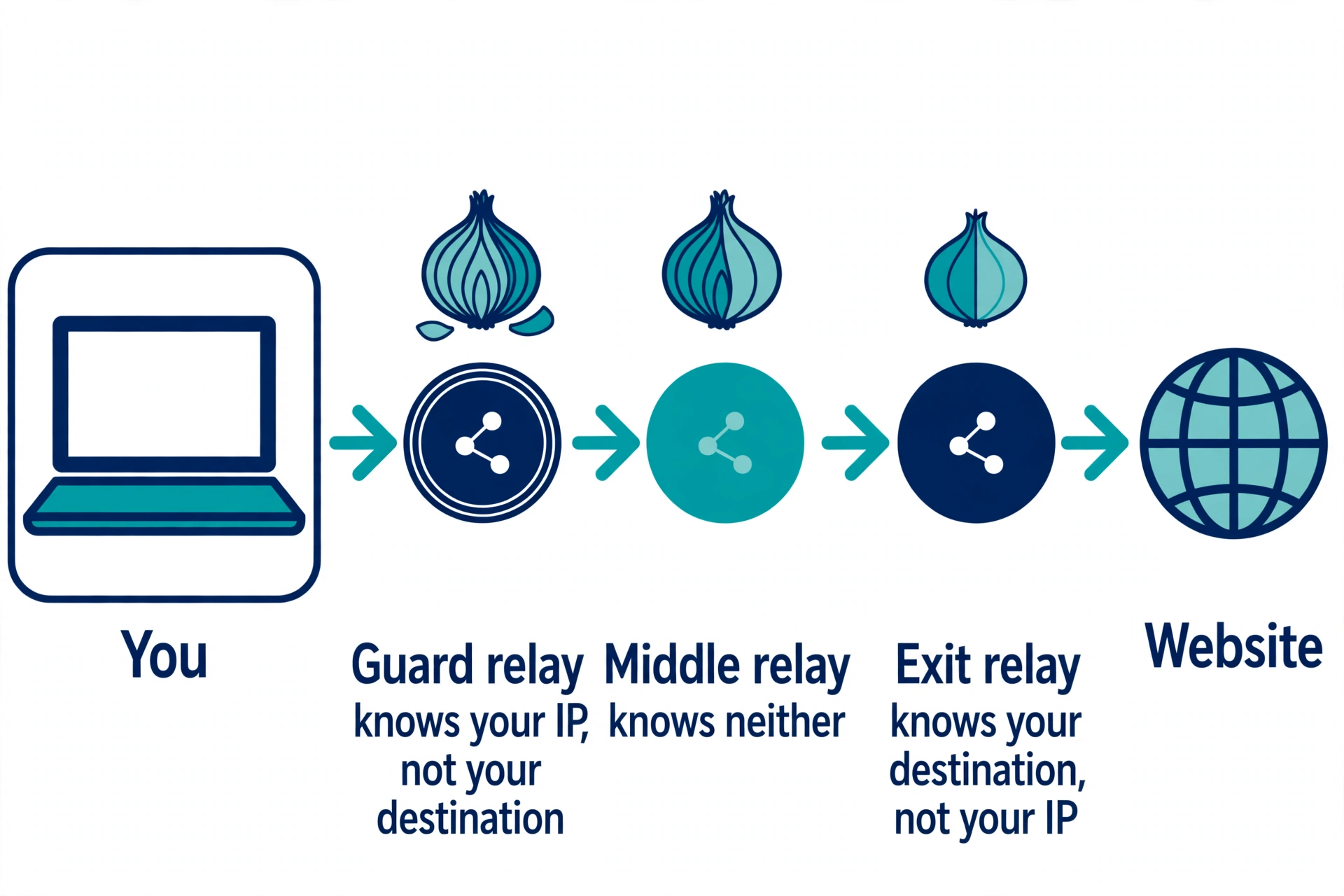
Tor Browser is a modified Firefox that makes its users look alike, with HTTPS-Only mode on by default: Tor’s encryption ends at the exit relay, so anything sent to a site without HTTPS can be read by whoever runs that relay.
Tor also opens onion sites: .onion addresses of 56 random letters and numbers. Traffic to one never leaves Tor, so there is no exit relay, and the connection is encrypted end to end. In early November 2026 the network counted about 9,500 relays and 2,500 bridges (Tor Metrics).
The VPN Side in Brief
A VPN builds one encrypted tunnel between your device and a VPN company server. Your provider sees only that encrypted connection, and websites see the server’s IP address instead of yours. Unlike Tor Browser, a VPN app usually protects the whole device. The trade is trust: the VPN company can see both your real IP address and the sites you visit, so its audited no-logs policy matters a great deal. Our guide to how a VPN works walks through the tunnel step by step.
VPN vs Tor at a Glance
| VPN | Tor Browser | |
|---|---|---|
| Main goal | Privacy from your provider and local network | Anonymity: no one links your browsing to you |
| Routing | One server run by one company | Three volunteer-run relays |
| Who sees your IP and your sites | The VPN company sees both | No single relay sees both |
| What your provider sees | An encrypted connection to a VPN server | That you use Tor, unless you use a bridge |
| What it covers | Usually the whole device | Only Tor Browser by default |
| Speed | Fast on a nearby server | Slow: about 4 to 10 Mbit/s (Tor Project measurements) |
| Onion sites | No, except Onion over VPN servers | Yes, directly |
| Streaming and downloads | Mostly works | Too slow for video; torrenting over Tor is unsafe |
In the Tor Project’s October 2026 measurements, a 5 MB download over Tor took a median of 4 to 11 seconds, and onion sites took 11 to 23 seconds. Netflix asks for 3 Mbit/s for HD and 15 Mbit/s for 4K.
What Is Onion Over VPN?
Onion over VPN, also called Tor over VPN, is a setup where your traffic goes to a VPN server first and then into the Tor network.
The onion over VPN meaning is easiest to see by following one request. Your device encrypts the traffic and sends it to the VPN server, which changes your IP address and hands it to Tor. It passes through three relays before reaching the site. Your provider sees only an encrypted connection to the VPN company, never that you use Tor, and the site sees a Tor exit relay.
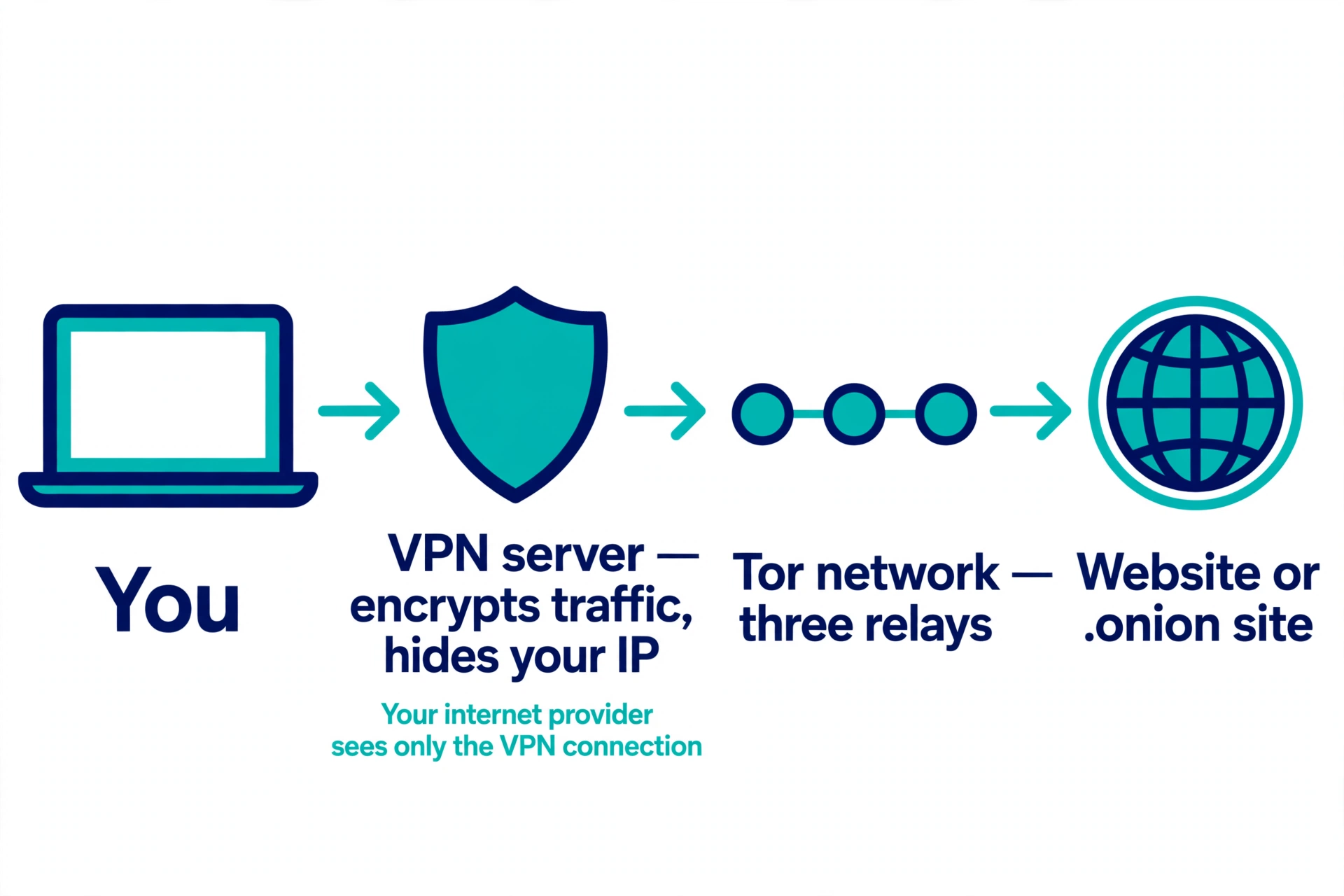
Its advantage over plain Tor Browser is clear: it hides Tor use from your provider, and it lets an ordinary browser open .onion sites, because the Tor part runs on the VPN server. NordVPN sells this as Onion Over VPN, and Proton VPN offers the same idea on its paid plans under the name Tor over VPN.
The cost is real: the VPN company now knows your real IP address and that you use Tor, and your everyday browser brings its cookies and fingerprint, so a site can still recognise you. The Tor Project strongly recommends against using Tor in any browser other than Tor Browser, because other browsers lack its privacy protections.
Tor Over VPN vs VPN Over Tor
The order matters: the two setups have opposite trade-offs.
Tor Over VPN: VPN First, Then Tor
This is the common setup, and it is what onion over VPN means. Connect to the VPN, then open Tor Browser. Your provider sees a VPN connection instead of Tor, and the first Tor relay sees the VPN server’s address instead of yours.
A Tor bridge does the first job without adding a company in the middle: an unlisted entry relay that hides Tor traffic, free and built into Tor Browser. Use Tor over VPN only when your network blocks Tor and every bridge but lets a VPN through, or when your VPN is on all the time anyway; our guide to whether you need a VPN covers the wider question.
VPN Over Tor: Tor First, Then VPN
Here traffic goes through Tor first, then to a VPN server, so sites see the VPN server’s address instead of a Tor exit. That can beat Tor-exit blocks, but the VPN sees every site you open, and the account you paid for ties that traffic to you. Few providers support it; most people should skip it.
The Tor Project’s advice covers both orders: “Generally speaking, we don’t recommend using a VPN with Tor unless you’re an advanced user who knows how to configure both in a way that doesn’t compromise your privacy.”
How to Use Onion Over VPN
NordVPN Onion Over VPN. Switch the protocol to OpenVPN (TCP or UDP): these servers do not appear with NordLynx. Open All locations (Specialty servers on Linux and Android TV). Pick Onion Over VPN and connect, then open your browser and enter the .onion address. In November 2026, NordVPN’s list showed five such servers: two in Amsterdam, two in Stockholm and one in Zurich.
Proton VPN Tor over VPN. Proton’s Tor servers carry an onion icon and TOR in the name, such as FR#13-TOR. Connect to one and open your browser. It is a paid-plan feature, Tor carries TCP traffic only, and on Mac, iPhone or iPad the kill switch must be on first or onion sites will not open.

Onion Over VPN vs Tor Browser
Tor Browser is the safer choice whenever it matters who you are. Onion over VPN is a convenience for opening an onion link someone sent you where you would rather not install Tor Browser, and you do not mind that the site could recognise your browser. It costs a VPN plan; Tor Browser is free.

Which Should You Use: Tor vs VPN?
It depends on the job.
Use a VPN for everyday privacy at full speed: public Wi-Fi, a nosy provider, streaming from another country, or large downloads.
Use Tor Browser when nobody should be able to link what you read to you: research on a sensitive topic, contacting a source, or an account nobody should trace back to you. Do not log in to anything with your name on it: signing in to Google over Tor or a VPN tells Google exactly who just arrived.
Use onion over VPN when you need to open an onion site quickly in an ordinary browser, or your network blocks Tor but allows a VPN. For anything that has to stay anonymous, use Tor Browser instead, with a bridge if Tor is watched or blocked where you are.
What is the best VPN for onion sites? There is no single answer: no provider can be named best without a proper comparison. Look for built-in Tor servers, an independently audited no-logs policy, and a kill switch on every app. NordVPN and Proton VPN both offer built-in Tor servers; they differ in plans, audits and apps, not in the Tor route.

The Downsides and Risks
Speed. Tor is slow by design. Three relays, often in different countries, add delay that a single VPN hop does not, and onion over VPN is slower still, because it adds the VPN hop on top of Tor.
Exit relays. The exit relay can read anything you send to a site without HTTPS, and an ordinary browser over Onion over VPN has no HTTPS-Only mode built in.
Attention and legality. In some places, using Tor itself draws attention. A bridge or a VPN hides Tor use from your provider, but not from the VPN company. Tor and VPNs are legal in most countries, including the United States and the United Kingdom; a few restrict or ban them, and anything illegal stays illegal over either one. Where both are blocked, obfuscated VPN servers and bridges such as WebTunnel or Snowflake are the tools to try, with no guarantee.
Watch: VPN vs Proxy vs Tor
1. “VPN vs Proxy vs Tor: What Each One Actually Hides” – Tech Made Simple
Follows one request from a phone in a cafe to a website, checking at every stop who can still see you, then covers Tor’s relays. The final chapter starts at 15:59. Checked live on 23 Nov 2026.
2. “How Does a VPN Work? (And Who Can Still See You)” – Clear Workings
The VPN tunnel and who can see what with a VPN on, plus VPN vs proxy vs Tor vs encrypted DNS. No sponsor, no affiliate links, no VPN recommendations. About 10 minutes. Checked live on 23 Nov 2026.
Frequently Asked Questions
Is Tor better than a VPN?
For anonymity, yes: no single company or relay sees both who you are and what you open, and you need no account. For privacy, speed, streaming and torrents, a VPN is better, and most people need the VPN more often.
What is onion over VPN?
Onion over VPN means your traffic goes to a VPN server first and then through the Tor network, so any browser can open .onion sites while you are connected. It is less private than Tor Browser, because your everyday browser brings its cookies and fingerprint along.
Is Tor a VPN?
No. A VPN routes everything on your device through one company’s server, while Tor Browser routes only its own traffic through three volunteer relays.
Is Tor slower than a VPN?
Yes, much slower. In the Tor Project’s October 2026 measurements, Tor managed roughly 4 to 10 Mbit/s, short of the 15 Mbit/s Netflix asks for 4K. A nearby VPN server usually costs little speed.
Related Reading
- VPN vs antivirus: do you need both, or does one cover the other?
- VPN vs Private Relay and Incognito: what Apple’s Private Relay and your browser’s private mode actually hide.
The Bottom Line
A VPN and Tor do different jobs. A VPN hides your browsing from your provider at close to full speed, and asks you to trust one company. Tor hides who you are from everyone, including the people running it, and asks you to accept slow speeds and a browser-only view of the internet. Onion over VPN sits between them: a VPN hop in front of Tor that hides Tor use from your provider and opens onion sites in any browser, at the cost of the VPN company knowing you use Tor. For everyday privacy, use a VPN. When it matters that no one can link your browsing to you, use Tor Browser. If you want the full background, our guide to what a VPN is explains the idea from the start.
Sources
- The Tor Project, “History” – https://www.torproject.org/about/history/
- The Tor Project, “A short introduction to Tor” – https://spec.torproject.org/intro/index.html
- The Tor Project, “Tor Browser with VPN” – https://support.torproject.org/tor-browser/general/vpn-with-tor/
- The Tor Project, “Onion services” – https://tb-manual.torproject.org/onion-services/
- Electronic Frontier Foundation, “How HTTPS and Tor Work Together” – https://www.eff.org/pages/tor-and-https
- Electronic Frontier Foundation, “Choosing the VPN That’s Right for You” – https://ssd.eff.org/module/choosing-vpn-thats-right-you
- PrivacyAffairs, “Onion Over VPN: What It Is, How to Use It and the Risks” – https://www.privacyaffairs.com/onion-over-vpn/
- PrivacyAffairs, “Tor vs VPN: The Real Differences and Which One to Use” (updated 5 Nov 2026) – https://www.privacyaffairs.com/vpn-vs-tor/
- NordVPN Support, “Onion Over VPN with NordVPN” – https://support.nordvpn.com/hc/en-us/articles/19559254946833-Onion-Over-VPN-with-NordVPN
- Proton VPN Support, “How to access the Tor network using Proton VPN” – https://protonvpn.com/support/tor-vpn
Checked 23 Nov 2026. Every factual claim on this page was verified against a named source above.