


A proxy is a stand-in that acts on your behalf. In computing, a proxy server is a computer that receives your internet requests, forwards them to the website you want, and passes the answer back to you, so the website sees the proxy’s address instead of yours.
The word is older than the internet. It comes from the idea of one person acting for another, and the computer version works the same way: something else makes the request for you.
Proxy Definition: What Does Proxy Mean?
Merriam-Webster defines a proxy as a person authorized to act for another, and the authority to do so. The same entry notes the computing sense: a proxy server is a computer system that facilitates the exchange of data between users on a network. The word comes from Middle English procuracie, meaning procuration, the act of getting something done for someone else.
In networking, the definition is narrower. The U.S. National Institute of Standards and Technology (NIST) glossary describes a proxy as software that receives a request from a client, then sends a request on the client’s behalf to the desired destination. Another NIST entry puts it more sharply: a proxy is an application that “breaks” the connection between client and server, accepting traffic, processing it, and forwarding it.
Put together, the computing meaning is simple: a proxy is a go-between. Your device talks to the proxy, the proxy talks to the website, and the website never talks to your device directly.
What “By Proxy” Means
The phrase “by proxy” means doing something through another person or thing instead of doing it yourself. Voting by proxy is the classic example: you authorize someone else to cast your vote. A proxy in this sense can be a person, a document that gives them authority, or, in computing, a server.
That is also where the plural comes from. One stand-in is a proxy; several are proxies. The spellings “proxys”, “proxi” and “proxie” appear in searches, but the standard plural is proxies.
What Is a Proxy Server?
A proxy server is the computer that does the stand-in work. When you browse through one, your request goes to the proxy first. The proxy opens its own connection to the website, sends the request from its own IP address, receives the response, and hands it back to you.
For the full explanation, including the four-step request flow, setup details and how to check that a proxy is working, see what a proxy server is.
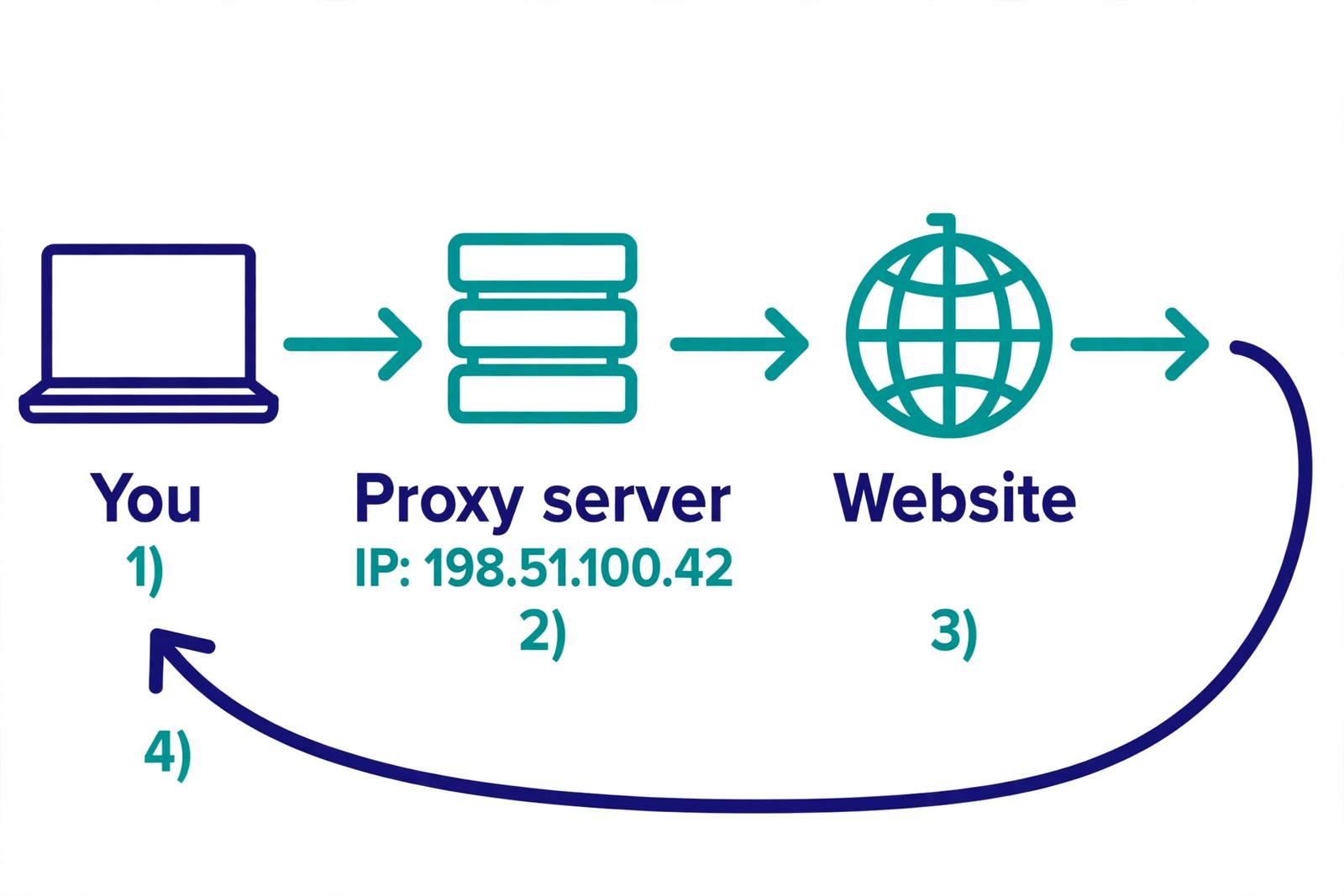
How a Proxy Request Travels
Your device sends its request to the proxy, the proxy opens its own connection to the website, the website answers the proxy, and the proxy passes the answer back to you. For secure HTTPS pages, the proxy opens a tunnel and the encrypted connection runs end to end. For the full explanation, see What Is a Proxy Server? and how a proxy works.
Forward Proxy vs Reverse Proxy
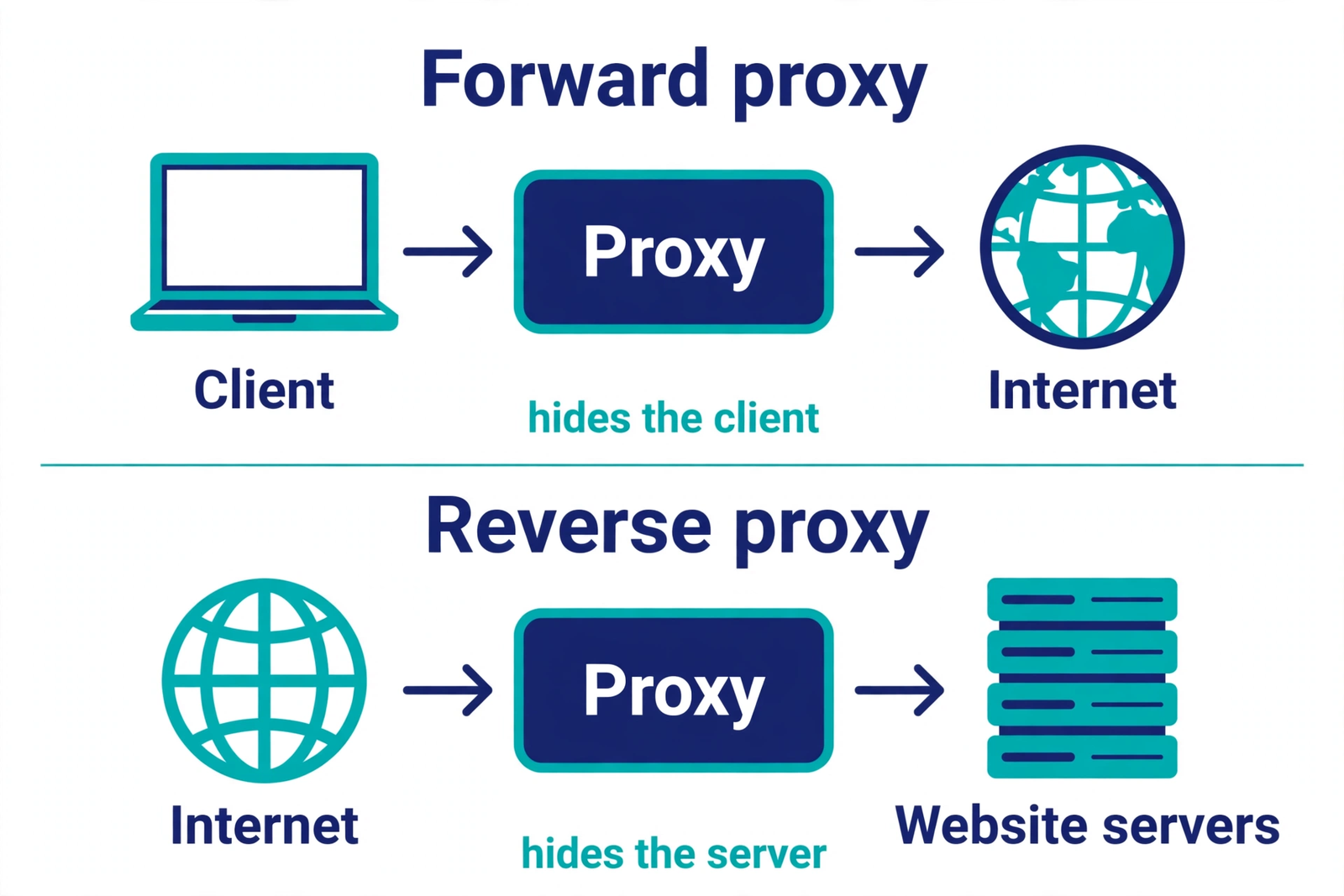
A forward proxy works for you, the client, hiding your IP address from websites; a reverse proxy works for the website, hiding its servers from visitors. For the full explanation, see What Is a Proxy Server?.
What a Proxy Changes, and What It Does Not Change
A proxy changes three things about your connection:
- The IP address websites see. They see the proxy’s address, not yours.
- The route your traffic takes. The proxy can filter, cache or log requests along the way.
- Which requests are allowed. A proxy can block sites, ports or file types before they load.
It does not change these:
- Encryption. A proxy adds no encryption of its own. HTTPS between you and the website is what protects page content.
- What you tell a website. Logins, cookies and anything you type still reach the site inside the connection.
- Your identity once you sign in. An account identifies you no matter which IP address the request came from.
A proxy also works at the level of individual apps and connections. You point one browser, one tool or one script at it, and only that traffic goes through the proxy. Everything else on the device keeps using your normal connection unless you set the proxy system-wide. That is the sharpest difference from a VPN, which routes all of a device’s traffic through one tunnel.
Types of Proxies at a Glance
Proxies can be sorted by where they sit, what they reveal, which protocol they speak, and where their IP addresses come from. The table below is a summary only.
| Type | In one line |
|---|---|
| Forward proxy | Works for clients, fetching the internet on their behalf |
| Reverse proxy | Works for servers, taking in visitors’ requests |
| Transparent proxy | Passes your real IP along, often without any setup on your device |
| Anonymous proxy | Hides your IP but reveals that a proxy is in use |
| Elite (high-anonymity) proxy | Hides both your IP and the fact that a proxy is in use |
| HTTP / HTTPS proxy | Handles web traffic, tunnelling HTTPS with CONNECT |
| SOCKS5 proxy | Relays raw connections for any app that supports it, not only browsers |
| Residential proxy | Uses IP addresses from home internet connections |
| Datacenter proxy | Uses IP addresses from hosting centres, fast and cheap, easier to recognise |
| Mobile proxy | Uses IP addresses from 4G and 5G carrier networks |
| Rotating proxy | Gives you a new IP for each request or session |
| Shared proxy | One IP used by several customers at once |
| Private (dedicated) proxy | One IP assigned to a single customer |
For the detail on each kind, how they are priced and which job each one fits, see types of proxies explained.

What Are Proxies Used For?
Proxies are used wherever someone needs a controlled middle step between a device and the internet:
- Privacy. Hiding your real IP address from the sites you visit.
- Access control. Schools and offices use proxies to block categories of sites and enforce browsing rules.
- Content filtering. Blocking malicious or unwanted sites before they load.
- Caching. Serving repeat requests from a local copy, which saves bandwidth and speeds up page loads on busy networks.
- Monitoring and logging. Giving a network administrator a record of who accessed what and when.
- Location checks. Seeing a website the way visitors in another country see it.
- Data collection. Businesses rent proxy networks to collect public web data, monitor prices, verify ads and check search results by city.
- Protecting websites. Reverse proxies spread load across servers, cache pages near visitors and absorb attack traffic before it reaches the application.
Proxy vs VPN
A proxy and a VPN both change the IP address websites see, but they work at different levels.
| Proxy | VPN | |
|---|---|---|
| Covers | One app, browser or script you point at it | All traffic from the device |
| Encryption | None of its own; HTTPS still protects content | Encrypted tunnel to the VPN server |
| IP the site sees | The proxy’s | The VPN server’s |
| Filtering and logging | Can filter, inspect and log requests | Does not filter content by itself |
| Typical use | One app’s traffic, office filtering, data collection | Privacy on untrusted networks, remote access |
A proxy suits changing the route for one job. A VPN suits protecting everything on a device at once. For the full comparison, including Tor and when to use each tool, see proxy vs VPN.
If you want the VPN side of the comparison from the start, our guide to what a VPN is explains the tunnel idea from the beginning.
Proxy on Wi-Fi and on Your Phone
A proxy in Wi-Fi settings is a proxy for that network only. When you enter a proxy address and port in a Wi-Fi network’s settings, traffic from your device on that network goes through the proxy. Other networks are unaffected, and turning the proxy off returns you to a direct connection.
On a phone, the same idea applies. A proxy set in Wi-Fi settings covers that network, while a proxy inside a single app covers only that app. A VPN app, by contrast, usually covers the whole phone. If a proxy is switched on and you do not know why, switch it off and check that your connection still works.

Are Proxies Safe? The Risks of Free and Open Proxies
A proxy is a middleman, and a middleman can see what passes through it. That is the central risk. Whoever runs the proxy can see your unencrypted requests, and on plain HTTP pages they can read and change the content. On HTTPS pages they see the website’s name and how much data moves, but not the content, unless your device trusts a certificate that lets the proxy decrypt traffic.
Free and open proxies carry the worst version of this risk, because you do not know who runs them. Researchers who monitored open HTTP proxies for two months, in a study presented at the NDSS security symposium in 2018, found that 38% of the proxies they could measure modified the content they relayed, and 5.15% did so in malicious or unwanted ways. Among the malicious ones, 47% injected ads, 39% injected code that collects user information for tracking, and 12% tried to redirect users to pages containing malware.
The study is from 2018 and looked at plain HTTP proxies, so its percentages do not describe today’s risk. They do show what an unaccountable middleman is able to do, which is why the rule is simple: never log in to accounts that matter through a proxy you cannot vouch for, and use HTTPS sites only.
Free web proxy sites, where you paste a URL into a web page and it fetches the page for you, carry the same warning in a smaller package.

Proxy IP Addresses and Ports
Every proxy is reached through an address and a port. The address is a name or an IP address, the port is a number, and private proxies also need a username and password. A proxy address tells your device where to send requests; the port tells it which service on that computer to talk to.
That is the whole idea in one line, and the detail belongs elsewhere. Our guide to proxy IP addresses and ports explained covers how to find the proxy your device uses, what the common ports mean, and how authentication works. For the full explanation, see What Is a Proxy Server?.
Proxy Outside Computing: Other Meanings
Most searches for “proxy” are about computers, but the word has older meanings that still show up in search results, and several of them are mapped to this page:
- A proxy person. Someone authorized to act or vote for you, such as a proxy voter at a shareholder meeting.
- A health proxy. A person you name to make medical decisions for you if you cannot make them yourself.
- A proxy fight or proxy contest. A battle for control of a company, fought by persuading shareholders to vote by proxy rather than in person.
- Marriage by proxy. A wedding where one or both partners are represented by a stand-in, used historically when travel made attendance impossible.
- Proxy in finance. A proxy statement is the document a company sends shareholders before a vote, and a proxy vote is a vote cast through that document.
In every case the idea is the same: a stand-in acting for someone who is not there.
How to Choose a Proxy
If you need a proxy, start from the job, not the price list:
- Protocol. Does your tool need HTTP, HTTPS or SOCKS5?
- IP type. Datacenter addresses are fast and cheap; residential, ISP and mobile addresses look like ordinary visitors and cost more.
- Locations. Country only, or region, city and carrier as well?
- Sessions. Do you need a new IP for every request, or one IP held steady while you stay logged in?
- Authentication. Username and password, an IP allow list, or both?
- Pricing model. Per gigabyte, per IP or per month, and does unused allowance expire?
- Limits and support. Which ports and site categories are allowed, and can you reach a person when something breaks?

Watch: What Is a Proxy?
1. “What is a web proxy? (explained with examples)” – Security In Mind
A short plain-English explainer on what a web proxy is, how it works, and why people use one. The channel is not affiliated with any proxy provider, and the video carries no affiliate links in its description.
2. “Proxy Servers – CompTIA Network+ N10-006 – 1.3” – Professor Messer
A training video on forward proxies, reverse proxies and open proxies. The N10-006 exam series has since been retired, but the proxy concepts in the video still apply. The channel is not affiliated with any proxy provider, and the video carries no affiliate links in its description.
Frequently Asked Questions
What does a proxy do?
A proxy receives your internet requests, forwards them to the website from its own IP address, and passes the answer back to you. Along the way it can filter, cache or log the traffic.
Does a proxy hide my IP address completely?
Websites see the proxy’s IP address instead of yours, as long as the proxy does not forward your address in a header. The proxy operator still knows your IP, and logins, cookies and browser fingerprints can still identify you.
Is a proxy the same as a VPN?
No. Both change the IP address websites see, but a VPN encrypts and routes all of a device’s traffic, while a proxy handles only the apps you point at it and adds no encryption of its own.
Is using a proxy legal?
Using a proxy is legal in most countries. Companies and schools run them every day. What you do through a proxy is still covered by the law and by each website’s terms.
Should a proxy be on or off?
Off, unless your network administrator, school, employer or proxy provider gave you details to enter. If a proxy is on and you do not know why, turn it off and check that your connection still works.
What is a proxy in Wi-Fi settings?
It is a proxy address and port entered for one Wi-Fi network. Traffic on that network goes through the proxy; other networks are unaffected.
Are free proxies safe?
Not reliably. A 2018 study of open HTTP proxies found 38% modified the content they relayed and 5.15% did so in malicious or unwanted ways, mostly injecting ads or tracking code. A paid proxy from a provider you can hold accountable is the safer way to use one.
The Bottom Line
A proxy is a stand-in. It makes requests on your behalf, shows websites its own address instead of yours, and gives whoever runs it a place to filter, cache or log traffic. It does not encrypt your connection and it does not make you anonymous. Used knowingly, through a provider you trust, it is a useful tool. Used blindly, through a free proxy run by a stranger, it hands your traffic to someone you have never met.
Sources
14
- U.S. National Institute of Standards and Technology (NIST), CSRC Glossary – proxy – https://csrc.nist.gov/glossary/term/proxy
- Mozilla Developer Network (MDN), “Proxy servers and tunneling” – https://developer.mozilla.org/en-US/docs/Web/HTTP/Guides/Proxy_servers_and_tunneling
- Mozilla Developer Network (MDN), “CONNECT request method” – https://developer.mozilla.org/en-US/docs/Web/HTTP/Reference/Methods/CONNECT
- Internet Engineering Task Force (IETF), RFC 9110: HTTP Semantics – https://www.rfc-editor.org/rfc/rfc9110
- Merriam-Webster, “proxy” – https://www.merriam-webster.com/dictionary/proxy
- Cambridge Learner’s Dictionary, “proxy” – https://dictionary.cambridge.org/dictionary/learner-english/proxy
- Encyclopaedia Britannica, “proxy (law)” – https://www.britannica.com/topic/proxy-law
- Tsirantonakis, Ilia, Ioannidis, Athanasopoulos and Polychronakis, “A Large-scale Analysis of Content Modification by Open HTTP Proxies”, NDSS Symposium 2018 – http://www3.cs.stonybrook.edu/~mikepo/papers/proxyscan.ndss18.pdf
- Cloudflare Learning, “What is a reverse proxy?” – https://www.cloudflare.com/en-gb/learning/cdn/glossary/reverse-proxy/
- Fortinet, “What is a proxy server? Definition, benefits & use cases” – https://www.fortinet.com/uk/resources/cyberglossary/proxy-server
- Xcitium, “What Is a Proxy? Types, Uses & Cybersecurity Benefits” – https://www.xcitium.com/blog/network/what-is-a-proxy/
- Browserless, “What Is a Proxy? Meaning, Types, and How It Works” – https://www.browserless.io/blog/what-is-a-proxy
- ProxyEmpire, “What Is a Proxy Server? How It Works, Types and Uses” – https://proxyempire.io/what-is-a-proxy-server/
- freeCodeCamp, “What Is a Proxy Server? In English, Please.” – https://www.freecodecamp.org/news/what-is-a-proxy-server-in-english-please
Checked 23 Nov 2026. Every factual claim on this page was verified against a named source above.