
By Tech Success Communications Editorial Team | Checked 23 Nov 2026

A VPN works by encrypting everything your device sends online and routing it through a server run by the VPN company. Websites see the server’s IP address instead of yours, and your provider sees only encrypted traffic it cannot read. Our guide to what a VPN is explains the idea from the start.
How a VPN Works in Three Steps
Here is how a VPN connection works, in three steps.
Step 1: Your Device and the Server Agree
When you tap Connect, the app proves to the VPN server that your account is valid, and the two sides agree on temporary encryption keys for the session.
Step 2: Your Traffic Is Encrypted and Wrapped
With the keys agreed, your device scrambles every packet before it leaves. Apps built on OpenVPN typically use AES-256, the standard the US National Institute of Standards and Technology published as FIPS 197. Apps built on WireGuard, the protocol most apps now offer by default, use ChaCha20-Poly1305. Our guide to VPN encryption explains the two in detail.
Encryption alone is not the whole story. Each scrambled packet is placed inside another packet, like a letter sealed in a second envelope. The outer packet carries the VPN server’s address, while the inner packet stays hidden. This wrapping is called encapsulation, and the wrapped connection is the VPN tunnel. Our guide to VPN tunnels explains the mechanics in detail.
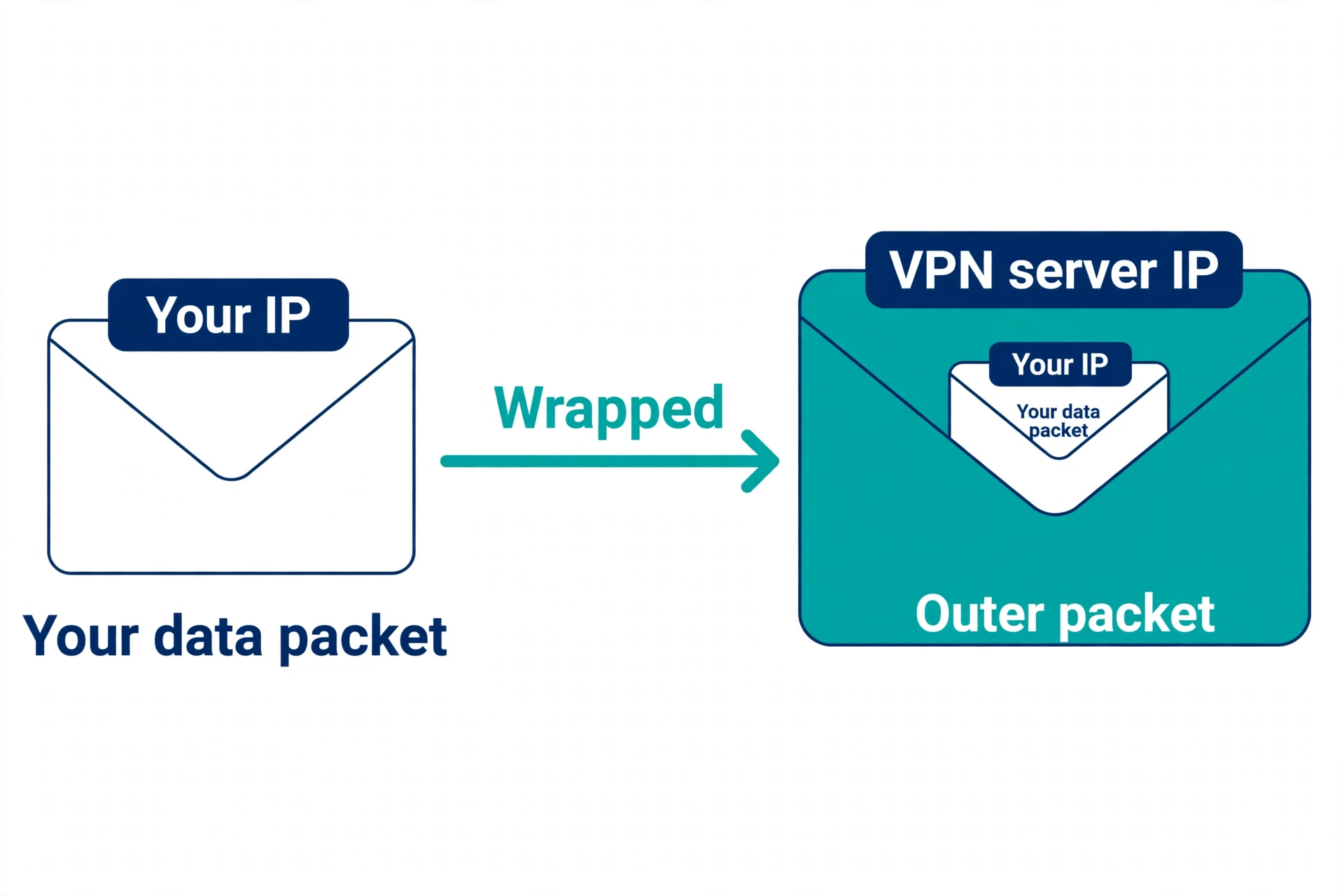
The protocol is the set of rules that builds the tunnel, and most apps choose one automatically. WireGuard is fast and modern; OpenVPN is older and widely audited; IKEv2 reconnects quickly when your phone switches networks. Our VPN protocols compared guide covers the trade-offs. OpenVPN 2.7.0, released 11 February 2026, was the first built for the in-tree Linux kernel module that shipped in Linux 6.16 in July 2025.
Step 3: The Server Sends Your Traffic On
The wrapped packets travel to the VPN server, which unwraps and decrypts them, then sends each request on to the website using its own IP address. The website’s reply comes back to the server, which encrypts it again and sends it through the tunnel to your device. Your device decrypts it, and the page loads as normal.
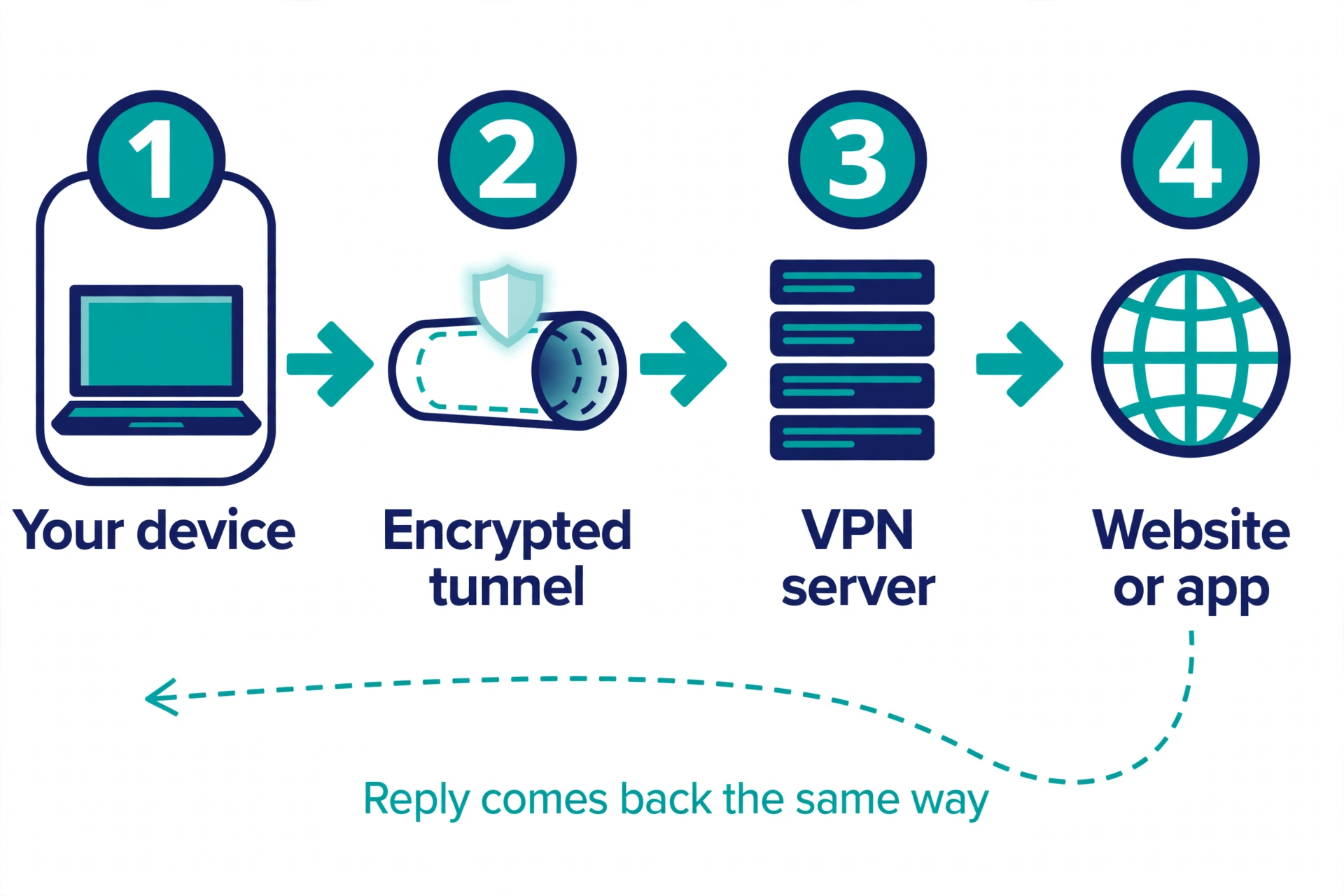
Connect, encrypt, forward, and back again: that is how VPNs work.
What the VPN Server Actually Does
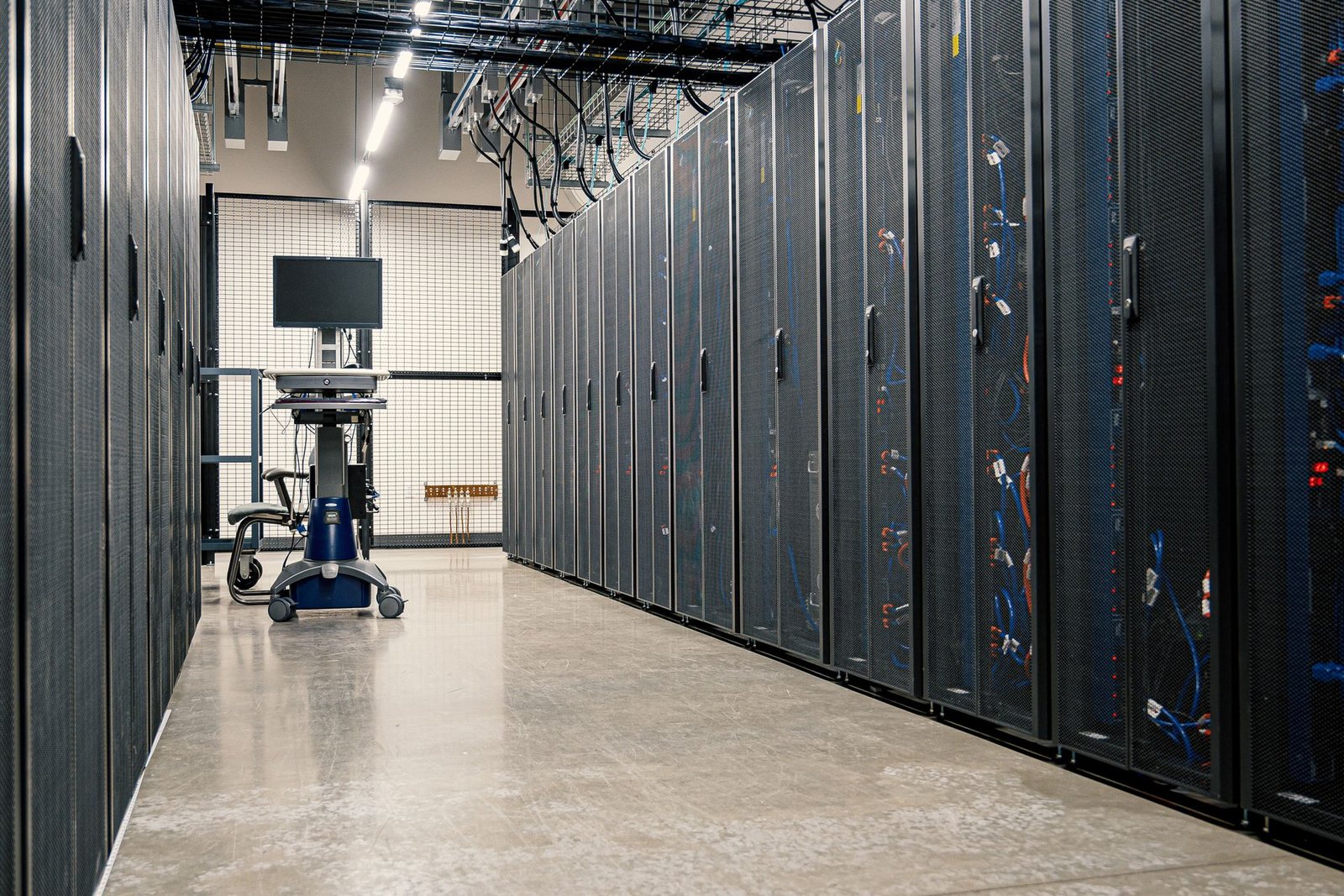
A VPN server is a computer in a data center that receives your encrypted traffic and decrypts it, then sends each request on to the website using its own IP address. Replies come back the same way. VPN companies run thousands of them, so you can choose the country websites see. That is how a VPN service works: your device talks to the server, and the server talks to the internet for you.
The server does more than forward traffic: it handles encryption, manages a session key for every user, and routes data securely, using load balancing to spread traffic and keep speeds stable. Some providers run RAM-only servers, with no hard drives, so a reboot wipes everything. Our guide to VPN servers and locations covers how they are run.
How a VPN Hides Your IP Address and Location
Your IP address is the return address on everything you send, and it reveals your rough location, often down to the city. When you connect, the VPN server replaces your address with its own, so sites, apps, and trackers record the server’s address instead of yours.
That is also how a VPN changes the country websites see: pick a server in another country, and services treat you as if you are there, because websites guess your location from the IP address they see. The same IP swap covers tracking links: a link logger sees the VPN server’s address, not yours.
DNS lookups get the same treatment. A lookup is the step where your device finds a website’s IP address from its name, and a good VPN resolves those lookups on its own servers, so your provider never receives a list of the domains you visit.
How Does a VPN Protect You?
A VPN protects the connection, not everything you do on it: your traffic is encrypted, and your IP address is replaced.
Your internet provider sits between you and every site you visit. In a 2021 staff report, the US Federal Trade Commission found that the six largest American ISPs collect and share far more data than most people expect, including browsing history and real-time location data. A VPN breaks that view: with one connected, your provider sees a single encrypted connection to a VPN server and nothing about the sites behind it.
On public Wi-Fi the same encryption matters. Cafe, hotel, and airport networks are shared with strangers, and on an open network anyone else on it can try to watch unencrypted traffic. A VPN makes that useless: an attacker who intercepts your connection sees only encrypted data.
Most VPN apps also include a kill switch, which cuts your internet if the tunnel drops. Our guide to VPN kill switches explains how it works.

How a VPN Works on Your Phone and on Mobile Data
A VPN on your phone works the same way as on a computer: it creates an encrypted tunnel to a VPN server, then routes all traffic through it. The app creates a virtual network adapter and routes every app’s traffic through the tunnel, not just the browser’s. That is how VPN apps work: they sit between your apps and the network, and every packet passes through them.
The difference is movement. Phones switch between networks all day, from home Wi-Fi to mobile data, and the VPN has to hold the connection through each switch. IKEv2 is built for exactly that, because it reconnects quickly after a network change.
A VPN needs no Wi-Fi: any internet access works, and the tunnel applies the same encryption and IP masking on each. A VPN uses a little more mobile data and battery, because it encrypts every packet and keeps a connection alive. VPNs typically increase data use by 5 to 15 percent, according to Security.org’s testing, updated in September 2026. WireGuard, the protocol most apps now offer, adds around 2 to 4 percent, and battery use typically rises by 10 to 20 percent. Obfuscated servers disguise VPN traffic as regular browsing and use 15 to 25 percent more data than a standard connection, so use them only where VPNs are blocked.
How a VPN Works at Home and at Work
At home, a VPN works exactly as described above, on each device or on the router. On a router, it covers every device connected to that router, including gadgets that cannot run a VPN app themselves, such as smart TVs. On one device, it covers only that device. That is how a VPN works at home: the same tunnel, on one device or on the router.
At work, the setup is usually the employer’s VPN, not a personal one. A remote access VPN lets staff open internal company systems from home or on the road; the destination is the company network, and the open internet stays outside it. Connect before you open any work accounts, use the server your employer recommends, and keep the kill switch on. A site-to-site VPN is the other business type: a permanent encrypted link between two office networks, set up on routers instead of laptops.
There is no single best VPN for working from home. For work, use the VPN your employer provides. For personal browsing, any reputable provider works; judge it on speed, server countries, and an independently audited no-logs policy.

How Do I Know If My VPN Is Working?
The simplest check is your IP address: look it up before you connect, then again after. If the address changes to match the VPN server’s country, the VPN is active. You can also run DNS and WebRTC leak tests, which confirm that no data is slipping outside the encrypted tunnel.
Kill switches do work, and they are the backup for this check: if the tunnel drops, the kill switch cuts your internet, so a leak test after a drop shows no connection rather than your real IP address. If you are not sure whether you have a VPN at all, look for a VPN app on your device or a VPN entry in system settings. Our guide to how to check if your VPN is working walks through the full checks.
Why Does My VPN Not Work?
When a VPN will not connect, the cause is usually one of four things. If no VPN will connect on a network, the network itself may be blocking VPN traffic.
The server is the problem. Try another server in the same country, or a nearer one.
The network blocks VPNs. Some hotel and office networks block VPN traffic; switching to an obfuscated protocol, which makes VPN traffic look like regular browsing, often gets through.
The free plan ran out. Free VPNs that work do exist, from reputable providers, but they limit bandwidth, offer fewer servers, or both. An unknown free VPN that stops working may simply have hit its limit. Stick to providers with a real reputation if you want a VPN that actually works. Our guide to the best free VPN explains what to expect from free plans.
The service blocks VPNs. Streaming services can spot VPN traffic and refuse to play. Try another server, or switch the VPN off for that stream.
Tor does not work like a VPN: it takes a different approach to hiding your IP address. Our guide to VPN vs Tor compares them in full.
Related reading: What does a VPN do? Our guide explains what a VPN is for, and what it cannot do.
Frequently Asked Questions
Does a VPN work on cellular data?
Yes. A VPN works over mobile data the same way it works over Wi-Fi: it encrypts your traffic and routes it through the VPN server, using a little more data, typically 5 to 15 percent extra, and a little more battery.
How do I turn my VPN off?
Open the VPN app and tap Disconnect, or turn the VPN off in your device’s system settings. If it keeps turning itself back on, the app’s auto-connect setting or your phone’s always-on VPN option is switched on; turn those off in the same places.
Will my VPN work with T-Mobile Home Internet?
Yes. T-Mobile’s own support pages say you can connect to a VPN while using its internet service, and to ask the VPN developer or your IT department if a particular connection needs help. Install the VPN app on your device, or run a VPN router behind the gateway. T-Mobile’s gateways cannot enable bridge mode or port forwarding, so a VPN will not open inbound ports at home.
Do VPN kill switches work?
Yes. A kill switch blocks all internet traffic the moment the VPN tunnel drops, and restores it only when the tunnel is back. That is the feature that stops your real IP address leaking during a dropped connection.
How do I find my VPN on my device?
Look for the VPN provider’s app on your phone or computer, or open your system settings and search for VPN. On a phone, the VPN settings sit under the network section. If nothing is there, no VPN is installed.
Why does Channel 4 not work with my VPN?
Channel 4, like other streaming services, can refuse to play when it detects VPN traffic. Try another server in the same country, or switch the VPN off for that stream. A VPN changes the country a service sees, but it does not guarantee every service accepts the connection.
Watch: How Does a VPN Work?, in Plain English
How Does a VPN Work? (And Who Can Still See You) — Clear Workings
A ten-minute explainer covering the tunnel, the key handshake, DNS and HTTPS, and who can still see what. The channel states it has no sponsor, no affiliate links, and no VPN recommendations. Checked live on 23 Nov 2026.
Sources
- Gizmodo, “What Is a VPN and How Does It Work? A 2026 Guide” (Oct 2026) — https://gizmodo.com/best-vpn/what-is-vpn
- Cloudflare Learning, “What is a VPN?” — https://www.cloudflare.com/en-gb/learning/access-management/what-is-a-vpn/
- NordVPN, “How does a VPN work?” (updated Nov 2026) — https://nordvpn.com/blog/how-does-a-vpn-work/
- US National Institute of Standards and Technology, FIPS 197, “Advanced Encryption Standard (AES)” — https://www.nist.gov/publications/advanced-encryption-standard-aes
- WireGuard, “Protocol & Cryptography” — https://www.wireguard.com/protocol/
- OpenVPN, “Changes in OpenVPN 2.7” — https://community.openvpn.net/openvpn/wiki/ChangesInOpenvpn26
- Electronic Frontier Foundation, “Choosing the VPN That’s Right for You” — https://ssd.eff.org/module/choosing-vpn-thats-right-you
- US Federal Trade Commission, “A Look At What ISPs Know About You: Examining the Privacy Practices of Six Major Internet Service Providers” (Oct 2021) — https://www.ftc.gov/system/files/documents/reports/look-what-isps-know-about-you-examining-privacy-practices-six-major-internet-service-providers/p195402_isp_6b_staff_report.pdf
- Security.org, “Do VPNs Use Data? VPN Data Consumption & Cellular Usage” (updated Sep 2026) — https://www.security.org/vpn/does-vpn-use-data/
- T-Mobile, “Connect your Devices to T-Mobile Internet” — https://www.t-mobile.com/support/home-internet/connect
Every factual claim on this page was verified against a named source above.