By Tech Success Communications Editorial Team | Checked 23 Nov 2026

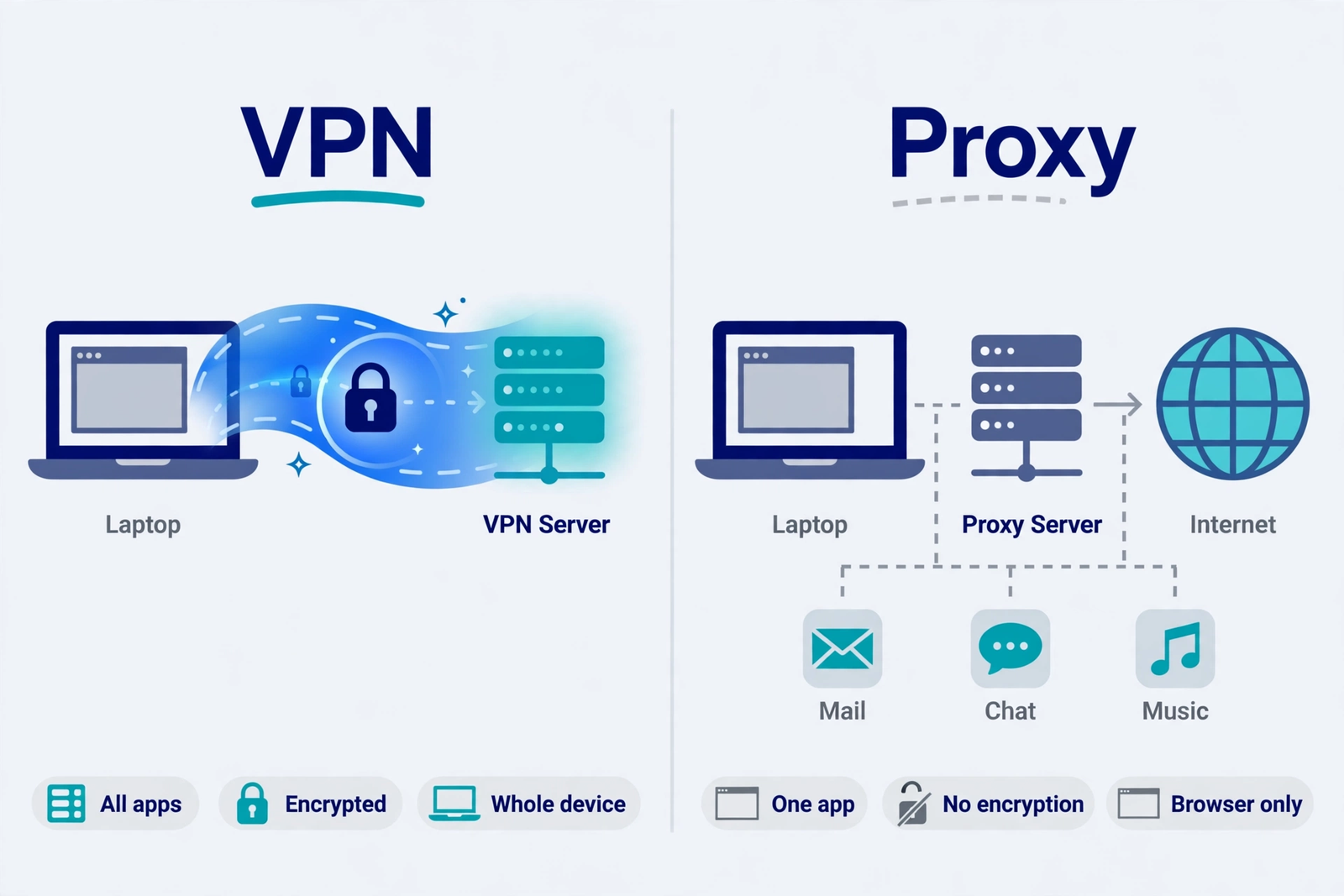
A VPN encrypts all the traffic on your device and routes it through a server run by the VPN company. A proxy forwards traffic from one app through a middleman server and changes the IP address websites see, without encrypting the connection itself. Both hide your real IP address. Only one of them protects the data travelling with it.
If you are new to VPNs, our guide to what a VPN is explains the basics. This page compares the two from the VPN side; our companion comparison, Proxy vs VPN, covers it from the proxy side.
VPN vs Proxy at a Glance
| VPN | Proxy | |
|---|---|---|
| What it is | An encrypted tunnel for the whole device | A middleman server for one app |
| Encrypts your traffic | Yes, everything to the VPN server | Usually no |
| Hides your IP address | Yes | Yes |
| Covers | All apps on the device | Only the app set to use it |
| Your provider sees | One encrypted connection | Connection to the proxy, plus everything outside it |
| Typical cost | Paid plans; free plans cap something | Often free; paid proxies charge per IP or per GB |
| Best for | Privacy and security on any network | A quick IP change for one browser task |
What a Proxy Does
The US National Institute of Standards and Technology defines a proxy server as a server that forwards its clients’ requests to other servers. Your browser sends a request to the proxy, the proxy passes it to the website, and the reply comes back the same way. The website sees the proxy’s IP address instead of yours.
That is the whole job: a proxy changes the address a website sees. It does not wrap your traffic in encryption, and it does not touch apps you never pointed at it. See what a proxy is and how a proxy works.
Proxies come in a few common forms:
- HTTP and HTTPS proxies. These handle browser traffic. HTTPS keeps the browser-to-site connection encrypted, but the proxy adds no encryption between your device and the proxy server.
- SOCKS5 proxies. SOCKS is a low-level protocol that passes along any kind of traffic without trying to understand it, including email and torrent traffic. SOCKS5, the current version, is defined in RFC 1928 from March 1996 and usually runs on TCP port 1080. It supports username and password authentication.
- Residential and data centre proxies. A residential proxy uses an address from a home internet connection, so it looks like an ordinary visitor. A data centre proxy uses a hosting company’s address, which is easier to spot.
- Transparent proxies. Schools, offices and public Wi-Fi portals run these to filter content and cache popular pages. They do not hide your IP address, and you may not know you are using one.
A forward proxy sits in front of you and hides your address from websites, while a reverse proxy sits in front of a website’s servers and hides them from you. Most of this page is about forward proxies.
Free web proxy sites are the simplest kind: open a page, paste in a video or website address, and the site fetches it for you. ProxySite is one well-known example: paste a YouTube video link, pick a server in the US or Europe, and watch without installing anything. The catch is the business model: free web proxies are usually ad-supported, and Proton warns that some inject advertising banners and malicious code into the pages they serve.
What a VPN Does
A VPN does the same forwarding job as a proxy, then adds encryption and scope. When you switch it on, an app builds an encrypted tunnel to a VPN server, and your operating system sends all internet traffic through it by default, including background apps. Websites see the VPN server’s IP address, and your provider sees only an encrypted connection to the VPN server. Our guide to how a VPN works walks through the steps.
Proton makes a useful point: a VPN server is a specific kind of encrypted forward proxy. VPNs use dedicated protocols such as OpenVPN and WireGuard, which encrypt the data itself rather than relying on each website’s HTTPS. A kill switch blocks your internet if the tunnel drops. See our comparison of VPN protocols and our guide to the kill switch.
VPNs are now mainstream. In Security.org’s August 2026 survey of 1,008 US adults, 42 percent said they used a VPN for personal or work purposes, up from 32 percent in 2025.
The Differences That Matter
The short version is encryption and scope.
Encryption
A VPN encrypts the connection between your device and the VPN server, which protects your traffic on networks you do not control. A standard proxy adds no encryption between your device and the proxy server. If the website uses HTTPS, the page content stays encrypted between your browser and the site, and the proxy only forwards it. Anything outside HTTPS travels readable. As the EFF puts it, a VPN hides your browsing data from your provider, and that data is then visible to the VPN provider instead. Trust moves; it does not disappear.
Scope
A proxy usually covers one application, most often a browser, while the rest of your device connects directly. A VPN covers the whole device: once it is on, email, messaging, games and background updates all travel through the tunnel. That is the practical difference on a phone, where dozens of apps talk to the internet at once.
Who Can See What
| Who | With a VPN | With a proxy |
|---|---|---|
| Your provider or Wi-Fi owner | That you use a VPN, and nothing about the sites behind it | That you use a proxy, plus everything your non-proxied apps do |
| The website | The VPN server’s IP address | The proxy server’s IP address |
| The provider or operator | Your traffic metadata | The sites your proxied apps visit |
| Trackers in the browser | Everything they saw before | Everything they saw before |
Neither tool clears cookies or changes your browser fingerprint. A VPN is not a tool for anonymity, in the EFF’s words, and a proxy is even less of one.
Speed
A proxy has less work to do per request, since it does not encrypt anything, so it can feel quicker for plain browsing. A VPN’s encryption adds overhead: Security.org puts the typical extra data at 5 to 15 percent, and WireGuard at 2 to 4 percent. Server distance, load and protocol matter more than encryption alone, and a free or crowded proxy is often the first to slow down or drop.
How Websites Spot Them
Websites do not need to read your traffic to flag it: they look at the IP address itself. In a check published in November 2026, Shifter found 90 percent of 530 servers from one major VPN provider were data centre hosting addresses, while none of its 99 residential proxy exits were. A shared data centre address is easy to spot, which is why streaming services show messages like Netflix’s “You seem to be using a VPN or proxy” (error code E106). Netflix blocks the address, not your account, and switching to another server in the same country is the usual first fix.
Shared addresses land on blocklists too: when an address is linked to abuse, spam or heavy automated use, sites block the whole range, and innocent users on it get caught. Wikipedia, for example, blocks editing from IP addresses that belong to VPN or proxy services. If you see “access via proxy/vpn/tor is not permitted”, the site has decided your connection type is not allowed. Turn the VPN or proxy off for that site, switch to a different server, or ask the site’s support to review a false positive. “VPN/proxy detected” means the same thing: the address was flagged, not your account.

When to Use a VPN, and When a Proxy Is Enough
Use a VPN when the traffic itself needs protection:
- On public Wi-Fi in cafes, hotels and airports, where strangers can watch unprotected traffic.
- For banking, work files or anything sensitive, where encryption matters more than speed.
- When you do not want your provider to see which sites you visit.

Use a proxy when the job is narrow and nothing sensitive is involved:
- To see a website as a visitor from another country: a proxy in the UK shows sites a British IP address.
- To check how ads or prices look in a different market.
- To test how a site responds from a different location or IP range.
- To run many sessions with different IP addresses at once.
For streaming, both tools can change the country a service sees, but neither is reliable at it: services keep lists of VPN and proxy addresses and block them. A VPN usually lasts longer because providers rotate through many addresses. A free web proxy is the quickest option for a single video, and the least reliable. Our guide to free online VPN and web proxy sites covers the free options.

Can You Use a VPN and a Proxy Together?
Yes, technically: you can point your browser at a proxy while a VPN runs underneath. Surfshark advises against it: traffic then passes through multiple servers, which slows the connection without adding meaningful security. The VPN already encrypts everything and hides your IP address, so a proxy on top mostly adds another operator who can see your traffic.
One combination does cause real errors: some workplace VPN apps refuse to connect when a local proxy is set. Cisco Secure Client shows “The VPN connection is not allowed via a local proxy” when Windows LAN settings point at one. The fix is to uncheck “Use a proxy server for your LAN” in Windows Internet Options, under Connections and LAN settings, before connecting again.
Free VPN and Proxy Apps With Confusing Names
Search for “vpn proxy” and the results are mostly apps, not explanations. The names blur the two tools together, so it is worth sorting out what they actually are.
VPN Proxy Master is a free Android VPN app by SecureGuard Group, not a proxy service. Google Play lists it at more than 100 million downloads with about 1.45 million reviews, and notes that it contains ads. Its listing claims a strict no-log policy and lists protocols including OpenVPN and IPsec. The name is marketing: it is a VPN client.
It is far from alone. App stores list a crowd of near-identical names: VPN – Proxy Master, with more than 10 million downloads, Fast and Secure VPN Proxy Master, and search variants such as Super Proxy VPN, Proxy Master VPN, VPN Master Proxy, MD Proxy VPN, Ostrich VPN Proxy Master and VPN Proxy Net. Treat each one as its own product: a name tells you nothing about the privacy policy, the logging, or who runs the servers. The same safety question comes up in other languages, asking whether VPN Proxy Master is safe.
Free tools deserve extra care. A 2026 study of 281 popular free Android VPN apps found 29 leaked traffic outside the tunnel and more than 80 percent contacted known advertising or tracking servers. Proton warns that public proxies can spy on everything you do while asking nothing in return. Surfshark is blunter about open proxies: they pose security risks including data theft and malware exposure. If a free service does not charge you, ask how it stays in business. Our roundup of the best free VPNs covers the safer free options, and our guide to free online VPN and web proxy sites covers the free proxy side.
VPN vs Other Tools
A proxy is only one of the tools people compare with a VPN. Each has its own page, so here is the short version.
VPN vs Tor
Tor routes traffic through three volunteer relays for stronger anonymity, at much slower speeds. A VPN is faster and simpler for everyday privacy. Full comparison: VPN vs Tor.
VPN vs Antivirus
An antivirus scans for malware. A VPN encrypts your connection. They do different jobs and work best together: a VPN cannot remove a virus, and an antivirus cannot hide your traffic. Full comparison: VPN vs Antivirus.
VPN vs Private Relay and Incognito
Private browsing only hides your history on your device. Apple’s Private Relay hides your IP address in Safari only. A VPN covers the whole device, every app included. Full comparison: VPN vs Private Relay and Incognito.
VPN vs Firewall
A firewall blocks unwanted connections. A VPN encrypts the connections you do make. One guards the door, the other seals the letters. Full comparison: VPN vs Firewall.
VPN or Proxy: Which Should You Choose?
Choose a VPN for privacy and security across the whole device: public Wi-Fi, sensitive accounts, and keeping your browsing away from your provider. Choose a proxy if you only need a different IP address for one browser task. Choose neither for anonymity: that belongs to Tor, covered in VPN vs Tor.
Cost is part of the decision. Paid VPNs typically cost $12 to $15 a month on a monthly plan, or $2 to $4 a month on a one to two year plan: typical ranges, not a quote for any single provider. Paid proxies are usually sold per IP address or per gigabyte, and residential proxies cost more than data centre ones. Free proxies cost nothing up front and usually pay for themselves with ads or your data. Subscribe with the provider directly. Our guide to how much a VPN costs breaks down VPN pricing in detail.
A VPN from a reputable provider is the safer default. See our guide to whether a VPN is safe before you pick one.
Watch: VPN vs Proxy in Plain English
“VPN Explained: Do You Really Need One? (Plain English)” – Simplex Explains
A short, about 4 minute plain-English explainer on what a VPN does, what it does not do, and when one is worth having, including public Wi-Fi, HTTPS, and free VPN risks. The channel is not affiliated with any VPN provider, and the video carries no affiliate links. Checked live on 23 Nov 2026.
Frequently Asked Questions
What is a VPN vs proxy?
Two different tools for routing traffic through a remote server. Both change the IP address websites see. A VPN also encrypts all traffic from your whole device, while a proxy covers one app and adds no encryption.
Does a proxy encrypt my traffic?
Not by itself. Traffic to HTTPS websites stays encrypted end to end, because the proxy only forwards it. Plain HTTP traffic is not encrypted, and your provider can still see which sites you visit.
What does “VPN/proxy detected” mean?
It means a website flagged your IP address as belonging to a VPN or proxy service, usually because it is a shared data centre address or on a blocklist. Switching servers, or turning the VPN or proxy off for that site, usually clears it.
What does “access via proxy/vpn/tor is not permitted” mean?
It is a site telling you it does not allow connections through a proxy, a VPN, or Tor. Turn the VPN or proxy off for that site, try a different server, or ask the site’s support to review it.
Can I use a proxy with a VPN?
Yes, but it is not recommended: traffic passes through extra servers, which slows the connection without adding meaningful security. The VPN already encrypts your traffic and hides your IP address.
Is VPN Proxy Master a VPN or a proxy?
It is a VPN app, despite the name: a free Android VPN client by SecureGuard Group with more than 100 million downloads. The word “proxy” in its name is marketing.
How do I know if I am using a VPN or a proxy?
Check your device’s network settings: VPNs appear under VPN settings, proxies under proxy settings. You can also look for a VPN app, or proxy settings saved in your browser.
Is a free proxy safe?
Usually not for anything sensitive. Public proxies are run by strangers, and there is no way to know who operates the server or what it logs. Open proxies pose risks including data theft and malware exposure. Use a reputable VPN instead for anything that matters.
The Bottom Line
A proxy changes the address websites see for one app. A VPN encrypts everything on the device and changes the address too. Pick the proxy for a quick, single-app job where nothing sensitive is involved. Pick the VPN when the traffic itself needs protection. Our companion comparison Proxy vs VPN covers the proxy side.
Sources
- NIST CSRC Glossary – “proxy server” – https://csrc.nist.gov/glossary/term/proxy_server
- Electronic Frontier Foundation – “Choosing the VPN That’s Right for You” – https://ssd.eff.org/module/choosing-vpn-thats-right-you
- Federal Trade Commission – “In the market for a VPN app?” – https://www.ftc.gov/business-guidance/blog/2018/02/market-vpn-app
- Security.org – “Do VPNs Use Data?” (updated 10 Sep 2026) – https://www.security.org/vpn/does-vpn-use-data/
- Security.org – “2026 VPN Trends, Statistics, and Consumer Opinions” (survey of 1,008 US adults, Aug 2026) – https://www.security.org/resources/vpn-consumer-report-annual/
- Cloudflare Learning – “What is a reverse proxy?” – https://www.cloudflare.com/learning/cdn/glossary/reverse-proxy/
- MDN Web Docs – “Proxy server” (Glossary) – https://developer.mozilla.org/en-US/docs/Glossary/Proxy_server
- IETF, RFC 1928 – “SOCKS Protocol Version 5” (March 1996) – https://www.rfc-editor.org/rfc/rfc1928.txt
- University of Minnesota IT – “Error Message: The VPN connection is not allowed via a local proxy” – https://it.umn.edu/services-technologies/how-tos/error-message-vpn-connection-not-allowed
- MVPNalyzer – “An Investigative Framework for Auditing the Security & Privacy of Mobile VPNs”, NDSS Symposium 2026 – https://dx.doi.org/10.14722/ndss.2026.231573
- Wikipedia – “Template:Blocked proxy” – https://en.wikipedia.org/wiki/Template:Openproxy
- SaaSHub – “ProxySite VS Unblock Videos” – https://cdn-b.saashub.com/compare-proxysite-vs-unblock-videos
- Proton – “What is the difference between a proxy and a VPN?” – https://proton.me/blog/proxy-vs-vpn
- NordVPN – “Proxy vs. VPN: What are the main differences?” – https://nordvpn.com/blog/vpn-vs-proxy/
- NordVPN – “Netflix says I’m using a VPN, but I’m not: How to fix it” – https://nordvpn.com/blog/netflix-proxy-or-vpn-error/
- Surfshark – “A VPN vs. proxy: differences explained” – https://surfshark.com/blog/vpn-vs-proxy
- Surfshark – “What is a VPN” – https://surfshark.com/learn/what-is-vpn
- Shifter – “Proxy vs VPN: What Each One Hides” – https://shifter.io/blog/proxy-vs-vpn
- Google Play – “VPN Proxy Master – Safer Vpn” (SecureGuard Group) – https://play.google.com/store/apps/details?id=free.vpn.unblock.proxy.vpn.master.pro
- AppBrain – “VPN Proxy Master – Safer Vpn” – https://www.appbrain.com/app/vpn-proxy-master-safer-vpn/free.vpn.unblock.proxy.vpn.master.pro
Checked 23 Nov 2026. Every factual claim was verified against a named source above. Pricing figures are typical ranges, not quotes for any single provider.