By Tech Success Communications Editorial Team | Checked 23 Nov 2026

Cybersecurity safety tips are small habits that keep attackers out of your accounts, devices and data. The strongest ones take minutes to set up and cost nothing: long unique passwords, multi-factor authentication, pausing before you click, and keeping your software updated.
This guide gathers cybersecurity best practices 2026 from the US Cybersecurity and Infrastructure Security Agency (CISA), the UK National Cyber Security Centre (NCSC) and the US National Institute of Standards and Technology (NIST), building on the cybersecurity best practices 2025, including NIST’s revised password standard, so every tip traces back to official guidance rather than guesswork. It covers cybersecurity best practices for individuals, cybersecurity tips for beginners, tips for employees, and guidance for small business owners. If you want the background first, our guide to what cybersecurity is explains the field from the start, and our guide to why cybersecurity is important sets out what is at stake. One note on names: cybersecurity, cyber security and information security are often used as if they mean the same thing. Our comparison of cybersecurity vs cyber security vs information security sorts out the three terms.
CISA’s Secure Our World program boils protection down to four habits: recognise and report phishing, use strong passwords, turn on multi-factor authentication, and update software. This guide follows that shape, adds backups, home network and small business habits, and together they are the core of cybersecurity and cyber hygiene: routine care for your digital life.
Use Long, Unique Passwords
Passwords are still the front door to most accounts, so they deserve the most care. NIST’s current password standard, SP 800-63B-4, published in July 2025, sets the floor at 15 characters for a password used on its own, and 8 characters where the password is only one part of multi-factor authentication. CISA’s advice calls for at least 16 characters. Aim for 16 or more and you satisfy both.
Length matters more than forced complexity. NIST now says services must not impose composition rules, the familiar demand for one uppercase letter, one number and one symbol. Those rules push people toward predictable passwords like Password1!, which satisfy the rule without being hard to guess. A passphrase of several unrelated words is easier to remember and harder to crack. CISA suggests five to seven unrelated words as an alternative to a long random password.
Three rules sit underneath all of this. Never reuse a password: one breached site hands attackers the key to every account that shares it. Never share passwords, even with colleagues or family. And do not change passwords on a schedule. NIST says services must not require periodic changes; change a password when there is evidence it has been compromised, not every 90 days.
Remembering dozens of long, unique passwords is not realistic without help. Use a password manager to generate and store them, so you only have to remember one strong master password. NIST’s standard says services must allow password managers. Protect the manager itself with multi-factor authentication.

Turn On Multi-Factor Authentication
Multi-factor authentication, or MFA, asks for a second proof of identity after your password, such as a code from an app, a fingerprint, or a physical security key. Even if an attacker steals your password, they still cannot sign in without that second factor. CISA lists MFA as one of its four essentials for businesses: require it wherever possible, starting with email, administrator and finance accounts.
Any MFA is better than none, which is CISA’s position in its small business guidance. But the methods are not equal. An authenticator app is stronger than a code sent by text message. NIST’s standard is blunt on this point: authentication by text message is not phishing-resistant, because a text code can be intercepted or tricked out of you. A security key or a passkey is the strongest common option, because the login is tied to the real site.
Turn MFA on in this order: email first, because email resets the passwords for almost everything else; then banking and payment apps; then cloud storage; then every work account that offers it. Save the backup codes somewhere separate from your phone, so a lost phone does not lock you out.
Our guide to zero trust, MFA and key security concepts explains how MFA fits into the zero trust model, where no login is trusted by default.

Learn to Spot Phishing and Report It
Phishing is a message that pretends to be from someone you trust, a bank, a delivery company, your employer, and tries to get you to click a link, open an attachment or hand over information. The US Federal Trade Commission reported that email was the top method scammers used to contact people in 2024. Our guide to phishing attacks explains how these attacks work in more detail.
The signs are consistent. The message creates urgency: your account will close, a payment failed, a package is stuck. It asks you to click a link or open an attachment you were not expecting. It uses a generic greeting instead of your name, or the sender address does not match the company it claims to be. Any one of these signs is a reason to stop.
The check that matters most is to never use the contact details inside the message. Do not click its link, call its number or reply to its address. Go to the company’s website or app yourself, or call a number you already have, and check there. The FTC gives the same advice: contact the company using a website you know is real or a phone number you looked up yourself, not one the message gave you. Hover over a link before clicking it, and treat unexpected attachments with suspicion, even from people you know.
Reporting helps everyone, not just you. Forward phishing emails to the Anti-Phishing Working Group at reportphishing@apwg.org and report the attempt to the FTC at ReportFraud.ftc.gov. At work, use your company’s report button or forward the message to IT before you delete it.

Keep Your Software Updated
Software updates are usually security fixes, not just new features. When a flaw is found, the maker patches it, and attackers then know exactly what the flaw is. Every device that stays unpatched is an open door to that flaw. CISA lists updating software as one of its four core habits.
Turn on automatic updates for your operating system, your browser and your apps, and restart when the device asks you to. A postponed restart is a postponed fix. Update the software people forget: the router, the printer and smart home devices. The NCSC’s small business guide gives the same instruction for all devices.
Replace software and hardware that no longer receives updates: an old phone or an unsupported system cannot be fixed when the next flaw appears.
Back Up Your Data and Test the Restore
Backups turn a ransomware attack or a dead hard drive from a disaster into an inconvenience. CISA lists backing up business data as one of the practices that level up a business’s defences, and the NCSC’s 10 Steps guidance says the same for organisations of every size. A backup you have never restored is a hope, not a plan, so test it.
Follow the 3-2-1 backup rule, which both CISA and the NCSC describe: keep 3 copies of important files, on 2 different types of storage, with 1 copy stored off-site.
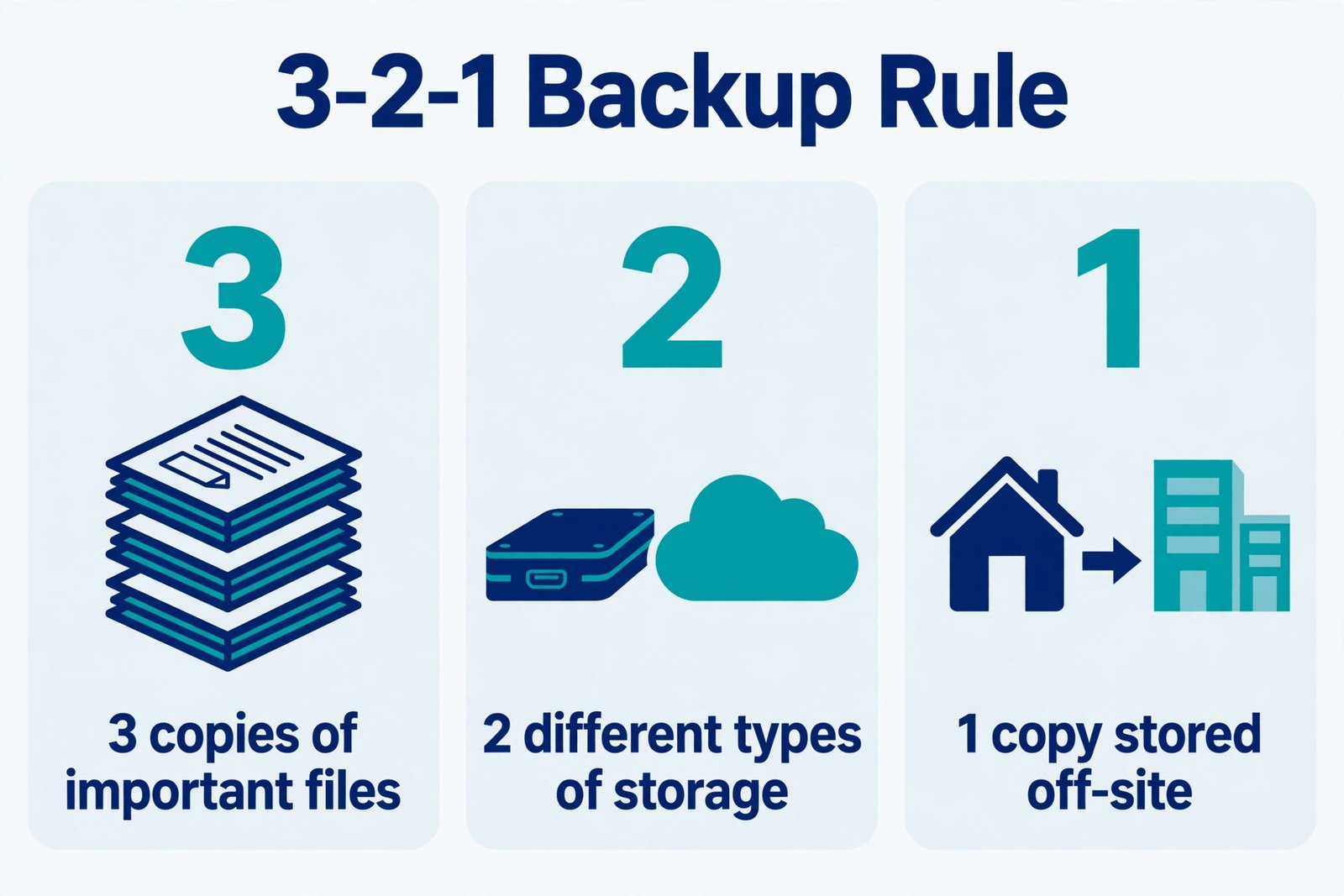
In practice, your files live on your computer, a second copy sits on an external drive or a different service, and a third copy is somewhere else entirely, such as cloud storage. Keep at least one copy offline or disconnected, because ransomware encrypts every drive it can reach, including a backup drive that is plugged in.
Decide what counts as important before you need it: photos, documents, financial records and work files. Set backups to run automatically, and once a year restore a few files to prove the backup works.

Secure Your Home Network and Devices
Home cybersecurity best practices 2026 start with the router, because every device in the house connects through it. Change the router’s default administrator password, the one printed on the label, since those defaults are public knowledge. Protect the Wi-Fi with the strongest encryption the router offers, WPA3 if available and WPA2 if not, and a long Wi-Fi password of your own. The NCSC’s small business guide, which it says applies equally to households, lists changing default passwords on all internet-enabled devices.
Set up a separate guest network for visitors and for smart home devices that do not need access to your computers. Update the router’s firmware when the maker releases it, and replace the router if the maker stops supporting it.
Lock every device. Use a screen lock on phones, tablets and laptops, and set them to lock quickly when you step away. Switch on device encryption where it is offered, BitLocker on Windows or FileVault on Mac, so a stolen laptop does not hand over its files. Switch on tracking and remote wipe, such as Find My on Apple devices, so a lost phone can be located, locked or erased.
Think before you share. Birthdays, pet names and holiday plans look harmless on social media, but they help attackers guess security answers and write convincing phishing messages. Check who can see your posts.
Home network security is one of the main types of cybersecurity, alongside device, data and cloud security, and these home cybersecurity tips apply across all of them.
Cybersecurity Tips for Small Businesses
Cybersecurity tips for small businesses follow the same habits as the personal tips above, with one difference: the owner has to make them happen for other people too. The cybersecurity tips for businesses below are written for small teams without a security department. CISA’s guidance for small businesses puts it plainly: cybersecurity is about culture as much as technology, and the chief executive builds that culture by talking about security and naming someone to own the work.
Start with CISA’s four essentials: train employees to avoid phishing, require strong passwords, require multi-factor authentication, and update business software. CISA’s Secure Your Business page adds four more practices: use logging on business systems so suspicious activity can be spotted, back up business data, encrypt business data, and report cyber incidents to CISA. An incident response plan ties them together: a written plan, practised with tabletop exercises, that says who decides what during an incident and who to call.
Give staff access only to the information and systems their job needs. The NCSC’s small business guide lists this as a policy action, and removing administrator rights from everyday accounts limits the damage if one account is compromised. Remove accounts promptly when someone leaves.
Train staff on the behaviours that stop real attacks: recognising phishing, reporting suspicious messages instead of deleting them quietly, verifying payment changes by phone on a number the business already has, and never sharing logins. CISA’s small business guidance gives the security program manager a training list covering MFA, updates, avoiding phishing links and how to report suspicious activity.
Track two simple numbers each month: the share of accounts with MFA switched on and the share of devices fully updated. Those two figures show whether the basics are in place, and they are the simplest version of cybersecurity metrics best practices for a small team.
Our guide to building a cybersecurity strategy turns these cybersecurity best practices for SMBs into a written plan.

Cybersecurity Tips for Employees and Remote Workers
Cybersecurity tips for employees start with the same four habits, applied on work systems. Use the accounts the company gave you, keep work and personal logins separate, and never share a work password with a colleague. If you receive a suspicious message, report it through the company’s reporting process instead of deleting it. The cybersecurity tips for remote workers in the next paragraph cover public Wi-Fi, VPNs and screen locks.
Remote workers face the same risks at home and on the road, with a few extras. Work only on company-approved tools and accounts, and keep personal browsing off work devices. On public Wi-Fi in cafes, hotels and airports, avoid banking and sensitive logins, and use the company’s VPN, which encrypts the connection between your device and the office network. Lock your screen whenever you step away, and keep work files in company storage.
If a term in this guide is unfamiliar, our cybersecurity glossary explains the key terms in plain language.
Your Cybersecurity Checklist
This is the whole guide in one list: the 10 essential cybersecurity best practices, written as actions you can check off. Good cybersecurity hygiene comes down to doing these ten things. Work through it once, then again once a year, for example during Cybersecurity Awareness Month in October.
- Use a long, unique password for every account, at least 16 characters or a passphrase of unrelated words.
- Store passwords in a password manager and protect the manager with MFA.
- Turn on multi-factor authentication everywhere it is offered, starting with email and banking.
- Pause on urgent messages, check the sender, and verify through a channel you already trust.
- Report phishing instead of only deleting it.
- Switch on automatic updates for your operating system, browser, apps and router.
- Back up important files following the 3-2-1 rule, and test that you can restore them.
- Change default passwords on your router and smart devices, and use WPA3 or WPA2 Wi-Fi encryption.
- Lock your screens, switch on device encryption and enable remote wipe.
- Share less personal information online, and review who can see your posts.
That list is the core of best practices cybersecurity guidance from CISA, the NCSC and NIST, and the best practices for cybersecurity are habits to repeat, not a product to buy.
Related reading: What is a VPN? Our guide explains how a VPN encrypts your connection and what it does and does not protect you from.
Frequently Asked Questions
What are the most important cybersecurity tips?
CISA’s Secure Our World program names four: recognise and report phishing, use strong passwords, turn on multi-factor authentication, and update software. Those four are the personal cybersecurity best practices to start with. Add backups and a secured home network, and you have covered the habits that stop the most common attacks.
How long should my passwords be in 2026?
Aim for at least 16 characters, or a passphrase of five to seven unrelated words. NIST’s 2025 standard sets the floor at 15 characters for a password used on its own, and 8 characters where it is only one factor in multi-factor authentication.
How can I tell if an email is phishing?
Look for urgency, an unexpected link or attachment, a generic greeting, or a sender address that does not match the company. Hover over links to see where they lead. Never use the contact details inside the message; go to the company’s website or app yourself.
Should I change my passwords regularly?
No. NIST’s current standard says services must not require periodic password changes. Change a password when there is evidence it has been compromised, for example after a breach notification, or immediately if you entered it on a suspicious site.
Is a password manager safe?
A reputable password manager is safer than reusing passwords or writing them down. It generates long, unique passwords and stores them encrypted behind one master password, protected with multi-factor authentication. NIST’s standard says services must allow password managers, and notes that they increase the chance people choose stronger passwords.
Do I still need antivirus software?
Yes, as one layer among several. The NCSC’s small business guide lists installing and switching on antivirus software as a basic action. Antivirus catches known malware, but it does not stop phishing or a stolen password, so it never replaces the habits in this guide.
What is the 3-2-1 backup rule?
Keep 3 copies of important files, on 2 different types of storage, with 1 copy stored off-site. For example, files on your computer, a copy on an external drive, and a copy in cloud storage. Keep at least one copy offline and test restoring files at least once a year.
What are the best cybersecurity awareness month tips?
October is a good time to work through the checklist above. The month’s message is the same four habits: recognise and report phishing, use strong passwords, turn on multi-factor authentication and update software.
What should I do if I clicked a phishing link?
Stop and do not enter any information. Change the password for that account from a device you trust, and switch on multi-factor authentication if it is not already on. Check recent account activity and bank statements. Report the message to the FTC at ReportFraud.ftc.gov, and tell your IT team if it arrived on a work account.
What are the best holiday cybersecurity tips for shopping online?
Holiday shopping brings a rush of fake shops, fake delivery messages and deals that look too good to be true. Shop on sites you know, check the padlock and the domain name, and be suspicious of urgent discount messages. Use a credit card rather than a debit card where you can, keep multi-factor authentication on for shopping accounts, and check your statements afterwards.
Watch: Cybersecurity Tips in Plain English
Former NSA Hacker Reveals 5 Ways To Protect Yourself Online, Tech Insider —
Former NSA hacker David Kennedy shares five habits: two-factor authentication everywhere, a different password for every account, keeping software updated, being careful what you share online, and guarding personal information. About three and a half minutes, with chapters running to 3:30. Checked live on 23 Nov 2026.
What Is Cybersecurity? | Explained Simply for Beginners, TechVyapy —
A beginner-friendly explainer covering what cybersecurity means, why it matters, the CIA triad, common threats, how a phishing attack happens, and seven everyday practices. About eight minutes, with the final chapter starting at 7:49. Checked live on 23 Nov 2026.
Sources
10
- US Cybersecurity and Infrastructure Security Agency, “Secure Our World”, https://www.cisa.gov/secure-our-world
- US Cybersecurity and Infrastructure Security Agency, “Four Cybersecurity Essentials for Businesses”, https://www.cisa.gov/resources-tools/resources/four-cybersecurity-essentials-businesses
- US Cybersecurity and Infrastructure Security Agency, “Cyber Guidance for Small Businesses”, https://www.cisa.gov/cyber-guidance-small-businesses
- US Cybersecurity and Infrastructure Security Agency, “Secure Your Business”, https://www.cisa.gov/audiences/small-and-medium-businesses/secure-your-business
- US National Institute of Standards and Technology, NIST SP 800-63B-4, “Digital Identity Guidelines: Authentication and Authenticator Management” (July 2025), https://pages.nist.gov/800-63-4/sp800-63b.html
- UK National Cyber Security Centre, “Small Business Guide”, https://www.ncsc.gov.uk/collection/small-business-guide
- UK National Cyber Security Centre, “10 Steps to Cyber Security: Data security”, https://www.ncsc.gov.uk/collection/10-steps/data-security
- US Federal Trade Commission, “Protect yourself from phishing scams” (Apr 2025), https://consumer.ftc.gov/consumer-alerts/2025/04/protect-yourself-phishing-scams
- US Federal Trade Commission, “How to Recognize and Avoid Phishing Scams”, https://consumer.ftc.gov/articles/how-recognize-avoid-phishing-scams
- TeamViewer, “10 basic cybersecurity tips everyone should follow”, https://www.teamviewer.com/cn/insights/basic-cybersecurity-tips-for-everyone/
Every factual claim on this page was verified against a named source above.